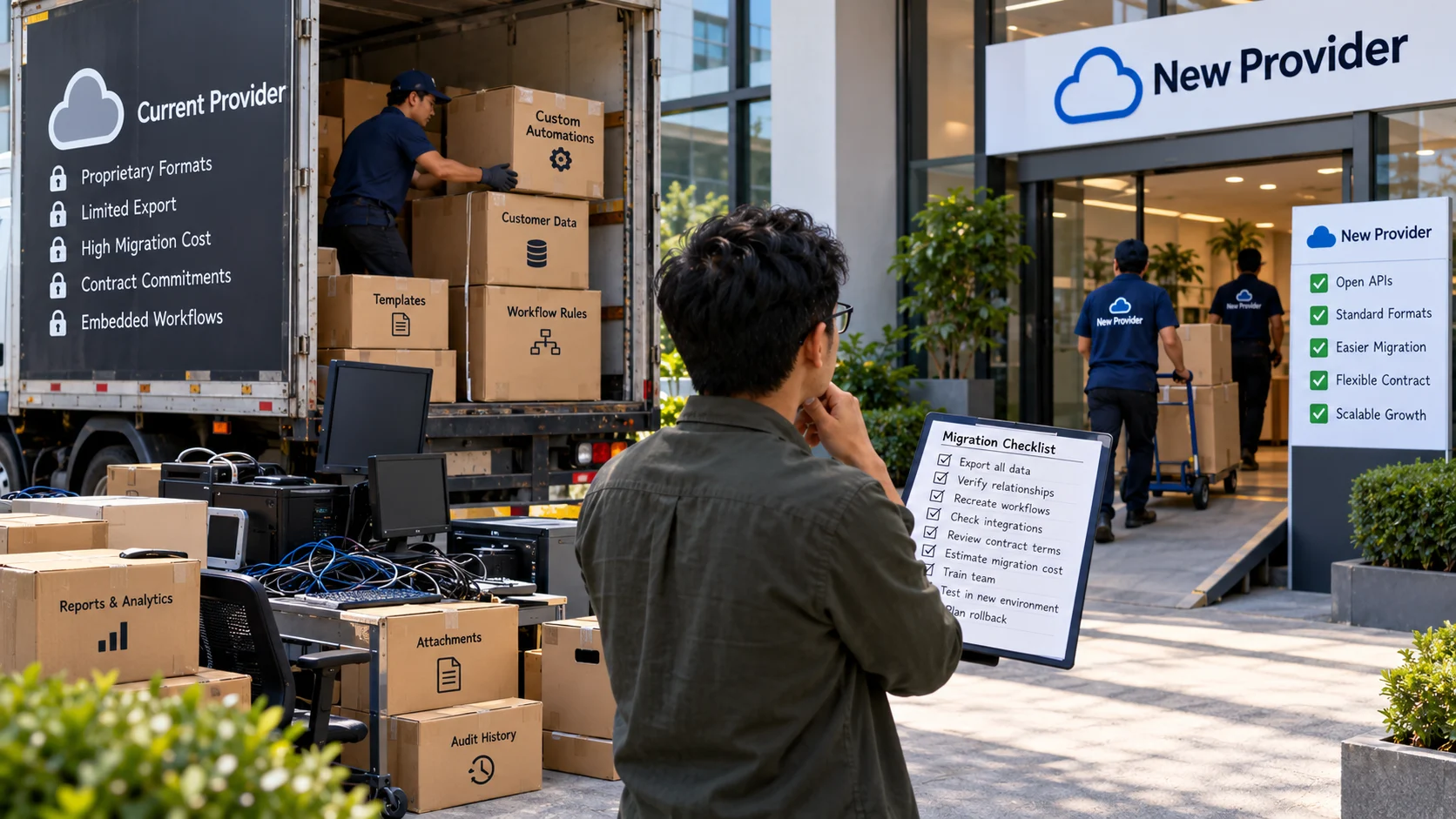
A growing retailer builds its order workflow around one platform and later finds that exporting custom fields and automations is expensive. Vendor lock-in arises when changing a technology supplier becomes unusually costly, risky, or slow because of data formats, integrations, skills, contractual terms, or proprietary services. This article analyzes exit costs and portability as procurement decisions, separate from general cloud-to-edge architecture or digital transformation philosophy. Quantitative examples below are hypothetical and should be adapted to the reader’s actual data.
Key Takeaways
Vendor lock-in arises when changing a provider is difficult because of data formats, integrations, contracts, or embedded workflows.
A low monthly subscription can conceal high migration and retraining costs.
Test a representative data export and restoration path before a contract or renewal makes switching expensive.
Good architecture balances portability against the genuine benefits of specialized managed services.
Update and rehearse the exit plan as datasets, licensing, and business dependencies evolve, rather than treating it as a one-time document.
Vendor Lock-In Is a Switching-Cost Problem
A business becomes dependent on a technology provider when moving to another solution becomes difficult, costly, risky, or operationally disruptive. This is commonly called vendor lock-in. Dependence is not automatically a mistake: a tightly integrated service can deliver convenience and reliability. The problem arises when an organization does not understand the cost of changing direction, recovering its data, or maintaining operations if the relationship ends.
A small company might build its website, customer database, email automation, and analytics on one software platform. Daily work becomes efficient because everything connects. Years later, exporting data may be straightforward while reproducing workflows, permissions, templates, and integrations proves expensive. The switching cost is broader than the price of downloading a CSV file.
Four Sources of Lock-In
Data portability limitations. A provider may offer exports but omit audit histories, attachments, relationships, or usable metadata. Data may be accessible only through rate-limited APIs, proprietary formats, or expensive migration services.
Application and workflow dependence. Teams may rely on custom rules, built-in automations, reporting definitions, and extension marketplaces that have no direct equivalent elsewhere. Rebuilding these workflows may take more effort than migrating raw records.
Commercial and contractual dependence. Long commitments, rising renewal prices, minimum usage levels, or expensive cancellation conditions can make switching difficult. Contract terms may also constrain data deletion, support during transition, or access after expiration.
People and operational dependence. Staff become skilled in one interface, and systems such as billing or customer service may be organized around its capabilities. A technically feasible migration can still disrupt service if the business has not documented procedures and trained alternatives.
Distinguishing these sources helps a company choose appropriate safeguards rather than assuming that “open source” or “cloud” alone determines freedom to switch.
Data Export Is Necessary but Not Sufficient
Test the export before the relationship becomes urgent. Can the business retrieve customer records, transactions, attachments, consent status, and activity history? Are identifiers stable? Can an independent system interpret relationships among the exported files? Does the vendor provide documented APIs and reasonable access during cancellation?
Imagine exporting a CRM contact list to CSV. Names and emails might survive, but the links to opportunities, call notes, and customer approvals may not. A new CRM can import the contacts yet remain operationally incomplete. A true portability test reconstructs at least one end-to-end workflow in a separate environment.
Data portability also interacts with privacy obligations. The exported package may contain personal information that must be handled with the same care as the source. Avoid storing backups indefinitely just because exporting them is convenient.
Assess Dependence Before Buying
Document the critical workflows
List what the platform will support and how costly interruption would be. Basic note-taking, payroll processing, payment reconciliation, and customer records do not have equal switching risks. Prioritize exit planning for systems that are difficult to replace quickly.
Ask for open interfaces and clear documentation
Standards-based APIs, export formats, and identity integrations can reduce friction. However, a service offering an API may still omit important objects or limit throughput. Request current documentation and verify the exact data needed for your use case.
Understand commercial terms
Read cancellation conditions, renewal notices, price adjustment clauses, service-level commitments, and post-termination access rules. For important contracts, obtain qualified review where appropriate. Do not rely on informal sales assurances if the written agreement is different.
Estimate migration effort honestly
Include data mapping, integration rewrites, staff training, parallel operation, validation, lost productivity, and potential downtime. An alternative provider with a lower subscription fee may cost more during the first year when migration is included.
Establish an exit path early
Assign an owner to document how records could be exported, validated, and imported elsewhere. For critical services, test the process periodically rather than writing a vague exit plan that nobody has tried.
A Practical Exit-Readiness Test
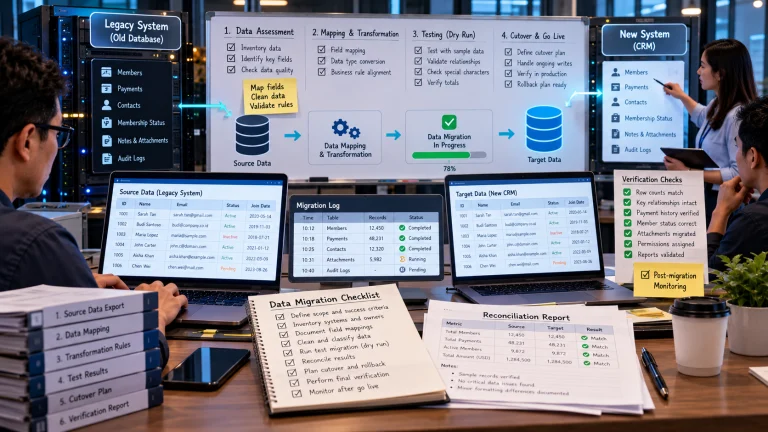
Choose one representative process, such as creating a customer, recording a transaction, attaching a document, and producing a report. Export the relevant data from the current system. Try to reconstruct the process in a safe alternative or neutral local format. Note which elements migrate automatically, which require manual mapping, and which cannot be recovered.
Record time, staff effort, API restrictions, missing fields, and assumptions. A small controlled test can reveal dependency risks before they become urgent. If the alternative system cannot preserve customer consent fields or historical financial adjustments, treat that as a material gap rather than a cosmetic inconvenience.
The test need not trigger an immediate supplier change. It creates leverage and realistic information for renewals, resilience planning, and procurement decisions.
Designing for Replaceability
Where practical, isolate provider-specific code behind documented interfaces, keep business rules in version-controlled configurations, and use portable data formats. Maintain an authoritative inventory of integrations and credentials. Avoid duplicating the same rule across dozens of hidden workflow builders, because undocumented automation makes switching difficult.
Architecture must remain proportionate. A small organization can spend more time designing theoretical portability than delivering value to customers. Focus safeguards on the most consequential dependencies, and revisit them when usage or criticality increases.
Comparing Total Cost of Ownership
A responsible comparison includes subscription fees, consumption charges, support, integration work, downtime risk, security and compliance obligations, and exit costs. A low initial price is not automatically the lowest total cost. Equally, a higher-priced managed service may be worth the dependence if it saves substantial operational effort and offers a credible exit path.
Avoid pretending that estimated migration costs are precise to the last dollar. State assumptions and explore scenarios such as ordinary planned migration, urgent vendor failure, or significant price increases. Decision-makers benefit from understanding plausible ranges and dependencies more than one optimistic number.
What to Do When Switching Is Not Currently Realistic
If a business is already deeply dependent, improve visibility before attempting a rushed migration. Inventory data, processes, contracts, and integrations. Export backups where permitted, test their usability, document important business rules, and negotiate access terms while the relationship is stable.
Plan gradual modular improvements if appropriate. For example, decouple reporting from a proprietary dashboard or maintain an independent backup of critical transaction data. But avoid building parallel systems without the resources to keep them synchronized. A safeguard that silently diverges can become a new risk.
Security and Continuity Considerations
Vendor dependence intersects with operational resilience. Service outages, account suspension, compromised credentials, and provider closure can interrupt workflows even when a migration is not planned. Define recovery targets, backup responsibilities, escalation contacts, and the scope of supplier support. Test the organization’s ability to continue essential processes during a provider outage.
Read shared-responsibility arrangements carefully. A vendor may operate reliable infrastructure while the customer remains responsible for access controls, retention settings, and application configuration. Lock-in decisions should consider both convenience and the responsibilities that remain with the business.
Vendor lock-in is best managed through informed choice, not a blanket rejection of integrated platforms. Choose systems for their current value while preserving enough evidence, exports, documentation, and operational flexibility to change course when necessary.
An exit-readiness test for a hosted SaaS platform
A growing business stores five years of customer orders in one CRM. It assumes exports are easy until it learns that custom fields, attachments, activity timestamps, and automation rules must be reconstructed in a replacement system. A vendor-lock-in assessment should test export completeness, API rate limits, contract termination terms, formats, audit logs, and the cost of retraining staff.
Asset Exit question
Customer records Can every required field be exported with stable IDs?
Automation rules Are the rules documented outside the vendor interface?
File attachments Can attachments be retrieved with source links intact?
Identity and access Can accounts be moved without losing audit evidence?
The objective is not to avoid every proprietary service; it is to know the cost and feasibility of leaving before critical dependence becomes invisible.
What the example teaches. The retailer downloads an export that contains orders but omits automation rules and custom labels. The migration rehearsal reveals the cost of rebuilding business logic. The next contract review asks about complete API exports, related objects, account permissions, and assistance during an orderly exit.
A Short Vendor Exit Checklist
Before signing or renewing a critical service, answer practical questions: Can we export the data in a documented format? Does the export include relationships, permissions, attachments, and timestamps? Are the APIs available on our contracted plan? Can the provider supply reasonable migration support? What happens to the account after cancellation, and when will retained copies be removed? Who owns custom integrations and configuration work?
Ask staff from operations, finance, legal, and IT to review the answers where relevant. Each group sees different dependencies. The engineering team may focus on APIs while customer support worries about losing conversation history and finance needs reliable invoices. A credible exit plan accounts for all of them rather than being limited to a technical export script.
Preventing Configuration Lock-In
Workflows can be harder to move than records. A company may have dozens of automation rules, notification templates, role configurations, custom reports, and integrations buried inside a vendor’s interface. Maintain a register of these features, their business purpose, owners, triggers, and dependencies. Use version-controlled configuration or documented procedures where practical so a replacement can reproduce essential behavior.
Test one complete process outside the platform. If a team cannot explain how a critical status change causes downstream notifications, the organization is more dependent than it realizes. Documentation also improves current operations, not just future switching.
When Dependence Is a Rational Choice
A company may deliberately accept some switching cost because a managed service is reliable, secure, and far cheaper to operate than a self-hosted alternative. The aim is an informed trade-off. Record why the benefit justifies the dependency, what would trigger reassessment, and which safeguards make an exit possible if conditions change. Trying to avoid every proprietary feature can impose its own significant cost and complexity.
Price the Exit Before the Contract Renewal
A platform’s subscription fee is only part of the switching cost. Estimate the effort to export complete data, recreate identity and permission rules, rebuild integrations, retrain staff, revalidate reporting, and operate two systems during a transition. Include contract terms covering data export, assistance, deletion, and notice periods. A provider with a low monthly price can be expensive to leave if important history is trapped in a format that other software cannot use.
Ask for a small sample export before signing or renewing a major agreement. Can the records be reconstructed with stable identifiers and timestamps? Are attachments, audit logs, and custom fields included? Is there an API or a documented migration path? Testing these details early turns abstract concerns about lock-in into measurable operational risks.
Review the Architecture for Replaceable Boundaries
Vendor dependence is not automatically harmful; specialized managed services often save a small team substantial engineering effort. The key question is where dependence becomes hard to reverse. Favor documented interfaces, portable exports, clear ownership of data, and separated business rules where these choices deliver value. Avoid constructing an elaborate abstraction layer solely to escape a hypothetical future provider switch.
Review the exit strategy annually. Changes in licensing, data volumes, regulations, or the team’s technical skills can alter the cost of moving. A short rehearsal that exports a representative dataset and rebuilds one reporting workflow offers much better evidence than a contract checklist that nobody has tested.
Frequently Asked Questions
Is all vendor lock-in bad?
No. Specialized platforms can create valuable efficiency. The goal is to understand dependence and maintain credible exit options where consequences justify them.
Does using open-source software remove lock-in?
It can reduce some dependencies, but deployment expertise, data structures, hosting services, and specialized integrations may create other forms of lock-in.
What should I ask vendors before signing?
Ask how to export complete data and permissions, what migration support exists, and which charges or restrictions apply when leaving.
Should every business adopt multiple cloud providers?
Not automatically. Multiple providers add cost and complexity; a tested backup, documented exports, or a simpler alternate process may be sufficient.
Further Reading on ByteScope
Innovation Debt
Small Language Models Explained
Sources and Further Reading
NIST: Cloud Computing Standards Roadmap — NIST primary material for frameworks and evaluation methods.
CNCF: Cloud Native Definition — Open project documentation.