Invoices often arrive as email attachments, scanned PDFs, photographs, or files exported from different accounting systems. Someone must extract the supplier, invoice number, dates, line items, taxes, totals, and bank details before a business can verify and pay them. AI invoice processing tools can reduce retyping and organize that information, but the bigger opportunity is building a workflow that detects mistakes before money moves.
This is not simply a document-recognition problem. An invoice can be read perfectly and still be fraudulent, duplicated, inconsistent with a purchase order, or addressed to the wrong legal entity. A trustworthy system combines extraction, validation, approval, record keeping, and exception handling. The human work shifts from typing every field to reviewing discrepancies that matter.
OCR is only the first layer
Traditional optical character recognition converts pixels into text. Document AI systems may go further by identifying fields, table structures, supplier names, quantities, and financial values. Microsoft AI Builder, for example, documents prebuilt invoice processing that extracts fields such as invoice ID and vendor information. Similar document-processing services can produce structured output for downstream workflows, though coverage and licensing vary.
The distinction matters because “the PDF was read” is not an accounting control. Consider a line item showing quantity 4, unit price $125, and total $500. The parser might correctly read each value, but the system still needs to reconcile the calculation and compare it with the authorized purchase. If a total is mislabeled due to an unusual layout, confident-looking extracted JSON can be wrong.
A well-designed workflow retains the original file or a securely controlled reference so that reviewers can compare any extracted field against the source. It should indicate which values came from the document, which came from supplier master data, and which were computed by a validation rule.
A realistic invoice processing pipeline
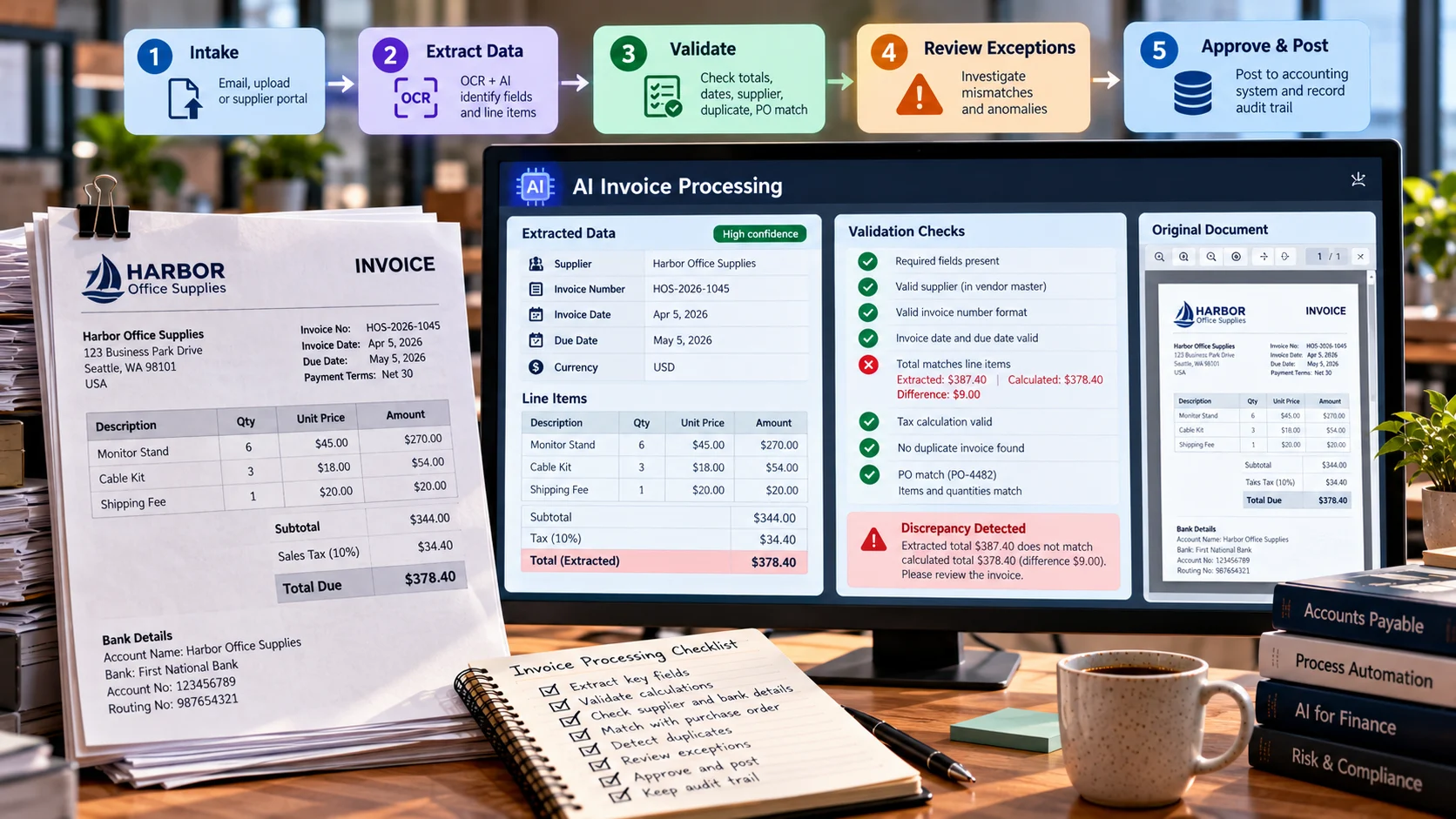
The process begins with intake through an approved email mailbox, upload form, or supplier portal. Save the original document with a unique ID, then check file type, malware risks, duplicates, and whether the sending channel is expected. Extract data using a document model, normalize dates and currencies, and validate arithmetic and business rules.
Next, reconcile supplier identity against an approved vendor register. Match purchase-order line items where relevant. If the invoice is within tolerance and has the required approvals, post it to the accounting system; otherwise send it to an exception queue. Record who reviewed the exception and why. Payment authorization should remain governed by the organization’s accounting controls rather than delegated to a text-generation prompt.
Separate these stages so they can be monitored. A model extraction error needs a different fix from a purchase-order mismatch or an unauthorized bank-account change. One generic “AI failed” status is not enough for finance operations.
Choosing the information to extract
Common header fields include invoice number, supplier legal name, supplier tax identifier where applicable, buyer name, invoice date, due date, currency, subtotal, tax amount, total, and payment terms. Line-item fields include description, quantity, unit price, line amount, discount, and tax treatment. Some documents have shipping costs, multiple tax rates, credits, or retention amounts that change the arithmetic.
Normalize values carefully. The date 04/05/2026 is ambiguous without locale context. A European decimal comma can change the meaning of 1.234,50. Negative lines may indicate credits rather than errors. Some invoices include separate “amount due” and “invoice total” values because of partial payments. The extraction system should not force every document into one simplistic layout if the business regularly handles more complex transactions.
Create a schema with nullable fields where the document truly lacks information. A missing purchase-order number should be represented as missing, not hallucinated from an unrelated reference. Keep field confidence or location metadata when available, but treat them as review aids—not as guarantees of correctness.
Worked example: checking a supplier invoice
Imagine a fictional invoice from Harbor Office Supplies. It lists 6 monitor stands at $45 each, 3 cable kits at $18 each, a shipping fee of $20, and sales tax of $34.40. Before tax, the calculated amount is 6 × $45 + 3 × $18 + $20 = $344. With the stated tax, the amount due is $378.40.
Now imagine the extracted grand total is $387.40. The document could contain a typing error, an unrecognized adjustment, or a model misread. The system should flag the $9 discrepancy instead of automatically replacing the total with a calculated number. A reviewer must compare the document, purchase order, and supplier communication.
A helpful exception record might contain: document ID, extracted and computed totals, source-page reference, validation rule, difference amount, assigned reviewer, and resolution. Preserve the evidence supporting the final approved number. The illustration is deliberately simple; real invoices require correct handling of local tax rules, discounts, and currency conversion policies.
Duplicate detection must be deliberate
A supplier may resend the same invoice with a different filename or email subject. Checking only the file hash will miss documents with identical economic meaning but changed bytes. Compare supplier identity, invoice number, date, currency, and amount, while recognizing that real organizations can have legitimate numbering collisions across supplier entities.
A duplicate check should generate a review signal, not an irreversible deletion. Credit notes, replacement invoices, and partial invoices complicate the logic. A false duplicate finding can delay a legitimate payment. Store clear resolution statuses so the same invoice is not repeatedly flagged after review.
A related risk is an attacker submitting a believable invoice using a look-alike supplier name. Extraction systems cannot establish payment legitimacy on their own. Vendor onboarding, bank-detail change controls, and independent verification procedures remain essential.
Matching against purchase orders
Two-way matching compares the invoice with an approved purchase order. Three-way matching may also compare received goods or accepted services. A business can define tolerances for small differences in quantities, prices, and tax treatment. The system should apply approved policy to those differences rather than inventing a tolerance after seeing the invoice.
For example, an invoice billing ten chairs when the receiving system confirms eight should be held for review. A mismatch may result from partial delivery or data delay, not necessarily misconduct. Provide the reviewer with linked purchase-order and receipt evidence. Automating the comparison is useful only when source systems use consistent identifiers and have reliable records.
Organizations without purchase orders can still implement controls: verify supplier status, expense category, manager approval, budget availability, and whether the service was actually delivered. Automation should reflect the purchasing process, not force every business into the same template.
Tools to consider, without assuming identical capabilities
A small organization using Microsoft Power Automate may evaluate AI Builder invoice processing because it connects extraction with low-code flows. Businesses on a Google Cloud stack may investigate Document AI processors. Accounting platforms sometimes offer built-in receipt and invoice capture. Dedicated accounts-payable automation vendors may provide approval routing, supplier portals, and ERP integrations alongside extraction.
The right comparison is based on the whole workflow. Check supported languages, currencies, line-item extraction, supplier matching, customization, exception queues, integration with the accounting system, access controls, file retention, and current pricing. Trial a realistic sample of your own invoices, including poor scans, multiple pages, credits, and unusual formats. Vendor demonstrations using perfect invoices are not a sufficient acceptance test.
For a business evaluating AI adoption, the existing ByteScope guide to AI data analysis tools provides context for checking structured outputs, while its workflow automation overview explains the surrounding task orchestration.
How to measure accuracy meaningfully
Overall extraction success is a vague metric. Measure field-level accuracy for critical fields, line-item completeness, and the percentage of invoices requiring manual correction. Consider the cost of each error: a wrong tax amount or bank destination matters far more than a slightly imperfect item description. Evaluate results by supplier format, document quality, language, and number of pages.
Track processing time from receipt to approved posting, not only model inference latency. Monitor exception-resolution time, duplicate alerts, and the number of corrected entries in the accounting system. If employees spend more time fixing AI output than they spent keying fields manually, the claimed efficiency has not been realized.
A useful acceptance test runs the same invoices through both the existing manual process and the proposed automated process, with careful review of the ground truth. Include unusual documents rather than selecting only the easy ones. Keep the original files and reviewer annotations to understand errors and improve rules over time.
Designing approval and security controls
Invoice data may include private contact details, financial terms, and bank information. Restrict who can access originals, extracted fields, and payment instructions. Use approved retention periods and maintain audit logs. If a vendor processes documents externally, verify contractual and technical controls before uploading confidential material.
Do not allow an AI model to approve payments simply because it describes the invoice as “low risk.” Separate extraction and classification from authority to spend company funds. Changes to bank details should follow an independently verified process, and any automated posting should have a documented rollback or correction path.
Also protect against malicious content embedded in invoice PDFs or notes. Text inside an invoice is source data, not authority to change company policies or issue instructions to automation agents.
Deployment steps for a small business
Begin with a small pilot: one supplier group, one document intake path, and one accounting integration. Define required fields and which discrepancies always require review. Collect representative examples and evaluate field-level extraction before attempting automatic posting. Document the decision points and train finance staff on how to correct and annotate problems.
Next add a dashboard of exception types. If most failures come from a handful of supplier layouts, targeted fixes may improve results more than switching models. Gradually expand automation only after the team demonstrates consistent reconciliation, secure document handling, and accurate posting. Keep a manual fallback for outages and unexpected formats.
A review queue built around financial risk
Not every invoice exception deserves the same priority. A missing nonessential memo field may be resolved automatically from trusted purchase-order records, while a new bank account on an otherwise familiar supplier deserves an independent verification procedure. Define queues by risk: identity mismatch, arithmetic discrepancy, purchase-order disagreement, missing tax field, or unreadable document.
For each queue, specify the reviewer, permitted actions, and evidence required to clear a case. A high-value invoice may require a second approval even when every extracted number matches perfectly. An urgent supplier payment should not bypass identity checks merely because an AI system labeled the document as credible.
Consider a recurring monthly utilities invoice. Small fluctuations in usage and tax may be expected; the automation can compare the new amount with previous months and show a trend. But a sudden increase might reflect real price changes, not extraction error. The tool should provide the anomaly and supporting numbers rather than inventing a cause. The finance team decides whether to approve, investigate, or dispute the charge.
Measuring the real benefit of invoice automation
Separate touchless capture from touchless approval. A tool may extract all fields without typing but still require every invoice to be checked by an authorized person. That can be a successful implementation. Measure time spent on manual keying, time spent on review, exception rates, payment delays, duplicate prevention, and correction workload after posting.
A reliable pilot might begin with 100 invoices from several representative suppliers. Finance staff create a gold-standard record for every invoice, then compare extracted fields with the truth. Report exact correctness of invoice ID, supplier, totals, tax, and line items independently. A 95% average across all fields can hide unacceptable mistakes in one high-impact field. Use those findings to decide which parts of the process may be automated safely.
Invoice exception ownership and audit evidence
A finance team should distinguish who corrects extracted data from who approves payment. If an OCR model reads a supplier account number incorrectly, a clerk may correct the field after checking the source document, but that does not authorize transferring funds. Record the correction, source reference, and approval separately.
Consider a document whose supplier name resembles a legitimate vendor but whose account details changed. The system can detect the mismatch and hold processing; it cannot verify the change merely by asking a language model whether the invoice “looks legitimate.” Use an approved independent contact channel and existing vendor-maintenance policy. This explicit separation turns extraction automation into a safer operational process rather than a faster route for fraudulent invoices.
Frequently asked questions
Can AI invoice processing replace accountants?
It can reduce repetitive capture and comparison work, but accounting judgment, fraud controls, supplier disputes, tax interpretation, and payment authority remain responsibilities of qualified people and governed systems.
Does a high model confidence mean a payment is safe?
No. Confidence in reading a field is not evidence that the invoice is genuine, authorized, or consistent with the contract.
What if suppliers use many different invoice layouts?
Test on those layouts, assess the processor’s adaptability, and maintain an exception workflow. Diverse layouts make validation and source references even more important.
Conclusion
AI invoice processing works best when extraction is only the beginning. A dependable pipeline validates math, matches authorized records, manages exceptions, and preserves human control over financial decisions. Start small, measure field-level correctness and end-to-end cycle time, and expand automation when it demonstrably improves the payment process without weakening oversight.
References
Microsoft Learn: Invoice processing in Power Automate
Google Cloud Document AI