A store manager wants monthly repeat-purchase counts across customers and orders without memorizing every table join. An AI SQL assistant translates a business question into a suggested database query, often using schema context and examples. Its output still needs validation for correctness, authorization, and cost. This tutorial is about text-to-SQL, relational schemas, and safe query review rather than generic AI coding tools or spreadsheet analytics. Quantitative examples below are hypothetical and should be adapted to the reader’s actual data.
Key Takeaways
An AI SQL assistant can draft database queries, but apparently plausible results may contain wrong joins or aggregations.
Provide documented table relationships, business definitions, and a minimum-privilege read-only database role.
Evaluate generated queries on a small dataset with known expected answers before trusting business reports.
Enforce permissions and execution limits in the database and application, not only in the model’s instructions.
Expose SQL, time periods, and metric definitions when a result must be explainable or audited.
What an AI SQL Assistant Actually Does
SQL is a language used to query and manage data in relational databases. An AI SQL assistant translates a natural-language request into a suggested query, explains an existing query, or helps debug database code. This can lower the barrier for people who understand a business question but do not remember SQL syntax. It does not remove the need to understand the database, define the metric correctly, or control permissions.
A user might ask, “Show monthly sales for completed orders this year.” That request appears straightforward, but a database may contain cancelled orders, refunds, multiple currencies, test purchases, duplicate imports, and different definitions of completion. A model can produce syntactically valid SQL that answers the wrong question. Successful assistance requires the correct schema, business definitions, and validation against known examples.
Prepare a Trusted Data Context
The assistant needs table names, approved column descriptions, relationships, and relevant metric definitions. A well-maintained data dictionary is safer than granting unrestricted access to the entire database. For example, document that orders.status = ‘completed’ denotes a paid and fulfilled order, or that the business uses a separate payments table to determine recognized revenue.
Limit context to tables the user may access. Database permissions must be enforced by the database or middleware, not simply suggested in a prompt. Hide secrets, personal identifiers, and unrelated sensitive fields where possible. Production credentials should never be inserted directly into a chat transcript.
When the schema changes, the assistant’s context must be updated. A query against a removed column may fail visibly; a query that joins a newly redefined field can return plausible but misleading results. Version schema documentation and record when definitions change.
A Worked SQL Example
Suppose a small store has this simplified table:
CREATE TABLE orders (
order_id INTEGER PRIMARY KEY,
order_date DATE NOT NULL,
order_status VARCHAR(20) NOT NULL,
total_amount DECIMAL(12,2) NOT NULL
);
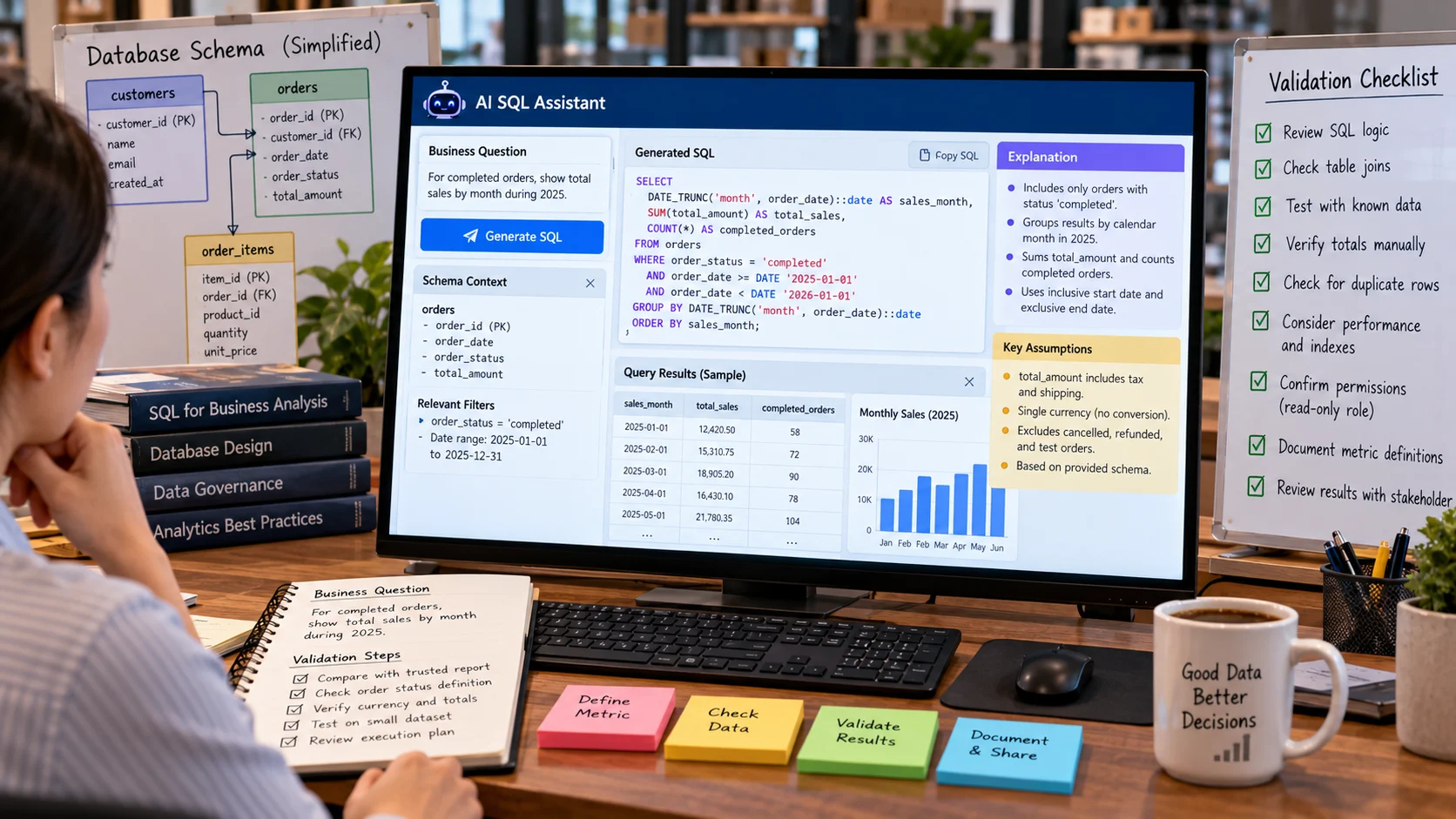
The user asks: “For completed orders, show total sales by month during 2025.” In a PostgreSQL-style environment, a candidate read-only query is:
SELECT
DATE_TRUNC(‘month’, order_date)::date AS sales_month,
SUM(total_amount) AS total_sales,
COUNT(*) AS completed_orders
FROM orders
WHERE order_status = ‘completed’
AND order_date >= DATE ‘2025-01-01’
AND order_date < DATE '2026-01-01'
GROUP BY DATE_TRUNC('month', order_date)::date
ORDER BY sales_month;
The query uses an inclusive start and exclusive end date, which avoids ambiguous end-of-day time assumptions if a timestamp is later substituted. It groups completed orders into calendar months and sums the recorded totals. The cast and DATE_TRUNC syntax are PostgreSQL-specific; other databases use different functions.
Even with correct syntax, confirm whether total_amount includes tax, shipping, or refunds. If records are stored in multiple currencies, summing them without conversion has little business meaning. The model cannot decide those accounting rules merely from a column name.
How to Validate a Generated Query
Start with an explanation in plain language: which records are included, which are excluded, which fields are aggregated, and what each output row represents. Ask the assistant to identify assumptions, not just generate code. Compare results with a trusted report for a small known period, such as one week with manually verified totals.
Review joins carefully. An accidental one-to-many join can multiply rows and inflate sums. Suppose one order has three line items. Joining orders with order_items and summing orders.total_amount would count the total three times unless the query is structured appropriately. This is a common source of business errors that a syntactically correct query will not reveal.
Use execution plans or query limits where appropriate. An assistant may suggest a query that scans millions of rows when an indexed filter or pre-aggregated table would be more efficient. Performance review matters on production systems, where even a read-only query can consume significant resources or degrade other users' experience.
A Safe Natural-Language-to-SQL Workflow
Define the question precisely. State the business metric, time period, timezone, exclusions, and desired level of detail.
Supply authorized schema context. Provide tables, columns, relationships, and approved definitions without exposing unnecessary private records.
Generate a candidate query. Request a concise explanation of assumptions and any unsupported part of the question.
Apply a read-only boundary. Use a database account or execution layer that disallows writes and limits accessible objects. Do not rely on a text instruction saying “SELECT only.”
Check the query before execution. Validate syntax, table references, join cardinality, filters, groupings, and resource limits.
Run on safe sample data. Compare against known cases and manually verify unusual values. Use a staging database when possible.
Review the result meaning. Confirm that a chart or summary has the right denominator, currency, dates, and missing-data treatment.
Document and reuse approved queries. Store tested SQL with metric definitions and revision history rather than regenerating important financial logic without review.
For complex queries, a data engineer may need to review performance, security, and business logic. A conversational interface is convenient but should not create an invisible channel around existing data-governance controls.
Common Mistakes That Produce Wrong Answers
Ambiguous definitions. “Active customers” could mean people with any account login, a recent purchase, or an active subscription. Define the term before asking for SQL.
Bad joins. Duplicate rows can appear when parent records are joined to multiple children. Verify uniqueness assumptions and count intermediate rows.
Incorrect time boundaries. Dates stored as timestamps may be interpreted in UTC while the business reports in local time. Choose and document the timezone.
Ignoring nulls. SQL aggregates generally handle nulls according to their function, but a missing amount is not automatically zero. Check how absent data should be represented.
Unrestricted execution. Generated UPDATE, DELETE, or costly queries should not be run with privileged production credentials. Separating recommendation from execution is a fundamental safety measure.
Measuring Value Beyond SQL Fluency
A useful assistant should improve time to obtain a correct answer. Track the proportion of generated queries that are syntactically valid, the share that match tested business logic, time to resolution, frequency of manual corrections, and database execution cost. Test straightforward questions alongside harder cases involving joins, missing data, nested conditions, and category definitions.
An evaluation dataset should include correct expected answers, not simply whether the query returns a table. For example, compare reported completed-order totals against an independently verified source and document discrepancies. If a query returns believable figures but uses an incorrect join, it must be counted as a failure.
Privacy and Data Governance
Even a read-only query can expose confidential information. Grant access according to users' roles, filter or mask sensitive columns, and avoid storing query results in logs that are broadly accessible. Be cautious when a remote assistant receives raw customer data or database schema containing secrets. Apply retention rules to prompts, generated queries, and outputs.
SQL assistants are best understood as coding and analysis partners. They make drafting and interpreting queries faster, but the database remains the authoritative execution environment and business owners remain responsible for definitions. A reliable implementation combines useful natural language with explicit permissions, tested metrics, and reviewable SQL.
A natural-language request translated into SQL
Imagine two tables: orders(order_id, customer_id, order_total, ordered_at) and customers(customer_id, region). A manager asks: “Show sales totals by region for January 2026.” An assistant might propose:
SELECT c.region, SUM(o.order_total) AS revenue
FROM orders AS o
JOIN customers AS c ON o.customer_id = c.customer_id
WHERE o.ordered_at >= DATE ‘2026-01-01’
AND o.ordered_at < DATE '2026-02-01'
GROUP BY c.region
ORDER BY revenue DESC;
The query is illustrative and assumes the schema and currency definitions shown. Before execution, check whether order_total includes refunds, whether time zones matter, and whether the user may access every region. Run approved queries against a read-only connection with enforced limits; never assume that fluent natural language guarantees correct SQL semantics.
What the example teaches. The manager asks for repeat purchasers by calendar month. A generated query joins orders to line items before counting customers, accidentally multiplying some purchasers. The team checks join cardinality, cancels refunds and test orders according to a written definition, and verifies counts on a known sample.
A Join That Looks Correct but Doubles Revenue
Consider orders and order_items. An order with a $100 total contains two items worth $60 and $40. If a generated query joins the order to both items and then sums orders.total_amount, it may report $200 for that order. The SQL executes successfully, and the result might look plausible when many orders are involved. The remedy depends on the metric: aggregate at the intended grain before joining, sum line-item amounts when appropriate, or use a carefully designed pre-aggregation. Simply applying DISTINCT without understanding the grain can introduce different errors.
Ask the assistant to state the expected number of rows at each intermediate stage and the unique key for that stage. For a monthly report, test a miniature dataset containing one order with multiple items and verify that its contribution appears once. This is a valuable regression test even when the model has generated hundreds of correct queries elsewhere.
Query Security Is More Than Filtering Keywords
An application should not treat a query as safe just because it begins with SELECT. Depending on the database and privileges, statements, functions, or resource-intensive operations may have unexpected effects. Enforce access restrictions at the database level, use approved schemas or views, constrain execution time and result size, and verify the intended query type through a proper parser or controlled interface. Avoid constructing raw SQL by concatenating untrusted text into an otherwise privileged query.
For sensitive analytics, return aggregated results when possible instead of full row-level customer details. A conversational assistant should not be able to bypass existing role-based permissions just because someone asks a natural-language question. Audit significant query access while limiting unnecessary retention of personal data in prompts and logs.
Teaching Business Users to Read Results
A chart labeled “revenue” needs documentation of currency, tax treatment, refunds, timezone, and source freshness. Encourage users to ask for a query explanation alongside the output. A simple result table can be accurate for the chosen SQL and still answer the wrong business question. The final review should ask whether the data supports the decision the user intended to make, not merely whether the query ran without errors.
Verify the Query on a Tiny Known Dataset First
Imagine two customers with the same surname and orders stored in separate tables. A generated query joining on surname might produce plausible-looking totals but incorrectly combine both customers' purchases. Seed a small test database with two deliberately similar names, one customer without orders, and an order that has multiple line items. Calculate the expected revenue totals manually, then run the generated query and compare results. Tests of this kind expose join and aggregation mistakes more reliably than judging whether the SQL looks sophisticated.
Also consider the cost of the query. A syntactically correct statement can scan a very large table, hold locks, or expose fields outside the user's purpose. Apply read-only database roles, query timeouts, row limits where suitable, and an allowlist of approved schemas. A natural-language interface should never become an alternative route around existing database authorization.
Ask for Evidence Alongside a Query Answer
For business users, a table containing a monthly total is not always enough. A good SQL assistant should provide the time window, definition of the metric, tables consulted, excluded records, and executed SQL when appropriate. If a user asks for "active customers," the assistant should clarify whether that means recent purchase, an open subscription, or a login within a chosen period. The database can compute each definition perfectly while producing very different totals.
When the result affects financial reporting, preserve a reproducible query and parameters so an analyst can rerun it against the same data snapshot. That provides a stronger audit trail than a conversational answer with no visible method.
Frequently Asked Questions
Can AI SQL assistants be trusted with production databases?
Not without controls. Use read-only credentials, restricted schemas, query timeouts, result limits, and review before execution.
Why do generated joins often fail?
Generated SQL may misunderstand relationships and multiply rows through one-to-many joins. Check keys, join conditions, and a known-result sample.
Do I need to learn SQL to use an AI assistant?
You can begin without advanced SQL, but knowing joins, grouping, and null behavior makes mistakes easier to detect. A reviewer remains essential.
What is the safest database permission?
A read-only role limited to the specific tables or views needed is a safer starting point than administrator access.
Further Reading on ByteScope
AI Coding Tools
AI Hallucinations Explained
Sources and Further Reading
PostgreSQL: SELECT — PostgreSQL reference documentation.
OWASP: SQL Injection Prevention — OWASP guidance on threat models and defensive practice.