A nonprofit publishes weekly videos and illustrated announcements that must be understandable with screen readers and captions. AI accessibility tools can assist with alt-text drafting, captions, transcription, reading support, plain-language rewrites, and interface reviews, but automated results need checks by people using assistive technologies. This article concentrates on authoring inclusive assets with AI assistance. A separate ByteScope guide will cover full digital accessibility audits and conformance processes. Quantitative examples below are hypothetical and should be adapted to the reader’s actual data.
Key Takeaways
AI may accelerate captions, descriptions, and transcripts but cannot reliably determine every accessibility need from appearance alone.
A correct alt description explains the image’s purpose in context; decorative images may need an empty alt attribute.
Check reading order, form names, captions, and task completion with assistive technology, not just automatic scores.
People with disabilities should inform testing and review when the project permits meaningful participation.
Human editors remain accountable for accuracy, respectful descriptions, and accessibility barriers left in the interface.
Accessibility Is a User Outcome, Not an AI Feature
Digital accessibility means that people with different visual, auditory, motor, cognitive, and other needs can use content and services. An AI tool may help generate captions, draft image descriptions, simplify language, or detect likely issues, but accessibility cannot be inferred from the presence of an “AI-powered” badge. A feature is useful only when people can complete the underlying task with the assistive technology and interaction methods they use.
Consider an online event page. The organizer wants attendees to discover the event, understand the agenda, register, and receive confirmation. An AI captioning service may improve recorded talks, but it does not fix a registration form whose error message is invisible to a screen reader. A text simplifier may reduce jargon but could also remove conditions important to informed consent. Accessibility must therefore be evaluated across the full journey, not only the content generated by one tool.
What AI Accessibility Tools Can Help With
Alternative text for images
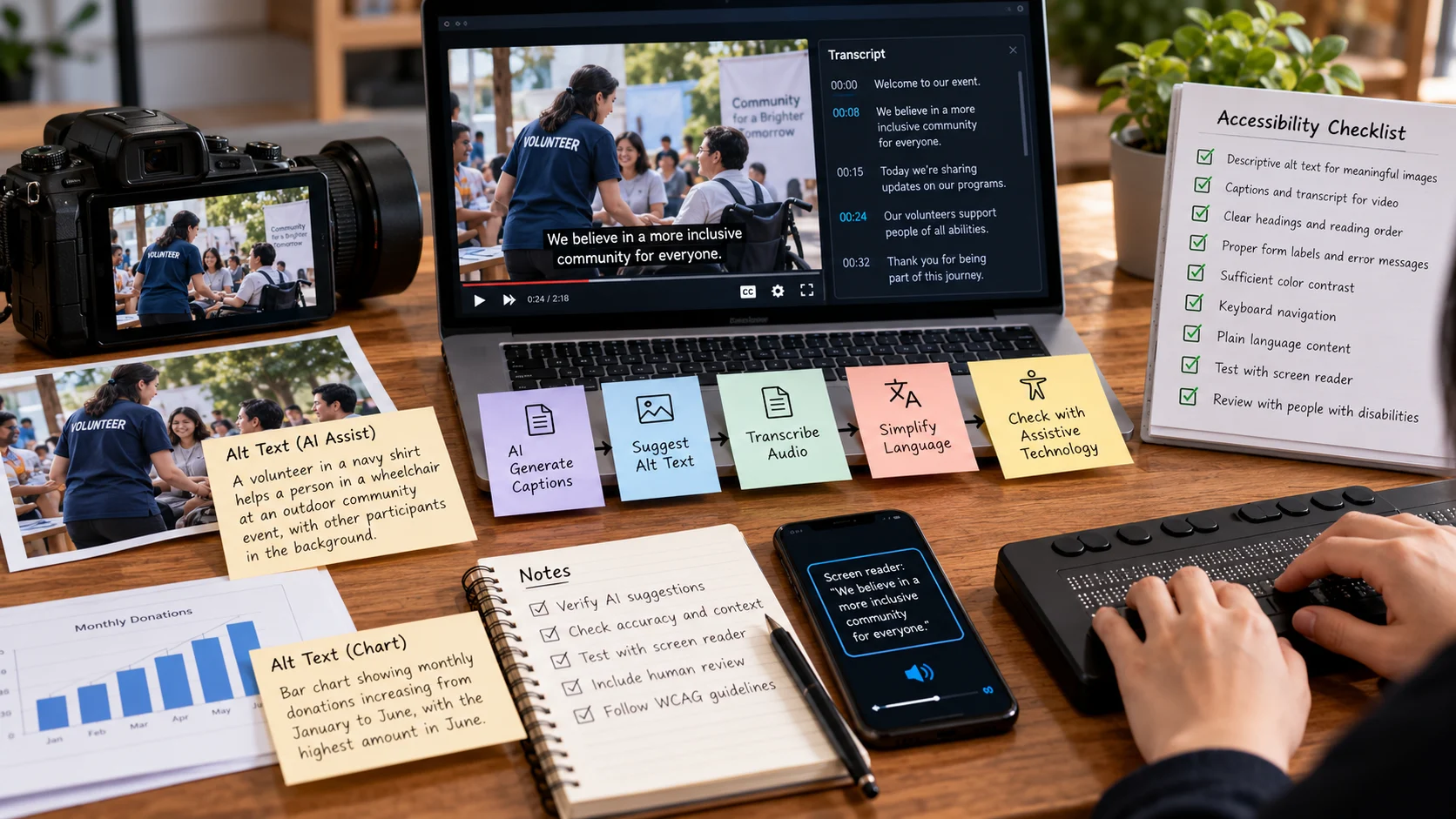
Image-to-text systems can propose descriptions of meaningful visual content. A useful alternative text is tied to the image’s purpose in context. A decorative shape often needs an empty alt attribute; a chart may require an explanation of the significant pattern; an image button needs a name that describes the action. A generic caption such as “person standing indoors” might omit the important fact that a photo shows where visitors should enter a building.
AI suggestions can speed drafting, especially for large image libraries. Human editors must confirm details the system may miss or invent. Don’t describe sensitive personal attributes without a legitimate need and sufficient evidence. If an image contains a price, date, or instruction, verify every character manually rather than trusting a fluent model guess.
Captions and transcripts
Speech recognition can produce first-pass captions and transcripts. Accuracy drops with overlapping speakers, specialized terms, poor microphones, and unfamiliar names. Captions also need sensible timing, speaker identification where necessary, and notation for meaningful sounds. A transcript may serve searching or review but cannot always substitute for synchronized captions in video.
Test a representative recording and correct mistakes before publication. For live sessions, communicate the limitations of automated captions and arrange additional accessibility support where required. Do not claim that a tool creates professional-quality accessibility by default.
Reading assistance and language simplification
AI writing tools can suggest shorter sentences, clearer headings, and explanations of technical jargon. These are valuable starting points for people who find complex prose difficult to process. However, an oversimplified instruction can be wrong. In financial, medical, legal, or safety-related materials, qualified reviewers must protect the original meaning. Plain language is not the same as removing important details.
Translation can widen access but should not be treated as equivalent to multilingual accessibility testing. A translated page might still have broken focus behavior, improper reading order, or labels that make no sense in the chosen language.
Issue detection and code assistance
Accessibility scanners and AI assistants can flag missing labels, suspicious contrast, heading-order issues, or inaccessible component patterns. Automated tools are good at finding some machine-testable problems; they cannot judge every meaningful alternative text, keyboard interaction, or cognitive burden. Use them to direct testing, not to replace testing.
Use WCAG as a Reference, Not a Marketing Score
The World Wide Web Consortium’s Web Content Accessibility Guidelines (WCAG) organize requirements under four broad principles: perceivable, operable, understandable, and robust. Relevant checks include text alternatives, keyboard operation, focus behavior, contrast, labels, and error identification. The specific success criteria and conformance levels matter more than a vendor’s single numerical “accessibility score.”
A screen can receive an apparently strong automated rating yet make it impossible to complete a purchase with a keyboard. Conversely, a tool may report issues whose impact requires interpretation in context. Review automated findings against the applicable WCAG criteria and test with actual assistive technologies. Where practical, involve people with disabilities in usability research, paying them appropriately for their expertise.
A Practical Workflow for More Accessible Content
Identify the user journey. Choose a specific action such as registering for a webinar or reading a product comparison, rather than trying to “make the entire website accessible” with one button.
Inventory the media. Record images, videos, charts, forms, navigation elements, and dynamic interactions. Note which parts were created with AI and which were not.
Check the fundamentals. Verify keyboard navigation, visible focus, semantic headings, descriptive links, labels, and error messages before applying AI-generated explanations.
Use AI for bounded assistance. Generate candidate captions, transcripts, image descriptions, or simplified drafts. Clearly identify the source and expected editorial checks.
Review against source material. Confirm captions match the audio, alt text reflects image purpose, and rewritten content retains facts and required instructions.
Test with assistive technology. Navigate using only a keyboard and perform tasks with common screen readers or other tools appropriate to the audience. Observe not only technical errors but whether the task is understandable.
Fix patterns in templates. If every form has the same inaccessible component, correcting the design system is usually more sustainable than repeatedly adjusting individual pages.
Monitor future content. Set publication checks for new pages, translated materials, new components, and uploaded media; accessibility requires continuing maintenance.
The workflow should capture both defect counts and task completion. For example, if captions are technically present but contain incorrect speaker names that confuse the instructions, the accessibility problem remains. If a form label is fixed but focus jumps unpredictably after an error, the workflow remains unusable.
An Image Description Example
Imagine a product listing containing an image of a power adapter. An AI tool suggests: “Black electronic object on a white surface.” That may describe visible pixels, but fails to communicate the information buyers need. If the image’s purpose is to distinguish the adapter’s connection type, an editor might use: “Black 65-watt USB-C laptop power adapter with a detachable cable,” provided those details are verified from the product and image. The alt text should not include guessed specifications.
The same picture could appear in a purely decorative collage, where an empty alt attribute may be appropriate. This shows why accessibility is contextual. Generating a longer description is not automatically better, and the correct output depends on what surrounding text already conveys.
What to Measure and What to Avoid
Useful indicators include the proportion of videos with reviewed captions, unresolved accessibility issues by severity, successful keyboard-only task completion, time to fix reported barriers, and user-reported difficulties. Count defects by impact, not just volume. One form that prevents account recovery can deserve higher priority than dozens of minor image-description suggestions.
Beware products that promise full compliance through a single overlay or automated scan. No tool can reliably verify all human and contextual requirements for every interface. Similarly, avoid auto-publishing sensitive AI captions without checking speech-recognition errors. Accessibility failures can exclude users, misrepresent instructions, and erode trust.
Privacy matters when tools transcribe private meetings, analyze recordings of people, or process documents containing personal information. Review consent, storage, and third-party transfer terms. Assistive support should not require people to sacrifice confidentiality without a justified reason.
The responsible role for AI accessibility tools is to accelerate parts of production and testing while maintaining accountable review. A better user experience is evidenced by tasks that diverse people can actually complete, not by the number of automatically generated descriptions.
Turning a video and infographic into accessible content
A community organization publishes a two-minute instructional video with a diagram showing how to register for a service. An AI transcript might convert the speaker’s phrase “ID number” into “idea number.” Editors should correct the transcript, synchronize captions, and check that relevant visual-only instructions are conveyed. For the diagram, useful alt text describes the information a screen-reader user needs rather than the colors or every decorative icon.
Weak alt text: “A blue and green picture.” Better, when context permits: “Three-step registration process: create an account, verify email, then choose an appointment.” That is not a substitute for a complex chart’s full data table. Test the experience with keyboard navigation and a screen reader, and ask whether users can actually complete the registration process.
What the example teaches. A promotional poster includes meaningful sale dates and decorative flourishes. The AI-generated alt text describes the colors but omits the deadline. A reviewer rewrites it around the information a visitor needs, while ensuring a decorative background is not read aloud unnecessarily.
Reviewing AI-Generated Captions in Practice
Imagine a recorded product tutorial in which a presenter says, “Connect the USB-C port before turning on the device.” An automated transcript might confuse the port name or omit “before,” creating an instruction that changes the order of steps. Reviewers should compare the caption track with the actual audio rather than correcting only spelling. Proper nouns, units, negative words, and safety instructions deserve special attention because small mistakes can change meaning.
Caption timing matters too. Text displayed too early can reveal the answer to a question before it is spoken, while captions displayed too late leave viewers behind the action. If two people speak, speaker identification may be necessary to understand the exchange. A summary transcript can be useful for reading and search, but may not provide an equivalent experience to appropriately timed captions.
Integrating Accessibility Into Publishing
A simple publishing checklist can prevent repeat problems. Editors should verify image purpose and alt text, heading hierarchy, descriptive links, captions, and readability before publication. Developers should test keyboard focus and component semantics when templates change. Content owners should provide a clear way for users to report barriers without needing to complete an inaccessible form to do so.
AI assistance belongs inside this workflow. It can propose alt text and identify unclear language, but the reviewer must decide whether the result is accurate, appropriate, and complete. Record exceptions for material requiring specialized interpretation, such as complex statistical charts or technical safety illustrations. If an AI-generated description cannot convey essential content, provide an accessible data table or an additional explanation.
Avoiding False Claims of Compliance
WCAG conformance is not established by installing an automatic overlay or achieving a high scan score. Human judgment and functional testing remain necessary because standards include meaning, interaction, and context. If a company publishes an accessibility statement, it should describe the scope, known limitations, contact method, and relevant assessment process truthfully. Advertising a guarantee that no tool can substantiate can mislead the people the organization is trying to serve.
Check the Accessible Experience, Not Only the AI Output
A generated image description may be grammatically fluent while duplicating information already adjacent to the image. Another may describe colors and shapes but omit the chart’s actual conclusion. Test the page with the intended assistive technology and reading order, not just an automated check of whether the alt attribute contains words. For decorative artwork, an empty alt attribute can be more appropriate than a detailed AI-generated caption. For a functional icon, the accessible name should communicate the action, such as “Submit application,” rather than visual appearance alone.
Include people who use assistive technology when the project allows. Give them realistic tasks and record whether they can finish without hidden instructions or uncertain labels. The aim is equitable task completion, not a high count of auto-generated descriptions. As with captions and transcripts, editorial review remains essential when a mistaken description changes meaning.
Frequently Asked Questions
Is automatic alt text enough?
Not always. Good alt text depends on why an image appears and what information it communicates. Machine descriptions often miss context or overdescribe decoration.
Can AI make a website fully accessible?
AI can assist with remediation, but accessibility also depends on navigation, focus behavior, semantics, and real user tasks that require testing.
Do captions need human editing?
Yes, especially for names, technical terminology, speaker identification, and important instructions. Automated transcripts are useful drafts, not infallible final captions.
How can small teams start cheaply?
Start with high-use content and one barrier type, such as uncaptioned training videos. Use W3C guidance and test with people who rely on the alternatives.
Further Reading on ByteScope
AI Design Tools
Responsible AI Guide
Sources and Further Reading
W3C: WCAG 2.2 — W3C accessibility and web-standard guidance.
W3C: Writing Text Alternatives — W3C accessibility and web-standard guidance.