A small accounting firm receives crooked receipts, multilingual invoices, and photographed forms that must become searchable records. AI optical character recognition (OCR) software reads text from image-based pages and can combine text detection, layout understanding, and language models to produce searchable documents or structured fields. Unlike document summarizers, OCR begins before there is reliable digital text. The goal is accurate extraction from scans and photographs, not merely making a paragraph shorter. Quantitative examples below are hypothetical and should be adapted to the reader’s actual data.
Key Takeaways
Basic OCR identifies characters in pixels; document understanding adds layout interpretation and extraction of business fields.
Cloud OCR, document-intelligence services, and local engines have different privacy, integration, and engineering tradeoffs.
Measure critical-field correctness alongside character error rate, not just the amount of searchable text produced.
Keep original images and page coordinates so uncertain totals and identifiers can be checked by a reviewer.
The best pilot accounts for human correction time, duplicate pages, multilingual cases, and exceptions in real input.
OCR, Document Understanding, and PDF Extraction Are Not Identical
A document can look perfectly readable on a screen yet contain no selectable text. A photograph, a scanned paper invoice, and an image-only PDF store pixels rather than ordinary digital characters. Optical character recognition (OCR) estimates which letters, words, and numbers those pixels represent. A PDF text extractor performs a different operation: it reads text that is already encoded in the document. Document-understanding systems may go further by locating tables, identifying invoice totals, or assigning meaning to form fields.
These distinctions shape the workflow. A company that only wants searchable archives may need reliable text recognition and a searchable PDF text layer. A company that wants to populate accounting software needs accurate fields and a way to verify them. A searchable page is not necessarily a correctly interpreted invoice, and even high overall character accuracy can conceal the wrong amount on a payment line.
Prepare the Documents Before Choosing a Tool
Begin with a representative sample, not a beautiful demonstration file. Include phone photos taken at an angle, faded thermal receipts, pages with stamps, multilingual documents, two-column layouts, handwriting where applicable, and images with small text. Label the exact information that matters: invoice number, supplier name, date, amount, and line-item totals, or whatever the real task requires.
Image quality cannot always be repaired after the fact. Severe blur destroys detail; a model may produce a plausible word but have insufficient evidence to justify it. Techniques such as rotation detection, deskewing, cropping, contrast adjustment, and sensible scan resolution can improve recognition, but aggressive preprocessing may erase punctuation or alter faint digits. Preserve the original image and record any transformation, particularly when the document has legal or financial significance.
Separate document categories. A receipt, handwritten registration form, shipping label, and magazine article have different structures. A tool tuned for printed paragraphs may be adequate for books yet poor at extracting table rows. The correct sample should include each document class and each language that will appear in actual operations.
Comparing Practical OCR Approaches
Local open-source OCR. Tesseract is widely used for recognizing printed text and supports language data and configurable processing. It can suit organizations that need local processing or want to build a custom pipeline. The trade-off is engineering work: image preparation, layout recovery, language selection, installation, accuracy evaluation, and integration remain the team’s responsibility.
Cloud image OCR APIs. Services such as Google Cloud Vision provide programmatic text detection for images. They can simplify infrastructure management, but sending images to a provider introduces privacy, data residency, latency, and usage-cost questions. Image OCR alone may not be the most convenient option for complex multipage forms.
Document-processing platforms. Products such as Google Document AI, Azure AI Document Intelligence, and Amazon Textract offer features beyond basic character recognition, depending on the service and model. They may detect key-value pairs, tables, and document fields. Their supported languages, file limits, region availability, output schemas, and pricing evolve, so the official documentation must be checked for the intended workflow.
None of these categories is universally most accurate. Performance depends on document type, language, page quality, and the data you actually need. A procurement decision should use a controlled trial rather than a feature checklist or a general marketing benchmark.
A Step-by-Step OCR Workflow for Small Businesses
1. Decide what the finished output should be
Possible outcomes include a searchable PDF, plain text, CSV rows, a database record, or an invoice awaiting approval. Different destinations demand different quality controls. A searchable archive may tolerate an occasional punctuation error; an exported bank account number may not.
2. Build a labeled benchmark sample
Collect perhaps several dozen permitted documents representing typical and difficult conditions. Manually record the correct critical fields and page regions. Use these labels as ground truth for comparison. The exact sample size should reflect document diversity and risk, not an arbitrary universal threshold.
3. Run preprocessing conservatively
Rotate tilted pages, remove unnecessary borders, and improve legibility without obscuring the original. Keep both original and transformed versions so reviewers can investigate discrepancies. Don’t remove handwritten annotations unless the business has explicitly decided they are irrelevant.
4. Execute OCR and retain location information
Where the service supports it, preserve word or line coordinates together with recognized text. Bounding boxes allow a reviewer to verify exactly which image area produced a suspicious value. This is particularly valuable for invoices with multiple subtotal and total fields.
5. Parse the text into business fields
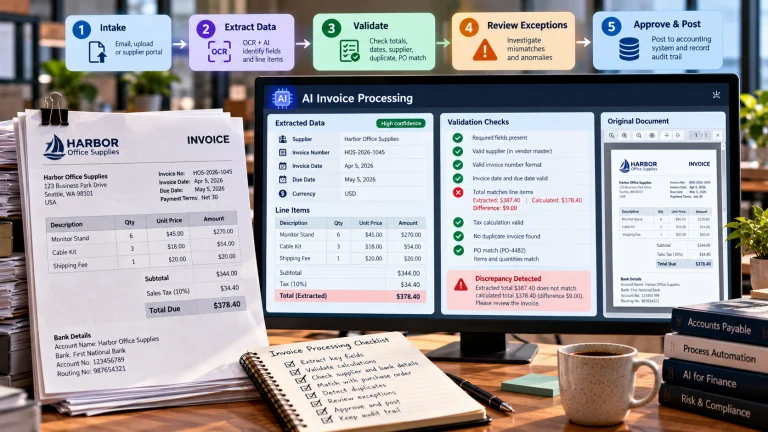
Extract desired values using documented rules or a suitable document-understanding model. Distinguish recognition from interpretation: the model may read “1,330.00” correctly and still choose the wrong occurrence as the amount due. Keep source references rather than storing only the final value.
6. Validate before exporting
Check date formats, currency, supplier IDs, and arithmetic relationships. For example, compare line-item sum, discounts, tax, and total, allowing for genuine rounding conventions. Mark conflicts for human review. Do not automatically change an uncertain digit to make the total appear plausible; that destroys evidentiary integrity.
7. Route exceptions and measure corrections
Staff should be able to see the cropped source image, proposed field, and validation reason. Track corrections by document class so repeated issues can inform improved scanning practices or better tool selection. Export approved values into accounting or archive systems only after the required checks.
How to Measure Accuracy Properly
Character error rate and word error rate quantify differences between recognized text and a reference transcription, but they do not measure every business outcome. A single incorrect character in a bank account number may be more serious than many errors in a descriptive paragraph. Track exact-match accuracy separately for the fields that affect transactions, identity, or compliance.
Also record processing time, human review minutes per document, failure rates, rejected files, and cost per correctly processed item. A tool with slightly higher automated accuracy might still be slower overall if reviewers struggle to find the original text. Conversely, an OCR system with clear source highlights may support faster, safer correction.
When evaluating multilingual documents, report results separately by language and document category. Aggregating everything into one accuracy score can hide an unacceptable failure rate on the least common group. Maintain a fresh holdout sample as the incoming document mix changes.
Privacy, Security, and Source Integrity
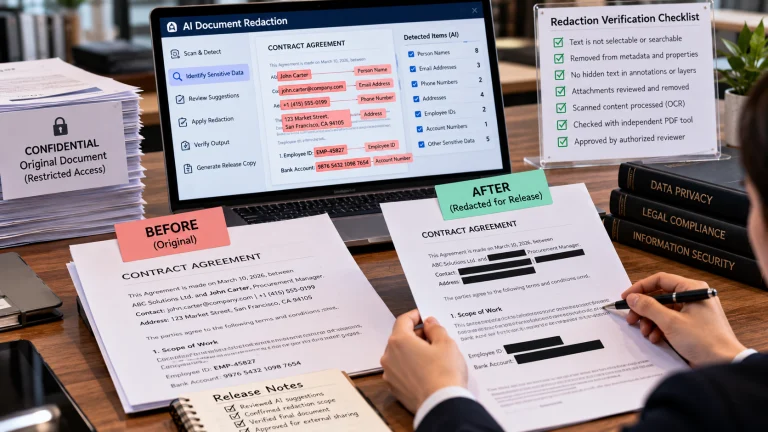
Invoices and forms frequently contain addresses, identity numbers, financial information, or private business details. Review provider terms, storage regions, logging, retention options, and permissions before uploading real files. Mask or minimize sensitive data when feasible, but remember that masking can interfere with accuracy testing if the field itself is under evaluation. Apply access controls to both the source images and extracted records.
Never treat OCR output as a certified transcript merely because it is text that can be copied and searched. Attach provenance, preserve permitted originals, and define who may correct the result. For high-stakes material such as signed agreements, identity documents, or payment instructions, the organization may require manual verification and stricter retention rules.
What a Good Pilot Report Looks Like
A credible pilot report identifies the sample, document mix, tool versions, language settings, critical fields, processing time, and observed failure examples. It distinguishes automatic extraction from human-corrected final records. It lists which errors would be unacceptable in production and describes how they will be detected. The report should conclude whether a specific workflow is ready for a limited rollout, not claim that every document type can now be processed without review.
AI OCR tools become useful when they reduce repetitive transcription while making errors easier to detect and correct. The goal is not merely converting pixels into words; it is producing information a business can rely on, with uncertainty visible when the source does not justify a confident answer.
Comparing practical OCR routes for mixed documents
Option Best starting point Important limitation to test
Tesseract OCR Local text recognition on controlled scans Complex layouts and handwriting may need extra processing
Google Cloud Vision OCR Image text detection via cloud API Privacy terms, layout fidelity and cost depend on workflow
Azure Document Intelligence Read Printed and handwritten document text, word locations Language, file and region support must be checked
These are capability categories, not a benchmark ranking. For a crooked invoice, an OCR result might report Amount due: 1,880.00 when the scan shows 1,330.00. A correct extraction workflow retains the image region and verifies the amount against line-item sums and currency. Before buying a subscription, test a small labeled set containing poor scans, multi-column receipts, tables, signatures, and at least one document in each needed language.
What the example teaches. The accounting team discovers that a low-resolution receipt turns the number 8 into 3, while an invoice table merges adjacent columns. It compares field-level totals against the image and manually checks suspicious rows. A searchable file is produced, but uncertain totals remain flagged for review.
Choosing Between Searchable PDFs and Structured Exports
Before approving an OCR workflow, verify that the output format preserves what users actually need. A searchable PDF often places an invisible text layer over the scanned image so the document remains visually familiar while becoming searchable. That can be helpful for archived contracts and receipts, but it may not create reliable table columns or business fields. A structured export such as CSV or JSON requires additional field recognition and validation.
Keep the distinction visible in a trial. A supplier invoice can become searchable even when its total is classified as a subtotal. Conversely, a field-extraction service may identify the invoice amount correctly but not produce a readable archival PDF. Some businesses need both outputs: a source-linked archive for reviewers and a structured record for downstream software. Specify both deliverables before pricing the workflow, and confirm that corrections remain traceable to the original document.
Handling Multi-Page and Duplicate Documents
A document intake pipeline should assign stable identifiers, detect repeated uploads, and preserve page order. A scanner may accidentally insert a blank page or capture the back of a receipt as a second transaction. If an OCR workflow treats every page as a separate invoice, the business can accidentally duplicate payments. Confirm document boundaries and supplier identifiers before creating operational records.
The pipeline should also distinguish rejection from uncertainty. A corrupted file might require re-upload, while a legible invoice with a disputed tax amount needs review. Providing clear exception categories saves staff time and gives managers usable evidence about where the document process fails.
Estimate Human Review Effort, Not Just OCR Accuracy
Suppose a finance team processes 1,000 invoices a month. System A extracts more text correctly overall but regularly confuses “invoice date” with “due date”; System B makes more harmless punctuation mistakes but reliably highlights the uncertain date field for review. A character-error-rate chart alone may favor A even if B reduces accounting rework. The pilot should therefore measure the percentage of invoices that pass every required field check without correction, the average minutes needed to review exceptions, and the financial consequence of any undetected mistakes.
Reviewers also need a way to report systematic defects such as a recurring supplier layout or a locale-specific decimal separator. Track those issues separately from unreadable originals. This distinction tells the team whether to improve scanning, retrain document classification, configure a new template, or change the verification rule.
Frequently Asked Questions
Can OCR read handwriting?
Sometimes. Handwriting accuracy varies with legibility, script, context, and the recognition engine. Always test representative handwriting from your own documents.
What is the difference between OCR and a PDF text extractor?
A PDF text extractor reads an existing machine-readable text layer; OCR attempts to recognize characters in an image where such a layer may not exist.
Are AI OCR tools accurate for invoices?
Accuracy varies with scan quality, page layout, language, and field type. Check totals, dates, identifiers, and tax values against original documents.
Should I keep original scans after OCR?
Usually yes, according to your legal and retention obligations. Originals support verification and correction when a text layer or extracted field is wrong.
Further Reading on ByteScope
AI Data Analysis Tools
When Automation Helps—and When It Hurts
Sources and Further Reading
Microsoft: Document Intelligence Read OCR — Microsoft product or Azure technical documentation.
Google Cloud: OCR Detection — Google product or cloud-service documentation.
Tesseract Documentation — Open project documentation.