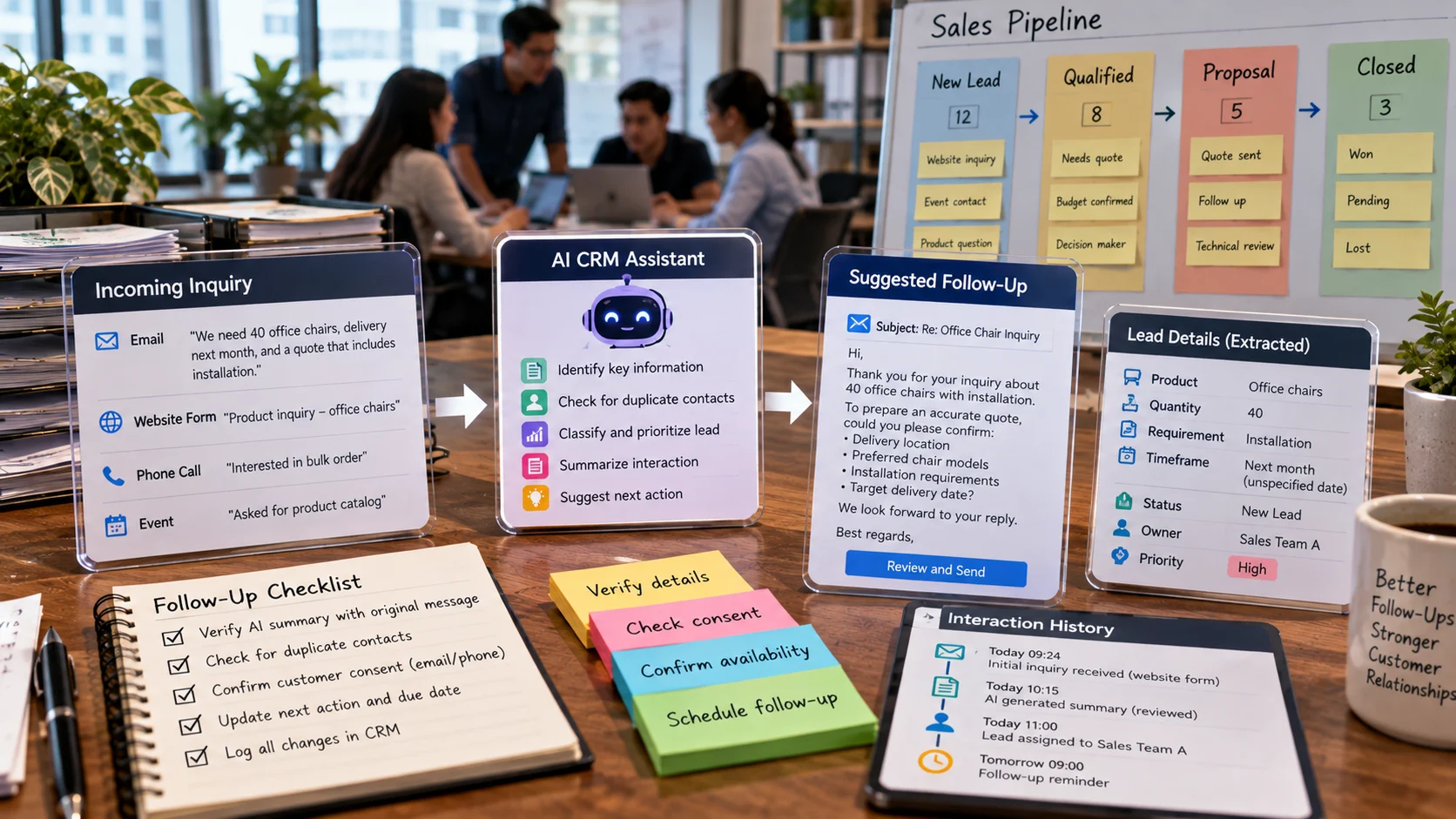
A five-person sales team works from shared inboxes and spreadsheets and regularly forgets to follow up with demo requests. AI features in customer relationship management systems can organize account context, draft follow-ups, classify signals, and suggest next actions while preserving a shared record of customer interactions. The focus is sales pipeline assistance and contact ownership, not the previously published article on AI customer service or generic CRM strategy. Quantitative examples below are hypothetical and should be adapted to the reader’s actual data.
Key Takeaways
AI CRM features work best after a sales team agrees on lead ownership, opportunity stages, and follow-up responsibilities.
Summaries and drafting can reduce repetitive work, but suggestions should link back to verified customer interaction records.
Customer consent and opt-out preferences must override generated outreach recommendations.
Monitor response delays, missed handoffs, relevant outcomes, and complaints rather than counting messages sent.
Begin with a narrow workflow and make corrections visible to the salesperson responsible for the account.
What Makes a CRM Tool Truly AI-Assisted?
Customer relationship management (CRM) software organizes accounts, contacts, leads, opportunities, and interactions. Adding AI can help summarize activity histories, classify inbound requests, suggest next steps, or identify patterns in sales pipelines. But a CRM is not more useful simply because it contains a chatbot. Value comes from reducing missed handoffs and supporting better decisions without sacrificing accuracy or customer trust.
Imagine a five-person sales team handling hundreds of inquiries from email, website forms, phone calls, and events. The manager wants to know which prospects received a response, what each person asked for, and which deals are stalled. Before deploying AI, the team needs stable definitions of an inquiry, a qualified lead, an opportunity, and a completed follow-up. Otherwise, automation will amplify unclear records and inconsistent behavior.
Common AI CRM Capabilities and Their Limits
Lead classification and prioritization. Predictive systems may score leads using observed characteristics or past outcomes. A high score does not imply that a person should receive better treatment or that the prediction is causal. Teams should understand which fields influence decisions and check for bias, leakage, and changing markets. A rules-based routing model may outperform a complex score when the business has little reliable historical data.
Interaction summaries. Generative AI can draft a summary after a meeting or email exchange, highlighting requirements, objections, agreed actions, and unresolved questions. These summaries can save time, but may omit important qualifiers or invent commitments. Salespeople should verify customer promises, price conditions, and dates before storing the summary as an authoritative record.
Drafting outreach. Tools may suggest follow-up email wording based on customer context. Personalization should use information the organization is permitted to process, and messages should be reviewed for tone, accuracy, and compliance. Sending hundreds of automatically personalized emails without consent or relevance can harm deliverability and customer trust.
Pipeline forecasting. Statistical systems may estimate deal probabilities or expected revenue. These numbers depend on consistent stage definitions, reliable close dates, and representative historical data. They should support a manager’s review, not create a false impression of mathematical certainty about individual people.
Set Up the Data Foundation Before the Automation
A useful CRM record needs a unique contact or account identifier, a defined owner, the date and source of the last interaction, status, and the next action where applicable. Organizations should avoid collecting every possible personal detail “in case AI might need it.” Data minimization and access controls are essential, particularly if conversation logs include sensitive information.
Duplicate contacts are a common problem. One person might fill out a website form, attend a webinar, and email a salesperson. The system should detect possible duplicates without merging unrelated people who share a company name. Define matching criteria and a review process for uncertain cases. Contact ownership should also be explicit so an AI suggestion does not trigger conflicting outreach from two employees.
An audit log is valuable when AI changes records. If a model proposes moving a deal to a later stage, the system should record the reason and who approved it. Some activities, such as summarizing text, may safely run automatically, while changes affecting customer commitments, pricing, or consent generally deserve more control.
Example: A Lead Follow-Up Workflow
Suppose a business receives a form submission: “We need 40 office chairs, delivery next month, and a quote that includes installation.” A reasonable system creates a lead, checks duplicates, assigns the responsible team, and drafts a suggested follow-up. AI may extract the quantity, timeframe, and service requirement from the message, but it should preserve the original wording and label uncertain fields rather than interpreting “next month” as a precise deadline without context.
The next action might be a reviewed email requesting delivery location, preferred models, and installation details. The CRM can schedule a reminder if no response arrives within the service target. The automation should not promise a price, inventory availability, or installation date without verifying authoritative systems. If the lead is out of scope, an explicit routing rule may assign it to another team.
The success measure is not the number of AI-written messages. It is whether valid inquiries receive timely, relevant responses and whether customer context survives the handoff. Track customer complaints, opt-outs, incorrect fields, and duplicated outreach alongside response times.
A Safe Implementation Roadmap
Stage 1: Standardize the pipeline
Define lead stages in practical terms. “Contacted” should mean a recorded interaction occurred, not that someone intended to send an email. Clarify who owns each stage transition and which events count as meaningful activity. Remove unused fields that make data entry burdensome.
Stage 2: Connect permitted sources
Integrate the channels that staff actually use. Check that email, web forms, and event registrations have appropriate permissions and disclosure. Avoid uploading entire private inboxes to a model when a smaller selected message would suffice. Map sources to stable identifiers and preserve timestamps.
Stage 3: Pilot one narrow use case
Choose meeting summarization or lead-category suggestions before attempting full autonomous sales. Use representative historical examples, including ambiguous leads and mixed-language inquiries. Compare AI proposals with staff judgments and correct the workflow when common errors appear.
Stage 4: Define approval thresholds
For low-risk tasks such as suggesting a follow-up subject line, staff review may be light. For quotes, contract terms, customer record merges, and outbound actions, require explicit authorization. The AI should not silently change financial fields or send messages under a salesperson’s identity without controls.
Stage 5: Measure against a baseline
Record response time before and after the pilot, proportion of overdue follow-ups, contact duplication rate, adoption by staff, and customer outcomes. If staff spend more time correcting summaries than writing them, the tool has not demonstrated the intended benefit.
Stage 6: Expand gradually
Only introduce more automation after data quality, consent, ownership, and exceptions are stable. Train staff in how to flag mistakes and disable an automation that behaves unexpectedly. Periodically reassess predictions as products, markets, and sales practices change.
CRM Metrics That Are Hard to Misinterpret
A response-time metric should start when an inquiry enters the system and stop at the first meaningful human or approved automatic response. Define whether weekends and holidays count. A follow-up-completion metric should reflect actions actually taken, not reminders generated. Pipeline conversion should use a consistent denominator: all eligible leads entering a stage during a defined period.
AI-specific quality metrics may include summary correction rate, erroneous lead merges, inaccurate extracted requirements, and customer complaints tied to automated outreach. Segment the results by lead source because a model may perform well on clear web forms and poorly on forwarded free-text emails. Evaluate user trust as well as employee time saved.
Ethics, Consent, and Operational Boundaries
Sales data often includes personal contact details, communications, purchasing histories, and internal commercial plans. Limit access according to role, set retention periods, review vendor processing terms, and honor applicable marketing consent rules. Generated outreach should not impersonate personal familiarity or make claims unsupported by the customer’s record. An inaccurate “I enjoyed our call yesterday” is more than awkward: it can damage credibility.
Do not let predictive scores become unchallengeable judgments about people. A new company or underrepresented customer type may have a poor score simply because the historical training set is narrow. Provide staff a way to override or correct recommendations with documented reasons. Likewise, never let a model quietly discard a genuine customer complaint because it looks unlikely to convert.
An effective AI CRM deployment preserves the sales team’s knowledge while improving coordination. The strongest result is a reliable next action attached to accurate context, with the human team still accountable for promises made to customers.
An example sales pipeline with human-approved follow-up
Sales stage Helpful AI assistance Approval needed
New inquiry Summarize stated requirements Verify source and consent
Qualified lead Flag a missing budget or deadline Representative confirms qualification
Proposal sent Draft a context-aware follow-up Seller approves terms and send
Negotiation Summarize open questions from notes Account owner checks accuracy
Consider a five-person sales team that forgot two demo requests because leads were copied into separate spreadsheets. Integrating a CRM may first solve the assignment problem without any AI. Once every lead has an owner and a next-action date, AI summaries can reduce reading time. A tool-generated email that invents a discount should never be sent without approval. Evaluate improvement using missed follow-ups and actual customer responses, not message volume alone.
What the example teaches. The sales team finds a promising lead with no recorded next contact date. An AI suggestion proposes a personalized reminder from meeting notes, but a salesperson checks whether the prospect has opted out. The CRM records the human-approved message and the date of actual follow-up.
Handling Sales Predictions Without Biasing the Team
Lead scores can create feedback loops. If representatives contact only leads ranked highly by a model, the business collects more outcome data for those leads than for the ignored group. The system may later interpret the absence of conversions among uncontacted leads as evidence that its original ranking was correct. That is a flawed inference: many customers never had a fair opportunity to respond. A responsible evaluation should consider selection effects and maintain an appropriate process for exploring lower-ranked leads.
Similarly, a score based on historical purchases may underrate genuinely new companies or customer groups. Review outcomes by lead channel, business size, and other relevant categories without turning protected characteristics into unfair screening criteria. Where consequential decisions are involved, provide human review and the ability to correct inaccurate customer data.
Planning Human Approvals
An AI summary that says a customer “expects delivery by Friday” should be checked against the actual email before the salesperson confirms a date. Build approval screens that highlight extracted commitments, source sentences, and uncertainties. A user should not have to inspect an entire conversation history to notice that a supposed deadline came from the assistant rather than the client.
For outbound communication, separate drafting from sending. Templates may be approved, but final messages should still respect current prices, inventory, consent, and account ownership. Record who authorized a message when necessary. If a workflow automatically creates reminders, prevent duplicate reminders when staff have already responded through another channel.
Evaluating Adoption Honestly
A team that opens an AI CRM feature frequently is not necessarily receiving value. Compare time spent updating records, unassigned inquiries, duplicated outreach, and actual customer response quality before and after deployment. Collect staff feedback about mistakes and corrective effort. A feature that produces polished summaries but makes reps distrust the database may be a net loss. Good adoption should mean that accurate customer context becomes easier to find and act on, not that the team generates more text.
Distinguish a Helpful Suggestion From an Automated Sales Decision
An AI assistant can propose that a salesperson contact a lead, summarize the last conversation, or draft an email. It should not automatically infer that a customer wants more messages or that a vague sentiment score is evidence of purchasing intent. Give users a way to inspect the record behind recommendations and correct the ownership or next action. If a customer has opted out, that preference must override suggested outreach.
During a pilot, compare not only the number of activities logged but also whether follow-ups reach the right person at the right stage. A team can send twice as many messages while damaging customer experience. Track meaningful outcomes, corrections, opt-outs, and complaint rates. This helps separate useful coordination from automation that merely produces more activity.
Frequently Asked Questions
Can AI replace a sales representative?
No. AI can help prepare notes and next actions, while a salesperson remains responsible for relationships, promises, negotiations, and consent.
Is lead scoring useful for small teams?
Only when the organization has meaningful outcome data and a clear definition of a useful lead. Simple ownership and follow-up reminders may create more value initially.
Should AI send follow-up emails automatically?
Automatic sending can cause inaccurate or unwanted outreach. Begin with drafts and approvals, especially for pricing, legal claims, sensitive customer history, or unsubscribed contacts.
How do you protect customer data in a CRM?
Minimize copied fields, use appropriate permission levels, evaluate vendor processing terms, and keep a correction path for inaccurate generated notes.
Further Reading on ByteScope
AI Customer Service Tools
Responsible AI Guide
Sources and Further Reading
Salesforce: Einstein for Sales Overview — Vendor capability documentation; check plan and features.
HubSpot: AI CRM — Vendor product documentation; check plan and features.