Taking notes is easy. Finding the right note three months later is harder. AI note-taking tools aim to solve that second problem by helping users summarize, organize, search, rewrite, and connect information that would otherwise sit in disconnected documents.
The most useful AI note system is not necessarily the one that generates the most text. It is the one that helps turn captured information into something you can retrieve and act on later.
What Can AI Add to Note-Taking?
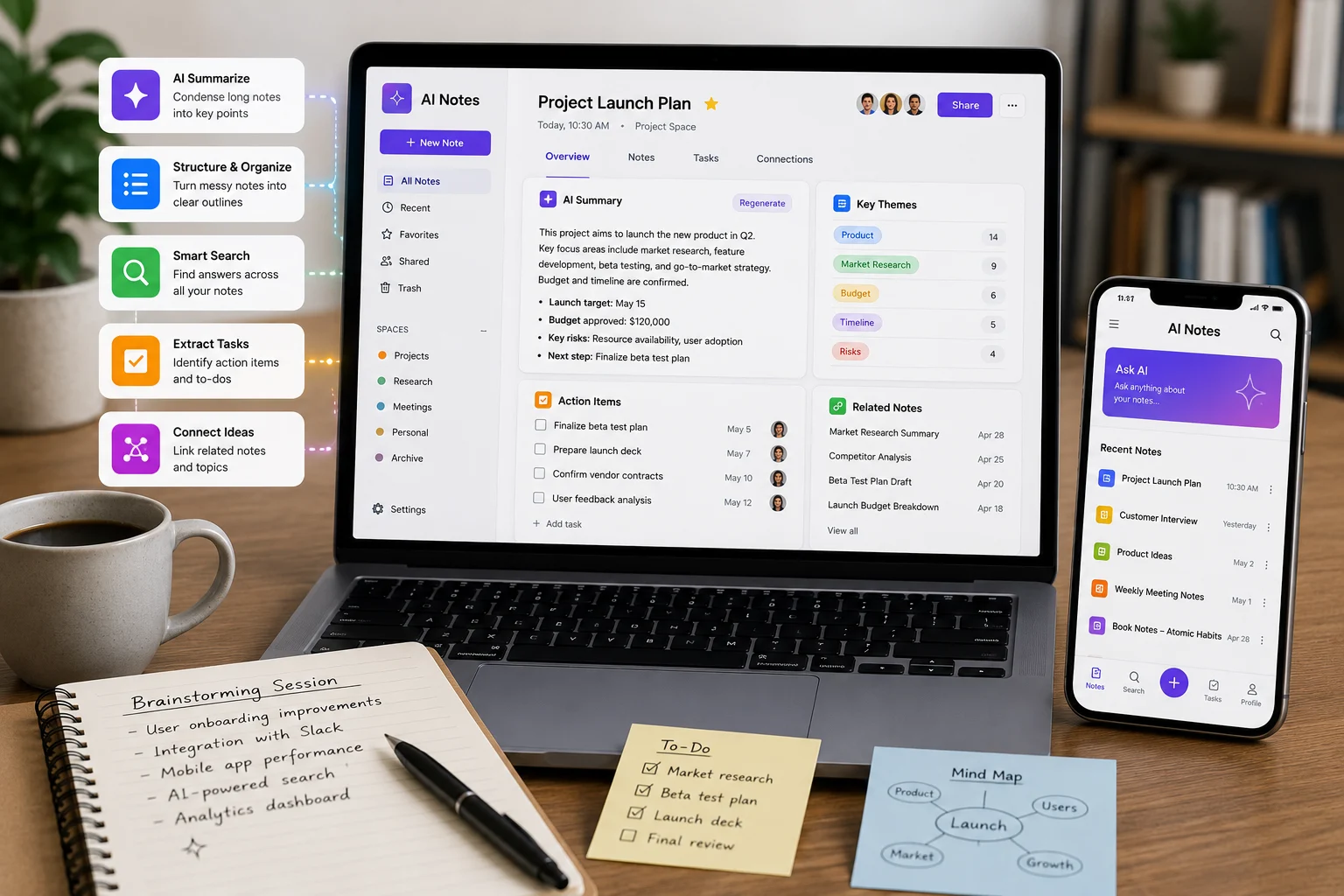
Traditional note apps store what you type. AI can add transformation and retrieval. It can summarize a long page, extract action items, rewrite rough notes, generate headings, identify themes, or answer questions across a workspace.
This turns the note system into more than a digital notebook.
Summarizing Long Notes
AI is useful after a lecture, brainstorming session, interview, or research session when the page contains too much detail to scan quickly.
A good summary should preserve decisions and important context rather than simply shorten every paragraph. Users can improve results by specifying what they need: key ideas, definitions, tasks, questions, or a study outline.
Turning Notes Into Structure
Raw notes are often messy because people capture ideas in the order they occur. AI can reorganize them into sections, bullet points, tables, timelines, or project plans.
This can be especially helpful when brainstorming produces many disconnected fragments.
Searching a Knowledge Workspace
Some AI note tools can answer questions across multiple pages or connected sources. Notion AI, for example, can work inside a workspace and use stored project plans, tasks, and other content as context.
This type of retrieval can make a large note collection feel more like a searchable knowledge base.
Notes vs. Meeting Assistants
AI meeting assistants focus on conversations and automatic transcription. Note-taking tools are broader: they may organize research, personal knowledge, project documentation, reading notes, and manually written ideas.
Many products now overlap, combining meeting capture with workspace AI.
AI Can Help With Writing, but Keep the Original
Rewriting can make notes clearer, but it can also remove nuance. When the original wording matters, preserve the raw note and generate a separate cleaned version.
This is particularly important for quotations, observations, research data, and legal or clinical notes.
From Notes to Tasks
A useful AI workflow can identify action items and convert them into tasks. This reduces the gap between documenting a decision and actually doing the work.
Integration with calendars, project tools, or automation systems can make this even more practical.
Personal Knowledge Management
Some users build long-term knowledge systems containing reading notes, ideas, research, and project history. AI can help identify connections between old and new information.
This resembles AI memory: the challenge is not storing everything but retrieving the right information at the right moment.
Privacy and Sensitive Notes
Notes may contain private thoughts, business plans, client information, or personal data. Review the provider’s privacy settings before putting sensitive material into an AI-enabled workspace.
Organizations may need enterprise controls, access management, retention policies, and restrictions on external model processing.
How to Choose an AI Note-Taking Tool
Look at search, organization, import formats, export options, AI summaries, database features, offline access, collaboration, mobile capture, integrations, privacy, and cost.
Most importantly, ask whether the tool reduces friction. A complex note system that requires constant maintenance can become another task rather than a productivity aid.
A Practical Workflow
Capture first without worrying about perfect structure. After the session, use AI to summarize or categorize. Verify important details. Then connect action items to your task system and archive the original source.
This keeps AI in a supporting role while preserving your own thinking and evidence.
The Bottom Line
AI note-taking tools can make information easier to organize, retrieve, summarize, and turn into action. Their real value appears over time when a large collection of notes remains useful instead of becoming an archive you never revisit.
Choose a system that fits how you already capture information, and use AI to improve structure and retrieval without replacing the original material that gives your notes meaning.
A Practical Checklist Before You Rely on Ai Note-Taking Tools
Define the job first. Decide what success means before choosing a model or product. A system can look impressive in a demo while solving the wrong problem. Write down the expected output, the information it may use, the acceptable error rate, and which decisions still require a person.
Test representative examples. A useful first test is to use the tool on a real week of notes and see whether you can retrieve an old decision faster than with your existing system. Include normal cases and difficult edge cases. The goal is to learn where the system is dependable and where it needs stronger instructions, additional tools, or human review.
Verify important outputs. Do not confuse fluency with correctness. Check facts, calculations, citations, permissions, and important transformations against a reliable source. The more expensive or difficult an error would be to reverse, the stronger the verification process should be.
Review privacy and access. Understand what information is being sent to the system, where it is stored, and who can retrieve it later. Give connected AI tools only the permissions they need. Sensitive data should follow the same governance rules that apply elsewhere in the organization.
Measure value over time. Track time saved, correction rate, reliability, user satisfaction, and operational cost. A tool that feels fast during the first week may not create lasting value if people spend the same amount of time fixing its output.
Common Mistakes to Avoid
One common mistake is choosing technology before defining the workflow. Another is testing only ideal examples. Teams also tend to add automation without planning what happens when the model is uncertain, the data is missing, or a connected service fails.
The most important limitation to keep in mind is that AI organization can remove nuance or create extra structure that looks useful but is never revisited. Build the workflow around that reality rather than assuming future model improvements will automatically solve it.
Frequently Asked Questions
Is AI note-taking tools always more accurate than a simpler approach?
No. AI is valuable when the task benefits from language understanding, pattern recognition, generation, or flexible decision support. A deterministic rule, database query, spreadsheet formula, or conventional software function can be better when the task is predictable and exact.
Should I pay for a AI note-taking tools product immediately?
Usually not. Start with a free tier, trial, or small pilot when one is available. Use it on real work and measure whether it saves time or improves quality. A paid plan becomes easier to justify when limits, collaboration, privacy, integrations, or higher-quality features solve a recurring problem.
What is the safest way to start using AI note-taking tools?
Begin with a narrow, reversible use case. Keep source material or original data available, review the output manually, and document the situations where the system fails. Expand automation only after the workflow performs consistently on representative examples and users know how to recover when it is wrong.