
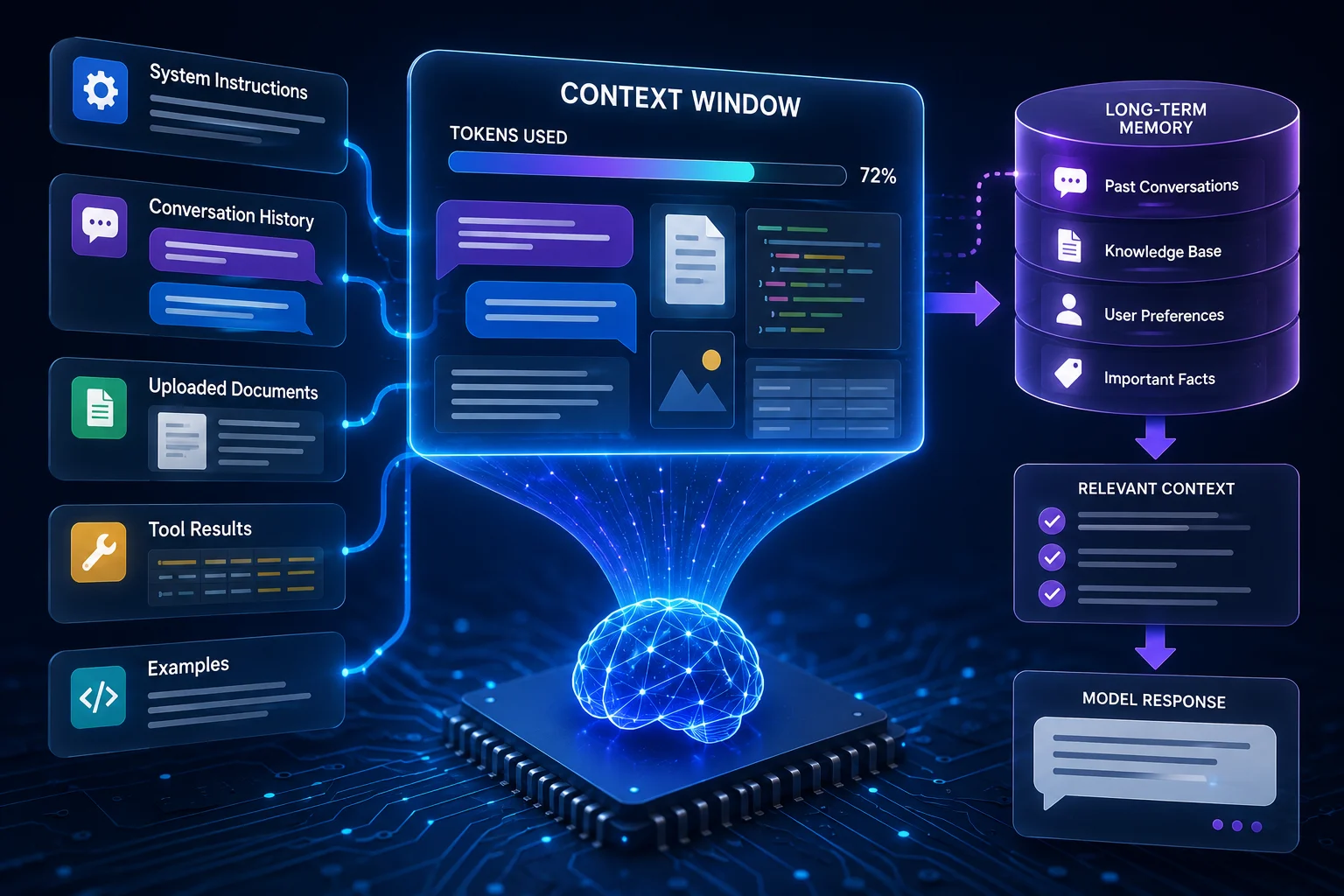
AI assistants can appear to remember a long conversation, but that experience has a technical limit. Language models operate within a finite amount of active information known as the context window.
The context window determines how much material the model can consider when generating its next response. Understanding this concept explains why long chats sometimes forget earlier details, why large documents may need to be split, and why “memory” in an AI product is not always the same thing as context.
What Is a Context Window?
A context window is the maximum amount of information a model can process together during one interaction. It is usually measured in tokens.
The active context may contain system instructions, conversation history, uploaded text, tool results, examples, and the user’s current request. The model generates its answer based on the information that fits into that window.
Different models support different context sizes. Those limits also change as AI systems improve, so specific numbers should always be checked in the current model documentation.
Context Is Not Human-Like Memory
A model does not inherently remember a previous conversation simply because it happened before. If the relevant conversation history is not supplied again, a stateless language model has no automatic awareness of it.
Applications can create the experience of memory by storing earlier information and reintroducing selected details into future prompts. That storage system exists outside the core model.
This distinction is important. Context is what the model can actively use right now. Memory is a broader product feature that may save, retrieve, summarize, or select information over time.
What Uses Up Context?
Nearly everything sent to the model consumes part of the context window. A long system prompt, several pages of conversation history, a large document, and a detailed tool result can all reduce the remaining space available for new information and the model’s response.
This is why a model with a large context window can analyze more material at once, but it still does not have unlimited capacity.
In agentic workflows, context management becomes especially important because AI agents may accumulate many observations, tool outputs, and intermediate steps.
What Happens When a Conversation Gets Too Long?
AI products use different strategies. Some may remove old messages from the active context. Others summarize earlier parts of the conversation. A system may also retrieve only the parts that appear relevant to the current request.
These techniques can preserve continuity, but they are not perfect. A summary may omit a detail that later becomes important. Retrieval may select the wrong passage. Old instructions may be compressed in a way that changes their meaning.
If a conversation depends on an exact requirement, repeating that requirement can be safer than assuming the system still has it available.
Large Context Windows Are Useful, but Not Magic
A larger context window lets a model accept longer documents, more examples, or more conversation history. This is valuable for research, code review, contract analysis, long transcripts, and multi-document tasks.
However, simply placing more information into the prompt does not guarantee better reasoning. Important details can become harder to identify when surrounded by irrelevant material. Models may also pay uneven attention to information depending on where it appears.
The best workflow provides enough context to solve the task without flooding the model with unnecessary data.
Context Windows and Long Documents
When a document is larger than the available context, an application can divide it into smaller chunks. The system may summarize each section, search for relevant passages, or use retrieval to select only the most useful pieces.
This is one of the reasons AI summarizer tools and retrieval-based systems can handle documents that would be inefficient to paste into a chat all at once.
Context Windows and RAG
Retrieval-Augmented Generation, or RAG, helps manage context by searching an external knowledge source and inserting only relevant information into the prompt. Instead of loading an entire knowledge base into every request, the system retrieves a small set of passages.
This makes context use more efficient and can improve factual grounding. Our guide to RAG explains how that process works.
How Users Can Manage Context Better
For long conversations, restate the current goal and important constraints when the topic changes. If you upload several documents, tell the model which source matters most. When a task becomes complicated, ask for an intermediate summary that you can verify before continuing.
Developers can use retrieval, structured state, summarization, caching, and task-specific prompts to keep the active context focused.
Why Context Can Affect Accuracy
Missing context can produce wrong answers because the model may not know a constraint that appeared earlier. Excessive context can also create problems because the model must decide which details are relevant.
Neither problem is exactly the same as an AI hallucination, but poor context can make hallucinations and misunderstandings more likely.
The Bottom Line
An AI context window is the amount of information a model can actively consider during one interaction. It is limited, measured in tokens, and shared by instructions, history, source material, and output.
A larger context window is useful, but effective AI systems still need good context management. The goal is not to give the model everything. The goal is to give it the right information at the right time.
A Practical Checklist Before You Rely on Ai Context Windows
Define the job first. Decide what success means before choosing a model or product. A system can look impressive in a demo while solving the wrong problem. Write down the expected output, the information it may use, the acceptable error rate, and which decisions still require a person.
Test representative examples. A useful first test is to run a long document or conversation task and check whether important instructions from the beginning are still being used correctly. Include normal cases and difficult edge cases. The goal is to learn where the system is dependable and where it needs stronger instructions, additional tools, or human review.
Verify important outputs. Do not confuse fluency with correctness. Check facts, calculations, citations, permissions, and important transformations against a reliable source. The more expensive or difficult an error would be to reverse, the stronger the verification process should be.
Review privacy and access. Understand what information is being sent to the system, where it is stored, and who can retrieve it later. Give connected AI tools only the permissions they need. Sensitive data should follow the same governance rules that apply elsewhere in the organization.
Measure value over time. Track time saved, correction rate, reliability, user satisfaction, and operational cost. A tool that feels fast during the first week may not create lasting value if people spend the same amount of time fixing its output.
Common Mistakes to Avoid
One common mistake is choosing technology before defining the workflow. Another is testing only ideal examples. Teams also tend to add automation without planning what happens when the model is uncertain, the data is missing, or a connected service fails.
The most important limitation to keep in mind is that a large context window can hold more information but does not guarantee that every detail receives equal attention. Build the workflow around that reality rather than assuming future model improvements will automatically solve it.
Frequently Asked Questions
Is AI context windows always more accurate than a simpler approach?
No. AI is valuable when the task benefits from language understanding, pattern recognition, generation, or flexible decision support. A deterministic rule, database query, spreadsheet formula, or conventional software function can be better when the task is predictable and exact.
Do I need to understand the mathematics behind AI context windows?
No. A conceptual understanding is enough for most users and product decisions. Mathematics becomes more important when you are implementing, optimizing, or researching AI context windows at a technical level. Start with the purpose, inputs, outputs, tradeoffs, and failure modes before going deeper into equations.
What is the safest way to start using AI context windows?
Begin with a narrow, reversible use case. Keep source material or original data available, review the output manually, and document the situations where the system fails. Expand automation only after the workflow performs consistently on representative examples and users know how to recover when it is wrong.