A customer taps a button and receives an instant confirmation. An employee opens a dashboard
and sees an updated performance metric. A manager approves a request from a phone. A support
agent receives a customer case with the relevant history already attached.
From the user’s perspective, these experiences may appear simple. One click produces one
result. But simplicity on the screen often depends on considerable complexity behind it.
Data has to come from somewhere. Systems have to exchange information. Rules determine
what should happen next. People or software make decisions. Permissions control who can
see or change information. Exceptions need somewhere to go when the normal process fails.
This invisible structure is the hidden architecture of digital innovation.
It is the part users rarely notice when it works well, yet it determines whether a digital
experience is reliable, scalable, understandable, and genuinely useful.
The first ByteScope article in this series,
Digital Innovation Beyond New Technology
,
argued that innovation should begin with a real problem rather than a fashionable tool.
The next question is what happens after that problem has been identified. How does an idea
become a functioning digital system?
The answer lies in the connections between data, workflows, decisions, integrations,
controls, and feedback. Understanding those connections makes digital innovation much
less mysterious.
The Interface Is Not the System
When people evaluate digital products, they naturally focus on what they can see: the
website, mobile app, chatbot, dashboard, form, or AI assistant. These interfaces matter
because they shape the user experience, but they are only one layer of the system.
Imagine an online order page. A customer selects a product, enters an address, pays, and
receives a confirmation. The visible experience may involve only a few screens. Behind
those screens, however, several things may happen.
The system checks inventory. A payment provider confirms the transaction. Customer data
is stored or updated. The order is assigned an identifier. A warehouse receives a task.
Shipping information is prepared. An email or notification is generated. Analytics systems
record the transaction. Fraud rules may evaluate the payment. An exception process may
activate if stock is unavailable or an address cannot be validated.
The interface may be elegant, but the experience fails if any important connection behind
it is poorly designed.
This is one reason digital innovation cannot be judged only by appearance. A beautiful
front end connected to fragmented data and unreliable processes can create more frustration
than an ordinary interface supported by a well-designed operating system.
The ByteScope Decision Spine
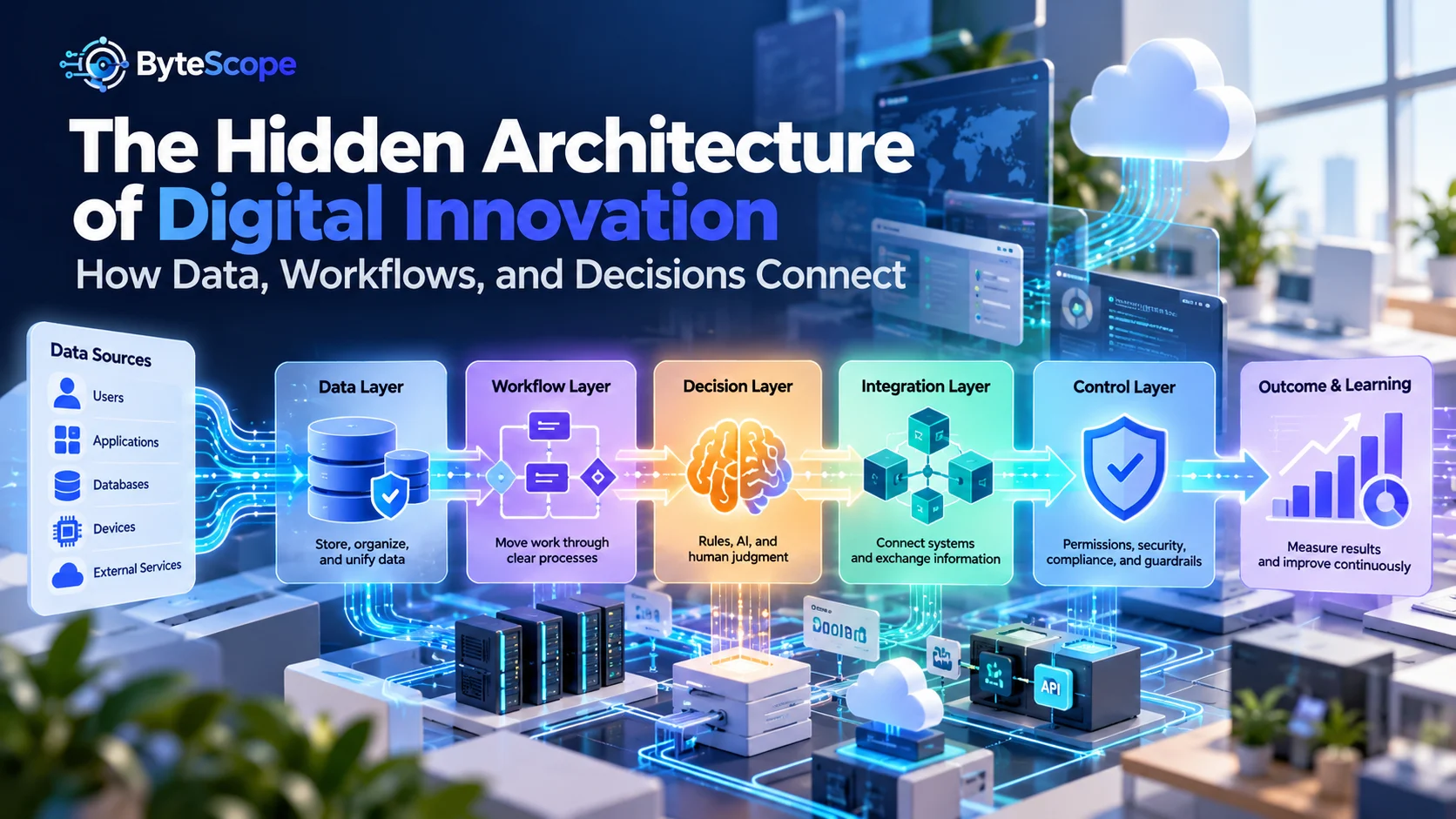
A useful way to understand the hidden architecture is to follow what we call the
ByteScope Decision Spine. It describes six connected layers that turn
information into action:
- Evidence: What data tells the system what is happening?
- Movement: How does work travel through the process?
- Decision: How does the system determine what should happen next?
- Connection: Which systems need to exchange information or actions?
- Control: What limits, permissions, reviews, and safeguards keep the system reliable?
- Learning: How does the organization measure outcomes and improve the system?
These layers do not need to appear as six separate software products. They are conceptual
parts of a digital system. A small workflow might implement all six with a spreadsheet,
a form, and a few automation rules. A large enterprise process may involve databases,
APIs, cloud services, analytics platforms, AI models, security controls, and dozens of
applications.
What matters is not the size of the technology stack. What matters is whether the layers
connect coherently.
1. Evidence: Data Gives the System Something to Act On
Every digital decision begins with some form of evidence. A customer entered an address.
A sensor recorded a temperature. A payment was received. An employee changed a status.
A sales number crossed a threshold. A user asked a question.
Without reliable data, a digital system is forced to act on incomplete or incorrect
information. That problem becomes more serious as automation increases because errors can
travel through the process faster than they would in a manual system.
Good data architecture starts with basic questions:
- Where does this information originate?
- Which system is considered the authoritative source?
- Who is allowed to create or change it?
- How frequently does it need to be updated?
- What happens when information is missing?
- How long should the information be retained?
These questions may sound administrative, but they directly affect user experience.
Imagine a customer changes an address in one application, but a second system continues
using the old address because the two databases are not synchronized. The user sees one
company; internally, the company behaves like several disconnected organizations.
Data also needs meaning, not just storage. A column called “Status” is not useful if one
department interprets “complete” as work performed while another interprets it as payment
received. Digital systems become fragile when the same information carries different
meanings across teams.
Tools such as
AI data analysis tools
can help users explore datasets, identify patterns, create summaries, and generate
visualizations. But analytical capability does not repair unclear definitions or unreliable
source data. Better analysis still depends on knowing what the data represents.
2. Movement: Workflows Turn Data Into Progress
Data describes a state. A workflow describes movement.
A customer request may begin as “new,” move to “assigned,” become “in review,” wait for
additional information, and eventually become “resolved.” Each state represents something
different, and each transition may require an action.
A workflow therefore answers questions such as:
- What starts the process?
- Who or what owns the next step?
- Which steps can happen automatically?
- Which steps require approval?
- What happens if a deadline is missed?
- Where do unusual cases go?
This is where many digital transformation projects quietly become complicated. Organizations
often automate the visible steps without agreeing on the underlying workflow.
For example, a team may replace emailed spreadsheets with an online system but still have
employees message each other manually to ask whether a record is ready. The data is digital,
yet the coordination remains informal.
A well-designed workflow makes the state of work visible. People should not need to ask,
“Who has this?” or “What happens next?” every time an ordinary case moves through the
process.
Spreadsheets often become informal workflow systems because they are flexible and familiar.
Modern
AI spreadsheet tools
can make formulas, summaries, cleaning, and analysis easier, but teams should recognize
when a spreadsheet is becoming responsible for too many roles at once. A workbook that
acts simultaneously as database, workflow engine, approval system, reporting platform,
and audit trail can become difficult to maintain.
3. Decision: Every Workflow Contains Decision Points
Movement alone is not enough. At certain points, the system needs to decide what should
happen.
Some decisions are simple rules:
- If the amount is below a threshold, approve automatically.
- If inventory reaches zero, stop new orders.
- If a ticket contains a billing issue, route it to the finance queue.
Other decisions require human judgment:
- Is this unusual customer complaint serious enough to escalate?
- Does this proposal meet the strategic goal?
- Should an exception be approved despite the standard rule?
Still others may benefit from statistical or AI-assisted judgment, such as recognizing
patterns in text, estimating demand, ranking possible options, or summarizing complex
information.
The important design question is not simply whether a decision can be automated.
It is whether automation is appropriate for the consequences of the decision.
Understanding
how artificial intelligence works
helps clarify this distinction. AI can be useful when tasks depend on pattern recognition,
language, prediction, or flexible interpretation. Deterministic rules remain preferable
when the process is predictable and exact.
A mature digital system may therefore use several decision mechanisms at once. Simple cases
follow rules. Ambiguous cases receive AI assistance. High-risk or unusual cases go to a
person.
That combination is often more reliable than trying to force every decision into one
technology.
4. Connection: Digital Systems Need to Talk to One Another
Most modern organizations do not operate through one application. They use collections of
systems: accounting software, customer databases, websites, communication platforms,
spreadsheets, analytics tools, payment systems, cloud storage, and specialized industry
applications.
Digital innovation often depends on connecting these systems so users do not have to act
as human integration layers.
When systems are disconnected, employees copy data manually, download and re-upload files,
send screenshots, or retype information from one application into another. These
workarounds consume time and create opportunities for error.
Integration can take many forms. One application might call another through an API.
A scheduled process may synchronize records every hour. An automation platform may listen
for an event in one system and create an action in another. A shared database may provide
information to several interfaces.
The technical method matters, but the architectural question is simpler:
what information or action needs to cross this boundary?
Not every system needs access to everything. Good integration moves only what is needed,
when it is needed, with clear ownership and appropriate permissions.
Integration Does Not Automatically Create Coherence
Connecting two systems can solve one problem while creating another. If definitions,
permissions, and timing are unclear, integration can spread inconsistency faster.
Suppose an organization connects a customer database with an email platform. Which system
owns the customer’s primary email address? If someone unsubscribes in the email platform,
how quickly should that preference reach the customer database? What happens if both
systems update the same record at nearly the same time?
Integration architecture therefore requires more than moving data. It requires rules about
authority, synchronization, conflicts, and failure.
A useful system should also make failures visible. If an integration silently stops working,
the organization may continue operating for days before someone realizes that information
is missing.
5. Control: Innovation Needs Boundaries
The more connected and automated a system becomes, the more important controls become.
Speed without control can turn a small mistake into a large one.
Controls include permissions, validation, approvals, monitoring, audit logs, security
rules, recovery procedures, and limits on what automated systems are allowed to do.
Consider an automated invoice workflow. A system may extract invoice details, match them
with purchase records, and prepare payment. That saves time. But the system may still need
limits such as:
- payments above a certain value require human approval;
- bank-account changes trigger additional verification;
- duplicate invoice numbers create an alert;
- all changes are logged;
- users have only the permissions required for their role.
Controls should reflect risk rather than being added uniformly. A typo in an internal note
has different consequences from an incorrect financial transaction.
This principle becomes especially important when AI participates in the workflow.
ByteScope’s guide to
responsible AI
explains why reliability, privacy, fairness, transparency, security, and human oversight
need to be treated as part of system design rather than optional additions.
6. Learning: A Digital System Should Produce Feedback
The final layer of the Decision Spine is learning. A system should not only perform work.
It should provide evidence about whether the work is improving.
Useful feedback may include:
- processing time;
- error frequency;
- completion rate;
- customer satisfaction;
- manual interventions;
- exception frequency;
- operating cost;
- rework or correction rate.
Metrics should connect to the original purpose of the innovation. If the goal was faster
service, measuring the number of automated tasks is less useful than measuring the time a
customer waits for resolution.
Feedback also reveals when optimization in one area creates problems elsewhere. A team
might reduce handling time by making responses shorter, only to discover that customers
contact support again because their questions were not fully answered.
Digital innovation improves when the system creates a closed loop:
observe, act, measure, learn, adjust.
A Practical Example: What Happens Behind a Simple Customer Request?
Imagine a customer visits a company’s website and submits a request for help. The visible
interaction may take less than a minute. Behind the scenes, the Decision Spine begins to
operate.
Evidence
The form captures the customer’s identity, contact information, topic, message, account
status, and submission time.
Movement
The request enters a queue. Its status becomes “new.” A routing process determines which
team should receive it.
Decision
A straightforward rule may classify requests by product. An AI model may help interpret
free-text descriptions. High-priority keywords or account conditions may trigger
escalation.
Connection
The support platform may retrieve account information from a customer database, create a
notification in a communication system, and record the interaction in an analytics
platform.
Control
Employees see only information relevant to their role. Sensitive data is restricted.
Automated responses are limited to approved situations. Uncertain classifications are
sent for review.
Learning
The organization measures response time, resolution time, routing accuracy, repeat
contacts, and customer feedback.
To the customer, the experience is simply, “I sent a message and the right person helped
me.” The quality of that simple experience depends on all six hidden layers working
together.
Why Dashboards Alone Do Not Create Data-Driven Organizations
Dashboards are one of the most visible symbols of digital transformation. They can make
complex information easier to monitor, but displaying information is not the same as
connecting information to action.
A dashboard may show that customer cancellations increased by 12 percent. What happens
next?
If nobody owns the metric, no threshold triggers investigation, and no workflow exists for
responding to the change, then the dashboard communicates information without producing
a decision.
This is an important architectural distinction. Data becomes valuable when it connects
to a decision. Decisions become valuable when they connect to action. Actions become useful
when their outcomes can be measured.
A mature digital system closes those gaps.
Data Without Workflow Creates Observation Without Action
Organizations can collect enormous amounts of information and still struggle to improve.
Analytics can identify patterns, but those patterns need a path into operational work.
Suppose a retailer discovers that certain products frequently go out of stock on weekends.
The finding is useful, but value appears only when it changes purchasing, replenishment,
forecasting, or inventory alerts.
This is why architecture matters more than simply possessing data. The important connection
is not database-to-dashboard. It is evidence-to-decision-to-action.
Workflow Without Good Data Creates Efficient Mistakes
The reverse problem is equally dangerous. An organization may automate a workflow based
on incomplete, outdated, or incorrectly defined information.
If an automated process uses an incorrect customer status, the workflow may route the
request perfectly according to the wrong input. The automation is technically successful,
yet the outcome is incorrect.
Good digital systems therefore include validation. Information may need to be checked
before a high-impact action occurs. Some fields may require controlled values instead of
free text. Other information may need confirmation from an authoritative source.
Automation does not reduce the importance of data quality. It increases it.
Automation Without Exception Design Becomes Fragile
Many workflows are designed around the happy path: the ordinary sequence where all required
information exists and every system behaves as expected.
Real operations contain exceptions. Customers enter unexpected information. APIs become
temporarily unavailable. Documents arrive in unusual formats. Payments fail. Records
conflict. People change their minds.
A resilient digital system asks what happens in these situations before they occur.
An exception does not always need a sophisticated solution. It may simply move the task to
a review queue and tell an employee why the automated path stopped.
The important point is that failure should be designed, not discovered accidentally.
How AI Changes the Hidden Architecture
Artificial intelligence adds new possibilities to the Decision Spine because it can work
with information that traditional software finds difficult to interpret.
Conventional automation performs best when inputs and rules are highly structured. AI can
help when the system needs to classify an email, summarize a document, interpret a natural
language request, recognize an image, estimate a probability, or generate a draft.
This expands the range of steps that can receive automated support, but it also changes
system design.
An AI output may be probabilistic rather than exact. The architecture may therefore need
confidence thresholds, verification, source retrieval, fallback behavior, or human review.
For example, a rules-based system can confidently determine whether an invoice total is
above $10,000. An AI model interpreting whether an email indicates an urgent complaint is
dealing with ambiguity.
Those two decisions should not necessarily have identical control structures.
The Best Architecture Is Not Always the Most Advanced
Digital architecture can become a status competition. Organizations may assume that
microservices are automatically better than a simpler application, that AI is automatically
better than rules, or that real-time processing is automatically better than scheduled
updates.
Architecture should be proportional to the problem.
A local business processing twenty requests a day may not need the same technical structure
as a platform processing millions of transactions. Additional components create their own
costs: monitoring, security, integration, training, maintenance, and failure modes.
The better question is:
What is the simplest architecture that can reliably support the required outcome?
Simplicity is not the absence of sophistication. It is the absence of unnecessary
complexity.
Five Warning Signs of Weak Digital Architecture
1. People Re-Enter the Same Information
Repeated manual entry often indicates disconnected systems or unclear ownership of data.
It adds labor and increases inconsistency.
2. Nobody Knows Which Record Is Correct
If several systems contain different versions of the same information and nobody knows
which is authoritative, automation will amplify confusion.
3. Status Lives in Conversations Instead of the System
When employees need to message someone to learn whether work is complete, the workflow
probably lacks a reliable state model.
4. Exceptions Are Handled Through Workarounds
Private spreadsheets, sticky notes, side chats, and unofficial procedures often indicate
that the formal system handles normal cases but fails when reality becomes messy.
5. Metrics Do Not Trigger Decisions
A company may have many dashboards while still making decisions slowly. If metrics are not
connected to ownership, thresholds, investigations, or actions, reporting remains separate
from operations.
A Simple Digital Architecture Audit
You do not need to be a software architect to examine the hidden architecture of a
workflow. Choose one recurring process and walk through the following questions.
Data
- What information starts the process?
- Where is that information stored?
- Which source is authoritative?
- What information is frequently missing or incorrect?
Workflow
- What are the major states of the process?
- Who owns each stage?
- Where does work usually wait?
- Which steps are repeated unnecessarily?
Decisions
- Which decisions are deterministic?
- Which require judgment?
- Which could benefit from AI assistance?
- What is the cost of an incorrect decision?
Connections
- Where is information copied between systems?
- Which integrations are critical?
- What happens when an integration fails?
Controls
- Who can see or change important information?
- Which actions require approval?
- Are important changes logged?
- Can an automated action be reversed?
Learning
- Which metric represents the intended outcome?
- Can the organization detect when performance gets worse?
- Who owns improvements after launch?
The purpose of this audit is not to produce a complicated architecture diagram. It is to
make invisible dependencies visible enough to improve them.
Frequently Asked Questions
What is digital architecture in simple terms?
Digital architecture is the structure that determines how data, software, workflows,
integrations, users, and decisions interact inside a digital system. It describes how the
parts fit together rather than focusing only on what users see on the screen.
Why is data important to digital innovation?
Data gives digital systems evidence about what is happening. Workflows, automation, AI,
and analytics depend on that information. Poorly defined or inaccurate data can produce
incorrect actions even when the software itself works correctly.
What is the relationship between workflows and digital innovation?
A workflow defines how work moves from one state to another. Digital innovation often
improves workflows by removing unnecessary steps, connecting systems, automating routine
transitions, and making ownership and exceptions more visible.
Does every digital system need AI?
No. Many digital systems work better with conventional rules, databases, integrations,
and workflow automation. AI is useful when a task benefits from capabilities such as
language interpretation, pattern recognition, prediction, or generation. The technology
should match the problem.
What makes digital architecture resilient?
Resilient architecture accounts for failure. It includes validation, monitoring, clear
ownership, controlled permissions, exception handling, recovery procedures, and fallback
paths when an automated step or external service becomes unavailable.
How can a small business improve its digital architecture?
Start with one important recurring workflow. Identify duplicate data entry, unnecessary
handoffs, unclear ownership, manual status tracking, and repetitive decisions. Improve the
most costly friction first instead of attempting to redesign the entire business at once.
The Bottom Line
The most impressive part of a good digital system is often the part nobody notices.
Information appears where it is needed. Tasks move without unnecessary chasing. Ordinary
decisions happen consistently. Exceptions reach the right person. Systems exchange the
right data. Important actions are controlled. Outcomes can be measured.
That simplicity is created by architecture.
The ByteScope Decision Spine offers one way to see the structure beneath
the interface: evidence, movement, decision, connection, control, and learning. Weakness in
any one layer can reduce the value of the others. Excellent analytics cannot rescue a
workflow with no path to action. Fast automation cannot compensate for unreliable data.
Powerful AI cannot remove the need for controls.
Digital innovation becomes more durable when these connections are designed deliberately.
Instead of asking only which app, platform, or AI model to deploy, organizations can ask
how information should become a decision, how that decision should become an action, and
how the result should become evidence for the next improvement.
That is the hidden architecture behind better digital systems: not technology operating
in isolation, but data, workflows, decisions, integrations, and people working as one
coherent system.