Digital innovation usually begins with a promise.
Make the process faster.
Connect the systems.
Automate the repetitive work.
Use artificial intelligence to understand information more efficiently.
Give customers a smoother experience.
Collect better data so decisions can improve.
Each of these goals can create real value. But every new digital capability also creates a
second set of questions that is less exciting and often discussed too late.
Who can access the information?
How much data should the system collect?
What happens if an account is compromised?
Who is responsible when an automated decision is wrong?
How will unusual activity be detected?
Can a user understand what the system is doing?
What happens when the technology fails?
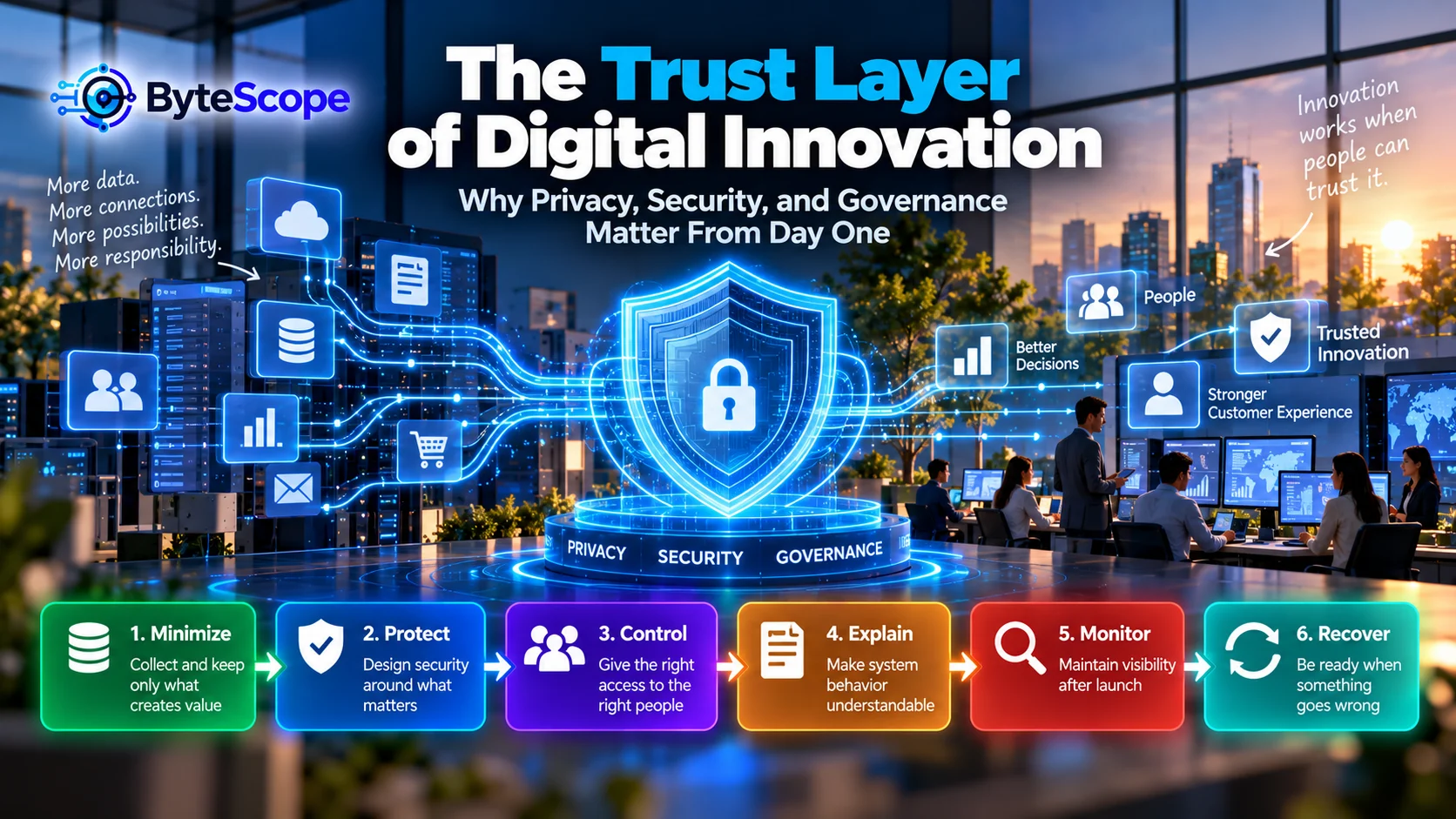
These questions form what ByteScope calls the trust layer of digital
innovation.
The trust layer is not one product, policy, or cybersecurity tool. It is the combination
of privacy, security, access control, governance, transparency, monitoring, and recovery
practices that make a digital system dependable enough for people to use.
Without that layer, innovation can still move quickly.
It simply becomes more fragile.
Trust Is Infrastructure, Not Decoration
Organizations sometimes treat privacy and security as requirements that appear near the end
of a digital project.
First, the product is designed.
Then the integrations are connected.
Then the automation is built.
Then someone asks whether the right people have access, whether unnecessary information is
being collected, or how the organization will respond if the system is compromised.
This sequence creates avoidable difficulty.
Security controls may become inconvenient because the architecture was never designed for
them.
Privacy protections may require redesigning data flows.
Auditability may be difficult because actions were never logged.
Accountability may be unclear because nobody defined ownership.
Trust therefore works better as infrastructure.
Just as a building needs foundations before walls are added, a digital system needs basic
trust assumptions before capabilities multiply.
Why Digital Innovation Increases the Need for Trust
Digital innovation tends to make systems more connected.
More data moves between applications.
More employees gain digital access.
More decisions depend on software.
More customer interactions happen automatically.
More third-party services become involved.
More devices connect to networks.
More workflows depend on integrations.
Each connection creates value.
It also creates another relationship that must be understood and controlled.
The article
The Hidden Architecture of Digital Innovation
explored how data, workflows, decisions, integrations, controls, and feedback connect
beneath visible digital experiences.
The trust layer sits across all of them.
It asks whether those connections are appropriate, controlled, understandable, observable,
and recoverable.
The ByteScope Trust Layer Model
To make this practical, ByteScope uses a six-stage model:
Minimize → Protect → Control → Explain → Monitor → Recover.
The model is deliberately broader than cybersecurity.
A system can be technically secure while still collecting unnecessary data.
It can protect information while giving too many employees access.
It can enforce access rules while providing no meaningful explanation of an automated
decision.
It can detect a problem but have no recovery plan.
Digital trust comes from combining these layers.
1. Minimize: Collect and Keep Only What Creates Value
One of the strongest privacy and security controls is surprisingly simple:
do not collect information that the system does not actually need.
Every piece of data creates responsibility.
It may need to be stored.
Protected.
Updated.
Shared.
Deleted.
Explained to users.
Possibly transferred to other services.
If a field does not materially improve the service, asking for it may create complexity
without corresponding value.
The “Why Do We Need This?” Test
Before collecting customer or operational data, teams should be able to answer:
- What specific purpose does this information serve?
- Which workflow or decision needs it?
- How long does it remain useful?
- Who genuinely needs access?
- Can the same outcome be achieved with less information?
If nobody can explain why a field exists, that is a warning sign.
Data accumulation often begins innocently.
A team says:
“Maybe we will use this later.”
Years later, the organization may still retain information that no active process needs.
Data minimization is therefore not merely about privacy.
It reduces the amount of information an organization must govern.
2. Protect: Design Security Around What Matters
Once information and systems are necessary, they need protection.
Security does not mean making every system impossible to access.
It means reducing the likelihood and impact of unauthorized access, misuse, disruption,
or manipulation while still allowing legitimate work to happen.
Protection can involve many layers:
- strong authentication;
- appropriate encryption;
- software updates;
- secure configuration;
- network controls;
- backups;
- device management;
- secure development practices;
- protection of credentials and secrets;
- appropriate vendor management.
The exact controls depend on the system.
A public marketing website does not necessarily require the same protection model as a
system containing sensitive customer or financial records.
Good security is proportional to value and risk.
The Security Problem With “Temporary” Digital Solutions
Temporary solutions often escape normal review.
A spreadsheet is created for a short-term project.
A shared account is used because it is convenient.
An automation is built quickly.
A third-party tool is connected for a test.
Then the solution becomes permanent.
ByteScope’s article
Innovation Debt: The Hidden Cost of Moving Fast With Digital Technology
described how temporary tools and workarounds can quietly become important infrastructure.
Security debt often grows in exactly the same way.
A system that began as an experiment eventually contains valuable information without ever
receiving the controls appropriate for its new importance.
3. Control: Give the Right Access to the Right People
Security is not only about keeping outsiders out.
It is also about deciding what legitimate users should be allowed to do.
A common mistake is granting broad access because it is operationally convenient.
Everyone can edit the spreadsheet.
Everyone can view customer records.
Several employees share the same administrator account.
Former employees remain inside old tools.
A third-party service receives more permissions than it needs.
These patterns create unnecessary exposure.
Use the Least Access That Still Allows the Work
A useful design principle is:
people and systems should receive the minimum access necessary to perform their
intended function.
A support employee may need to view customer history but not modify billing settings.
A reporting system may need read access but not permission to delete records.
An automation may need to create a task but not administer the entire platform.
Reducing permissions limits what can happen accidentally or maliciously.
It also makes accountability clearer.
Access Should Follow Roles, Not Convenience
As organizations grow, permissions based on individual memory become difficult to manage.
Instead of asking:
“What access does John have?”
a better model may be:
“What access should someone in this role have?”
This makes onboarding, role changes, and offboarding easier to control.
Permissions should also be reviewed periodically because work changes.
Access that was necessary two years ago may no longer be appropriate today.
4. Explain: Trust Needs Understandable Behavior
A system can technically function correctly while still creating distrust.
This often happens when users do not understand what the system is doing.
Imagine a customer submits a request and receives:
“Your application cannot be processed.”
No explanation.
No next step.
No indication whether information is missing or the request was rejected.
The system may have followed its rules perfectly.
The experience still feels arbitrary.
Transparency does not always require revealing every internal rule or technical detail.
It requires giving users enough information to understand what happened and what they can
do next.
Explain the Outcome at the Right Level
Useful digital explanations may include:
- why certain information is requested;
- what will happen after submission;
- whether a decision was automated;
- why a request cannot proceed;
- what information may need correction;
- how a user can ask for help;
- how long a process normally takes.
The
Invisible Customer Journey
showed how uncertainty during routing, waiting, and decision-making can damage customer
experience even when the underlying system is functioning.
Explanation is one way to reduce that uncertainty.
Explainability Matters Even More With AI
Traditional software often follows explicit rules.
AI systems may produce classifications, recommendations, summaries, predictions, or
generated outputs based on learned patterns.
That creates additional questions.
How reliable is the output?
What information influenced it?
Can a person verify the result?
What happens when the AI is uncertain?
Can the user challenge or correct an important outcome?
Not every AI system needs a technical explanation of every internal calculation.
But important decisions should have enough context, verification, and human oversight to
support responsible use.
5. Monitor: Trust Requires Visibility After Launch
Digital projects often receive the most attention before launch.
After launch, teams move to the next project.
But digital systems continue changing.
Users change.
Integrations change.
Software changes.
Threats change.
Business rules change.
An automation that worked reliably for six months may fail after a field is renamed.
A user account that was appropriate last year may now have unnecessary privileges.
A vendor connection may begin transferring more information after a configuration change.
Trust therefore requires ongoing visibility.
What Should Organizations Monitor?
The answer depends on the system, but useful signals may include:
- failed login attempts;
- unusual access patterns;
- permission changes;
- automation failures;
- integration errors;
- unexpected data movement;
- changes in system configuration;
- high-risk actions;
- service interruptions;
- unexpected increases in error rates.
Monitoring should not merely produce logs.
Someone needs to know which signals matter and what action should follow.
A Log Nobody Reviews Is Not a Control
Modern systems can generate enormous amounts of activity data.
It is possible to record almost everything.
That does not automatically create oversight.
A monitoring strategy should answer:
- Which events deserve attention?
- Who receives the alert?
- How quickly should someone respond?
- What information is needed for investigation?
- When should the issue escalate?
Monitoring becomes useful when information is connected to responsibility.
6. Recover: Assume Something Will Eventually Go Wrong
No digital system is perfectly reliable.
Servers fail.
Networks go offline.
Employees make mistakes.
Software contains defects.
Credentials can be compromised.
Third-party providers can experience outages.
Automations can behave unexpectedly.
A mature trust layer therefore asks not only:
“How do we prevent failure?”
It also asks:
“How do we recover when prevention is not enough?”
Recovery Is More Than Backup
Backups are important, but recovery is broader.
Organizations may need to know:
- how to disable a compromised account;
- how to stop an incorrect automation;
- how to restore important information;
- how to operate during an outage;
- how to communicate with affected users;
- who coordinates the response;
- which systems should be restored first;
- how the organization will learn from the incident.
The goal is resilience.
A trustworthy organization is not one that promises nothing will ever fail.
It is one that can respond intelligently when something does.
Cloud, Edge, and the Distribution of Trust
Infrastructure design changes how trust must be managed.
In centralized environments, organizations may have fewer locations to monitor and update.
Distributed edge systems can place computing across stores, factories, vehicles, offices,
or devices.
ByteScope’s
From Cloud to Edge: Where Digital Innovation Actually Happens
explored how workload placement creates trade-offs in latency, resilience, privacy, cost,
and governance.
The trust implication is important:
distributed intelligence creates distributed responsibility.
An organization may need to protect thousands of devices, maintain secure software updates,
verify device identity, and monitor which systems remain healthy.
Privacy Is Not the Same as Security
Privacy and security overlap, but they solve different questions.
Security asks:
How do we protect information and systems from inappropriate access or disruption?
Privacy asks:
Should we collect, use, share, or retain this information in this way at all?
A database can be extremely secure while still containing information the organization did
not need to collect.
Likewise, an organization can have a reasonable purpose for collecting information but
protect it poorly.
A trustworthy digital system needs both perspectives.
Governance Answers “Who Decides?”
Governance can sound bureaucratic, but the underlying concept is simple.
Who is allowed to make important decisions about the system?
Who owns the data?
Who approves new integrations?
Who decides whether AI can be used in a workflow?
Who determines retention periods?
Who can create administrator accounts?
Who is responsible for monitoring failures?
Who decides whether a third-party tool is appropriate?
Without governance, these decisions still happen.
They simply happen informally.
Informal Governance Does Not Scale Well
In a three-person company, the owner may personally approve every new tool.
That may be sufficient.
As the organization grows, individual judgment becomes harder to scale.
Different teams adopt different services.
Employees create automations independently.
Data spreads across platforms.
AI tools are used for increasingly important work.
At that point, some shared principles become useful.
Governance does not need to mean a committee for every decision.
It can mean having clear rules about which decisions require review and which teams can
move independently.
The Trust Problem With Third-Party Tools
Modern digital innovation relies heavily on external services.
Organizations use cloud storage, analytics, email systems, AI platforms, automation tools,
payment services, customer platforms, and many other providers.
This creates tremendous capability.
It also means that part of the organization’s trust model depends on other companies.
Before connecting a new service, teams should understand:
- what information the service receives;
- which permissions it requires;
- how the connection can be revoked;
- what happens to data if the service is discontinued;
- whether the organization can export important information;
- who internally owns the relationship.
Third-party capability should not become third-party ambiguity.
Trust and Automation
Automation increases the speed at which systems act.
That means errors can also move faster.
A person may make one incorrect update.
A poorly configured automation can make thousands.
ByteScope’s
When Automation Helps—and When It Hurts
introduced the idea that automation should be repeatable, predictable, reversible,
verifiable, consequence-aware, and able to escalate to humans when necessary.
Those characteristics are also trust controls.
The more authority an automated system receives, the more important it becomes to understand
what it can do and how to stop it.
Trust and the Customer Experience
Customers may never see an organization’s governance model.
They experience its consequences.
They notice whether a password-reset process works safely.
They notice when an account change appears consistently across services.
They notice whether support can explain what happened.
They notice when they receive unexpected messages.
They notice when a company requests information that seems unrelated to the service.
Trust is therefore not only a backend concern.
It becomes part of the customer experience.
The Cost of Friction vs. the Cost of Control
Security and governance can create friction.
Additional authentication takes time.
Approval requirements can slow changes.
Permission controls may prevent employees from performing certain actions immediately.
The answer is not to eliminate control.
It is to make the control proportional to the risk.
Requiring several approvals for a low-risk internal document change may be excessive.
Requiring stronger verification before changing a customer’s payment information may be
entirely reasonable.
Good trust design protects important actions without making routine work unnecessarily
difficult.
The ByteScope Trust Budget
A useful way to think about digital systems is that every new capability spends some of an
organization’s trust budget.
Consider a new integration.
It may require another credential.
Another vendor relationship.
Another set of permissions.
Another data flow.
Another monitoring responsibility.
Another failure scenario.
The feature may absolutely be worth it.
But the cost should be visible.
A system becomes difficult to trust when capabilities accumulate faster than the
organization’s ability to understand and govern them.
A Practical Example: Customer Support Automation
Imagine a company introducing AI-assisted customer support.
The system reads incoming requests, retrieves account information, categorizes the problem,
drafts a response, and recommends an action.
The capability sounds useful.
Now apply the Trust Layer Model.
Minimize
Does the AI need access to the customer’s entire account, or only the information relevant
to support?
Protect
How are account information, credentials, and communication protected?
Control
Can the system only draft messages, or can it also issue refunds and modify accounts?
Explain
Can the employee understand why the system recommended a particular action?
Monitor
Are incorrect classifications, unusual actions, or repeated failures visible?
Recover
Can employees reverse an incorrect action and disable the automation quickly if necessary?
The AI capability has not changed.
The surrounding system has become more trustworthy.
A Practical Example: Small-Business SaaS Stack
Consider a small company using cloud storage, accounting software, email marketing,
scheduling, customer management, automation, and AI services.
The company may not have a dedicated security department.
That does not mean trust requires enterprise complexity.
Basic practices can create substantial value:
- avoid shared administrator accounts;
- use strong authentication;
- remove access when people leave;
- know which tools contain important information;
- keep important backups;
- review integrations periodically;
- avoid unnecessary data collection;
- document critical automations.
Trust should scale with the organization.
Small businesses need proportionate controls, not no controls.
Trust Should Be Part of the First Design Conversation
When planning a digital system, teams commonly ask:
What features do we need?
How quickly can we launch?
What will it cost?
Which technology should we use?
Add a second group of questions:
- What information will the system collect?
- Who should be able to access it?
- Which actions are high consequence?
- What should happen when the system is uncertain?
- How will important actions be monitored?
- How can mistakes be reversed?
- Who owns the system after launch?
These questions are much cheaper to answer before the architecture becomes difficult to
change.
The Trust Layer Audit
Choose one important digital workflow and examine it using six questions.
Minimize
Are we collecting or retaining anything the workflow does not genuinely need?
Protect
What would happen if the information, account, or service were compromised?
Control
Do users and integrations have more access than necessary?
Explain
Can the user and the responsible employee understand important outcomes?
Monitor
Would we know if the system behaved unexpectedly?
Recover
Can we restore service, reverse mistakes, or disable problematic automation?
A single workflow can reveal surprisingly large trust gaps.
Trust Does Not Mean Eliminating All Risk
No useful digital system is completely risk-free.
An organization that attempted to remove every possible risk might also remove most of the
value.
The objective is therefore not zero risk.
It is understood and proportionate risk.
Organizations should know what they are protecting, what can go wrong, how likely the issue
is, how severe the consequence may be, and what controls are appropriate.
That approach allows innovation and responsibility to coexist.
Trust Can Become a Competitive Capability
Trust is often described only as a defensive concern.
Avoid breaches.
Avoid misuse.
Avoid regulatory problems.
Those objectives matter.
But good trust architecture can also enable innovation.
When data ownership is clear, teams can integrate systems more confidently.
When permissions are well designed, employees can access what they need without receiving
unnecessary authority.
When automations are monitored, organizations can expand them more safely.
When recovery is tested, teams can make changes without assuming every failure will become
a crisis.
Trust does not merely restrict digital innovation.
It creates the conditions for innovation to scale.
Seven Warning Signs of a Weak Trust Layer
An organization may need to strengthen its trust layer when:
- employees share accounts or credentials;
- nobody knows which tools contain important customer data;
- former employees retain access;
- automations can make significant changes without monitoring;
- teams cannot explain why certain data is being collected;
- critical systems depend on one person knowing how they work;
- there is no clear recovery plan when an important service fails.
None of these problems necessarily requires an expensive technology project.
Many begin with clearer ownership and better operating discipline.
Frequently Asked Questions
What is the trust layer in digital innovation?
The trust layer is the combination of privacy, security, access control, governance,
transparency, monitoring, accountability, and recovery practices that help keep digital
systems dependable as their capabilities expand.
What is the difference between privacy and security?
Privacy concerns whether information should be collected, used, shared, and retained in a
particular way. Security focuses on protecting systems and information from inappropriate
access, alteration, loss, or disruption. Strong digital systems generally need both.
Why should security be considered from the beginning?
Adding security after a system is fully designed may require changing architecture,
permissions, data flows, and workflows. Considering important controls early can reduce
later rework and prevent insecure temporary assumptions from becoming permanent.
Does governance slow innovation?
Poorly designed governance can create unnecessary delay. Effective governance distinguishes
between low-risk decisions that teams can make independently and higher-risk decisions that
need additional review. Clear decision rights can actually make routine innovation faster.
Do small businesses need digital governance?
Yes, but it can be lightweight. Even a small organization benefits from knowing who owns
important systems, who has administrator access, where customer data is stored, which
automations are critical, and how access is removed when employees leave.
How does AI change digital trust?
AI can introduce probabilistic outputs, greater automation, new data flows, and new forms
of decision support. Organizations may need additional verification, monitoring, human
oversight, permission controls, and clear boundaries around what the AI is allowed to do.
Can a completely secure system still be untrustworthy?
Yes. A system might be strongly protected from unauthorized access while collecting
unnecessary information, producing unexplained outcomes, or offering no meaningful way to
correct errors. Trust is broader than cybersecurity alone.
The Bottom Line
Digital innovation creates capability.
The trust layer determines whether that capability can be used responsibly and reliably.
Privacy asks whether information should be collected and used.
Security protects systems and information.
Access control limits authority.
Governance clarifies who makes important decisions.
Transparency helps people understand what is happening.
Monitoring reveals unexpected behavior.
Recovery limits the damage when something goes wrong.
The ByteScope Trust Layer Model brings these responsibilities together:
Minimize → Protect → Control → Explain → Monitor → Recover.
Minimize unnecessary information.
Protect what genuinely matters.
Control who and what can act.
Explain important outcomes.
Monitor the system after launch.
Recover when prevention fails.
Organizations do not build trust by adding a privacy policy, installing one security tool,
or creating a governance document.
They build it through hundreds of small design decisions.
What data should we collect?
Who needs access?
What can this automation change?
How will we know if it fails?
Can the user understand the result?
Can we recover?
Those questions may appear less exciting than launching a new AI feature or digital
platform.
But they determine whether innovation can survive contact with the real world.
The strongest digital systems are not only fast, intelligent, connected, and convenient.
They are systems people can reasonably trust.