When people talk about digital innovation, they often focus on applications, artificial
intelligence, automation, dashboards, connected devices, and data. Less attention is given
to a quieter design question that can determine whether all of those technologies actually
work well:
where should the computing happen?
For many years, the answer increasingly became “in the cloud.” Instead of maintaining
every application and database on local hardware, organizations could use remote computing
infrastructure that scaled more easily, supported centralized management, and made digital
services available from almost anywhere.
Cloud computing remains one of the foundations of modern digital systems.
But not every digital task should travel to a distant data center before something happens.
A factory machine may need to stop within milliseconds when a dangerous condition appears.
A camera may generate far more video than is practical to continuously upload. A retail
device may need to keep working when internet connectivity becomes unstable. A vehicle may
need to interpret nearby conditions immediately rather than wait for a round trip to a
remote server.
This is where edge computing becomes important.
Instead of treating the cloud and the edge as competitors, a better model is to see them as
different locations within one digital system. Some work benefits from centralized
computing. Other work benefits from being performed closer to the device, user, sensor, or
physical event.
The real innovation is not choosing one side.
It is deciding what should happen where.
Cloud and Edge Are Locations in the Same Digital System
It is easy to describe cloud and edge computing as two separate technology categories.
That can hide the more useful architectural idea.
A digital workflow may begin on a device, perform an immediate calculation locally, send
selected information to the cloud, combine that information with data from other locations,
and later send updated instructions back to the device.
The workload moves across layers.
For example, imagine a chain of refrigerated stores.
Temperature sensors continuously measure cooling conditions. A local edge device may
immediately detect that a refrigerator is becoming dangerously warm and trigger an alarm.
At the same time, summarized readings are sent to a cloud platform where managers can
compare performance across hundreds of stores.
The edge protects the local operation.
The cloud provides centralized visibility.
Both contribute to the same digital outcome.
This is closely related to the architecture discussed in
The Hidden Architecture of Digital Innovation
, where data, workflows, decisions, integrations, controls, and feedback need to work
as a connected system rather than isolated technologies.
What Does “The Cloud” Actually Mean?
Cloud computing refers broadly to computing resources provided through network-accessible
infrastructure rather than being limited to a user’s local device or an organization’s
on-site hardware.
Those resources may include:
- data storage;
- databases;
- application hosting;
- analytics;
- AI services;
- backup systems;
- software development infrastructure;
- collaboration platforms;
- large-scale computing capacity.
The important feature is abstraction.
A business can use computing capability without necessarily owning and maintaining all of
the physical infrastructure underneath it.
This allows organizations to scale resources, centralize information, deploy applications
to multiple locations, and access sophisticated technology that might otherwise require
substantial hardware investment.
Cloud computing is therefore not simply “someone else’s server.”
Its strategic value comes from making computing capacity easier to provision, combine,
manage, and scale.
What Is Edge Computing?
Edge computing moves selected processing closer to where data is created or where action
needs to occur.
The “edge” may be:
- a smartphone;
- a factory gateway;
- a retail computer;
- a vehicle;
- a router;
- a camera;
- a local server;
- an industrial controller;
- another computing device near the physical environment.
The edge does not always mean a tiny sensor.
It simply means that part of the computation happens closer to the source or destination
of the data instead of being performed entirely in centralized cloud infrastructure.
This can be valuable when the system needs rapid response, limited bandwidth, local
resilience, reduced data movement, or stronger control over where sensitive information is
processed.
The ByteScope Workload Placement Lens
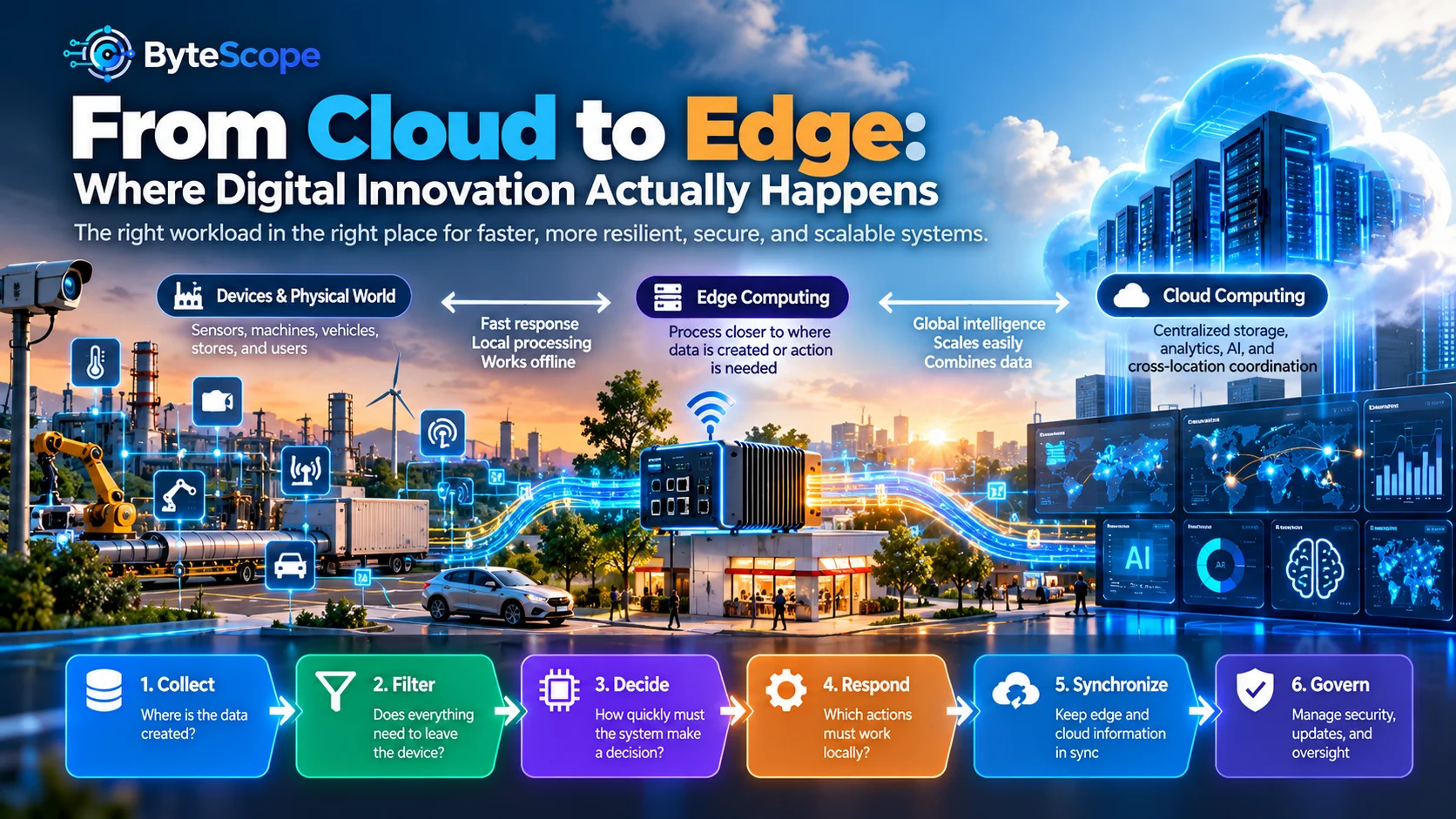
To understand how cloud and edge systems work together, ByteScope uses the
Workload Placement Lens.
It follows six stages:
Collect → Filter → Decide → Respond → Synchronize → Govern.
The framework is not intended to prescribe one architecture for every system.
Instead, it helps answer the question:
which parts of the workload should happen locally, and which should happen
centrally?
1. Collect: Where Is the Data Created?
Every distributed digital system begins somewhere.
A person clicks a button.
A sensor produces a reading.
A camera captures an image.
A machine generates operating data.
A vehicle records movement.
A retail terminal processes a transaction.
Before deciding where computation should happen, teams need to understand where data
originates.
This matters because moving data has a cost.
The cost may involve:
- network bandwidth;
- time;
- cloud processing fees;
- storage;
- privacy exposure;
- dependence on connectivity.
A single temperature sensor may generate very little data.
A high-resolution video camera can generate an enormous amount.
Treating both data sources the same way would make little architectural sense.
2. Filter: Does Everything Need to Leave the Device?
One of the most valuable edge-computing functions is filtering.
Instead of sending every piece of raw data to the cloud, an edge system can determine what
is worth transmitting.
Imagine a machine producing hundreds of measurements every second.
The organization may not need every raw reading permanently stored in a central platform.
The edge device might summarize normal behavior and send only:
- periodic averages;
- important events;
- detected anomalies;
- selected diagnostic data.
This reduces unnecessary network traffic and central storage.
The principle is simple:
move information, not always all raw data.
Filtering becomes especially valuable when systems operate at large scale. Ten devices may
create manageable data. Ten thousand devices can create an entirely different engineering
problem.
3. Decide: How Quickly Must the System Make a Decision?
Latency is one of the most important reasons to place computation closer to the edge.
Latency is the delay between an event and a response.
For many digital services, a small network delay is acceptable.
If a business dashboard updates several seconds later, nothing important may happen.
Other environments are different.
An industrial safety system may need to react immediately.
A vehicle processing nearby objects cannot depend entirely on a distant server for every
decision.
A retail checkout process should ideally continue operating even if connectivity becomes
temporarily unreliable.
The question is therefore:
How much delay can this decision tolerate?
Tasks that tolerate delay can often benefit from centralized cloud processing.
Tasks that require immediate response may belong closer to the edge.
4. Respond: Which Actions Must Work Locally?
A digital system should consider not only where decisions happen but where actions happen.
Suppose a temperature sensor detects overheating in an industrial machine.
Sending the reading to the cloud for historical analysis makes sense.
But if overheating requires an immediate shutdown, the local system should not necessarily
wait for a remote response before acting.
This creates an important architectural distinction:
local safety and continuity can coexist with centralized intelligence.
The edge can protect the immediate operation.
The cloud can later aggregate events, identify broader patterns, update models, and help
engineers understand why the problem occurred.
This approach resembles the automation principles discussed in
When Automation Helps—and When It Hurts
: predictable and time-sensitive actions can often happen automatically, while more
complex interpretation may happen elsewhere or involve humans.
5. Synchronize: The Edge Should Not Become an Island
Edge computing does not mean disconnecting devices from centralized systems.
Local intelligence becomes more useful when relevant information can synchronize with
the broader digital environment.
A store may process transactions locally during an internet outage and synchronize the
records later.
A factory gateway may detect anomalies immediately while sending summaries to a cloud
platform for fleet-wide analysis.
A mobile application may cache important information on the device but update it when
connectivity becomes available.
Synchronization creates continuity between local operation and central coordination.
The difficult questions include:
- Which data should synchronize?
- How often?
- Which system is authoritative?
- What happens when local and central records conflict?
- How should interrupted transfers recover?
These are not merely technical details.
They determine whether users can trust the system.
6. Govern: Distribution Creates New Responsibilities
Moving computation toward the edge can solve several problems while creating others.
A centralized cloud system may be easier to update and monitor because much of the software
runs in controlled infrastructure.
Edge systems distribute software and data across many locations.
That introduces questions about:
- software updates;
- device identity;
- access control;
- security;
- data retention;
- monitoring;
- physical tampering;
- version consistency;
- failure recovery.
A system with 5,000 edge devices is not simply one application repeated 5,000 times.
It is 5,000 distributed operating environments that must remain trustworthy.
Governance therefore becomes part of workload placement.
Why the Cloud Became So Important to Digital Innovation
Cloud computing changed digital innovation because it lowered several barriers.
Organizations could launch applications without purchasing all of the required hardware
in advance.
They could scale capacity when usage changed.
Teams could collaborate across locations.
Data could be centralized for analysis.
Software services could be updated centrally instead of individually installed across
every user’s computer.
Cloud infrastructure also made sophisticated digital capabilities more accessible to
smaller organizations.
The
Small-Business Innovation Ladder
discusses why smaller businesses often benefit from using existing digital services before
building expensive custom infrastructure.
The cloud supports that strategy by allowing companies to consume technology as a service
rather than owning every layer themselves.
Why the Edge Is Becoming More Important
As digital systems become more connected to the physical world, the location of computing
matters more.
Applications increasingly interact with:
- machines;
- vehicles;
- cameras;
- sensors;
- wearable devices;
- retail locations;
- buildings;
- industrial systems.
These environments generate data continuously and may require responses that cannot depend
entirely on constant connectivity.
Edge computing allows part of the intelligence to exist where the physical event happens.
This is particularly relevant to digital twins. In
Digital Twins Without the Hype
, ByteScope explored how real-world observations connect to digital models, simulation,
decisions, and learning.
Edge computing can provide the local layer that observes, filters, and responds, while
cloud systems maintain the broader model and historical perspective.
Cloud vs. Edge: The Wrong Question
Asking whether cloud or edge computing is “better” is often like asking whether a kitchen
or warehouse is better for a restaurant.
They serve different functions.
The useful question is:
which workloads belong in which location?
The cloud is often strong for:
- centralized storage;
- large-scale analytics;
- aggregating information from many locations;
- training or running compute-intensive models;
- central administration;
- long-term historical analysis;
- cross-location coordination.
The edge is often strong for:
- rapid local response;
- operation during connectivity problems;
- filtering high-volume data;
- reducing unnecessary data transfer;
- local device control;
- certain privacy-sensitive processing.
Most sophisticated systems use a combination.
A Practical Example: Smart Retail
Imagine a retailer with hundreds of physical locations.
Each store contains checkout systems, inventory data, cameras, environmental sensors, and
employee devices.
A cloud-only architecture might attempt to send everything centrally.
That would create several challenges.
Checkout performance could depend heavily on connectivity.
Video could consume substantial bandwidth.
Immediate store-level decisions might experience unnecessary delay.
A hybrid architecture divides responsibilities.
At the Edge
The store can process transactions, maintain critical local data, detect selected events,
and continue basic operations during temporary network disruption.
In the Cloud
The organization can aggregate sales, compare locations, manage centralized reporting,
analyze long-term patterns, and coordinate software or configuration changes.
The customer does not need to know where each calculation occurs.
The architecture is successful when the experience remains fast and reliable.
A Practical Example: Industrial Equipment
Consider a manufacturing plant with machines generating vibration, temperature, pressure,
and operating data.
Uploading every raw measurement continuously may be expensive and unnecessary.
An edge gateway could process the high-frequency data locally.
Normal conditions may be summarized.
Unusual patterns could trigger immediate alerts and send richer diagnostic information to
the cloud.
The cloud can then compare similar machines across factories, analyze long-term trends, and
support maintenance planning.
This creates two levels of intelligence:
local operational intelligence and
central organizational intelligence.
A Practical Example: AI at the Edge
Artificial intelligence makes workload placement even more interesting.
An AI model may be trained in cloud infrastructure using large datasets and significant
computing resources.
A smaller or optimized version may then run on an edge device.
For example, a camera could use a local model to detect whether a particular event occurs.
Instead of continuously uploading raw video, the system may send only selected events,
counts, or alerts.
This can reduce bandwidth and response time.
It also introduces trade-offs.
Edge devices usually have more limited computing capacity than large cloud environments.
Models may need to be smaller, compressed, or optimized.
ByteScope’s article
Small Language Models Explained: When Smaller AI Can Be Better
explores a related idea: the largest model is not automatically the best choice when
efficiency, hardware, latency, or deployment constraints matter.
Latency: When Milliseconds Matter
Latency is often discussed as a technical metric, but it has practical consequences.
Consider three different tasks.
A manager opens a monthly analytics report.
A customer taps a checkout button.
An industrial safety system detects dangerous machine behavior.
All three benefit from speed, but their tolerance for delay is very different.
The analytics report may tolerate seconds.
The checkout process should feel responsive.
The safety system may need to react almost immediately.
Architecture should follow that tolerance.
Not every system needs edge computing merely because low latency sounds desirable.
The question is whether the delay materially affects the outcome.
Bandwidth: Moving Less Data Can Be a Feature
Cloud storage can make it easy to assume that all available data should be uploaded and
kept.
At scale, that assumption becomes expensive.
Video, industrial telemetry, scientific instruments, and connected devices can produce
massive data streams.
Edge processing allows organizations to determine what deserves to move upstream.
Instead of transferring ten hours of ordinary video, the system may transmit only the
minutes containing a relevant event.
Instead of sending thousands of normal sensor readings, it may send statistical summaries
plus abnormal periods.
This is not merely a cost optimization.
Filtering can make central systems easier to interpret because they receive more relevant
information.
Resilience: What Happens When the Internet Disappears?
Cloud-dependent systems often assume connectivity.
Real environments do not always cooperate.
Networks become congested.
Connections fail.
Remote locations experience outages.
A resilient architecture identifies what must continue working locally.
A store may still need to process basic transactions.
A machine may still need safety controls.
A building may still need environmental management.
Once connectivity returns, the local system can synchronize with central services.
This is called graceful degradation: the system loses some capabilities but does not lose
everything.
Privacy: Process Locally When Moving Data Creates Unnecessary Exposure
Data movement can also affect privacy.
In some situations, a system can extract the information it needs locally without sending
the raw source elsewhere.
For example, a device may analyze data locally and transmit only a result or event.
This does not automatically make edge systems private or secure.
Local devices have their own risks.
But workload placement can reduce unnecessary movement of sensitive information when the
system is designed appropriately.
The correct architecture should consider not just what data is technically available but
what data genuinely needs to leave its original environment.
Cost: Cloud and Edge Both Have Hidden Expenses
Cloud computing can reduce upfront infrastructure costs, but usage still has a price.
Storage, processing, data transfer, database operations, AI services, and network traffic
can accumulate as systems scale.
Edge computing can reduce some of those costs but introduces others.
Organizations may need to purchase devices, deploy software remotely, maintain hardware,
monitor distributed systems, and handle failures across many locations.
Moving a workload to the edge does not make it free.
The cost shifts.
Good architecture evaluates the total lifecycle rather than comparing only one monthly
cloud bill with one hardware price.
The Edge Can Create New Security Problems
Centralized systems are attractive partly because teams can secure and update infrastructure
from a controlled environment.
Edge devices may exist in factories, stores, vehicles, homes, offices, and public spaces.
Some may be physically accessible.
Some may run for years.
Some may receive irregular maintenance.
Security therefore needs to account for:
- device authentication;
- encrypted communication;
- secure updates;
- permission control;
- tamper resistance where appropriate;
- credential protection;
- monitoring for compromised devices;
- safe retirement and data deletion.
Distributed intelligence creates distributed responsibility.
Do Not Put a Workload at the Edge Just Because You Can
Edge computing is useful enough that teams can become tempted to distribute everything.
That can create unnecessary operational complexity.
If a workload has no meaningful latency requirement, uses little bandwidth, requires
frequent software changes, and works perfectly well centrally, moving it to thousands of
devices may make the system harder to manage without creating meaningful value.
This leads to one of the most important principles in architecture:
centralize what benefits from centralization and distribute only what benefits from
distribution.
Seven Questions for Choosing Cloud, Edge, or Both
Before deciding where a workload belongs, ask:
- How quickly must the system respond?
- How much data does the source generate?
- Does the system need to operate during network disruption?
- Would moving raw data create unnecessary privacy or security exposure?
- Does the workload require computing resources unavailable locally?
- How difficult will distributed software and hardware be to maintain?
- Which information needs to be aggregated across locations?
These questions usually lead to a mixed answer rather than a purely cloud or purely edge
architecture.
The Three-Layer Pattern
Many digital systems can be understood through three practical layers.
Device Layer
This is where the physical interaction happens: sensors, machines, cameras, phones, retail
terminals, or other devices.
Edge Layer
This layer performs nearby processing, filtering, caching, coordination, or rapid local
decisions.
Cloud Layer
This layer supports centralized analytics, large-scale storage, cross-location coordination,
model management, long-term history, and organizational visibility.
Not every system needs all three layers.
The pattern is useful because it makes workload placement explicit.
How Cloud and Edge Support Digital Innovation Together
The strongest cloud-edge architectures do not ask users to understand the infrastructure.
The user experiences a system that simply works.
The local layer makes the interaction responsive.
The central layer gives the organization scale and visibility.
The synchronization layer keeps them coherent.
This is another example of why digital innovation is better understood as system design
than technology adoption.
The first article in this series,
Digital Innovation Beyond New Technology
,
focused on turning real problems into better digital systems.
Cloud and edge computing represent one of the architectural decisions inside that broader
process.
The goal is not to deploy an edge strategy because edge computing is fashionable.
The goal is to place computation where it produces the best outcome.
A Simple Workload Placement Exercise
Choose one digital workflow and divide its activities into four columns:
- Must happen immediately
- Can wait
- Requires centralized information
- Must continue during connectivity loss
Tasks in the first and fourth categories may deserve edge consideration.
Tasks that depend on organization-wide data, large-scale analytics, or extensive computing
resources may belong centrally.
Some tasks will appear in more than one column.
Those are usually where hybrid design becomes valuable.
Frequently Asked Questions
What is the difference between cloud and edge computing?
Cloud computing performs storage and processing in centralized remote infrastructure.
Edge computing performs selected processing closer to the devices, users, or physical
environments where data is created or actions occur.
Is edge computing replacing the cloud?
No. Edge computing usually complements cloud infrastructure. Local systems can perform
time-sensitive or data-intensive tasks while cloud systems provide centralized storage,
analytics, management, and coordination.
Why is edge computing faster?
Edge computing can reduce the distance data must travel before processing occurs. This can
lower latency for applications that need rapid local response. The actual improvement
depends on architecture, network conditions, and the workload.
Does edge computing work without the internet?
Some edge applications can continue performing selected local functions during internet
disruptions. Whether this is possible depends on how the system is designed and which
services require cloud connectivity.
Is edge computing more secure than cloud computing?
Not automatically. Edge processing can reduce the need to transmit some data, but
distributed devices introduce their own security risks. Both cloud and edge environments
require appropriate access control, encryption, updates, monitoring, and security design.
Does AI need cloud computing?
No. Some AI models can run directly on phones, computers, gateways, cameras, and other edge
devices. Larger models or computationally intensive workloads may still depend on cloud or
data-center infrastructure.
When should a business use edge computing?
Edge computing becomes particularly useful when applications require low latency, must
operate during connectivity interruptions, generate large volumes of local data, or benefit
from processing information close to its source.
The Bottom Line
Digital innovation does not happen in one place.
Some intelligence belongs in centralized infrastructure where organizations can combine
large datasets, scale computing capacity, coordinate services, and analyze long-term
patterns.
Other intelligence belongs close to the physical world, where devices need to filter data,
respond quickly, preserve local operation, or avoid sending unnecessary information across
a network.
The ByteScope Workload Placement Lens provides a simple way to think about
that division:
Collect → Filter → Decide → Respond → Synchronize → Govern.
Collect where information originates.
Filter what does not need to travel.
Decide where latency and computing requirements make the most sense.
Respond locally when immediate action matters.
Synchronize information that needs a broader organizational view.
Govern every distributed component so the system remains trustworthy.
The future of digital infrastructure is therefore unlikely to be simply “cloud” or simply
“edge.”
It is a continuum.
Computing moves closer to the user when proximity creates value and moves toward centralized
infrastructure when scale and coordination create value.
The organizations that design this well will not necessarily have the most infrastructure.
They will know where each piece of intelligence belongs.