A digital transformation project can succeed on paper and still fail in everyday work.
The software is deployed.
The integration works.
The data migrates successfully.
Employees receive accounts.
Management announces the launch.
Training is completed.
Technically, everything appears ready.
Then something unexpected happens.
Employees continue using spreadsheets.
Customers avoid the new self-service process.
Staff members copy information from the new platform into their old notes.
Teams use only a small portion of the available features.
An AI assistant is available, but employees open it only occasionally.
A new workflow is officially required, yet important work still happens through email and
messaging apps.
The technology works.
The transformation does not.
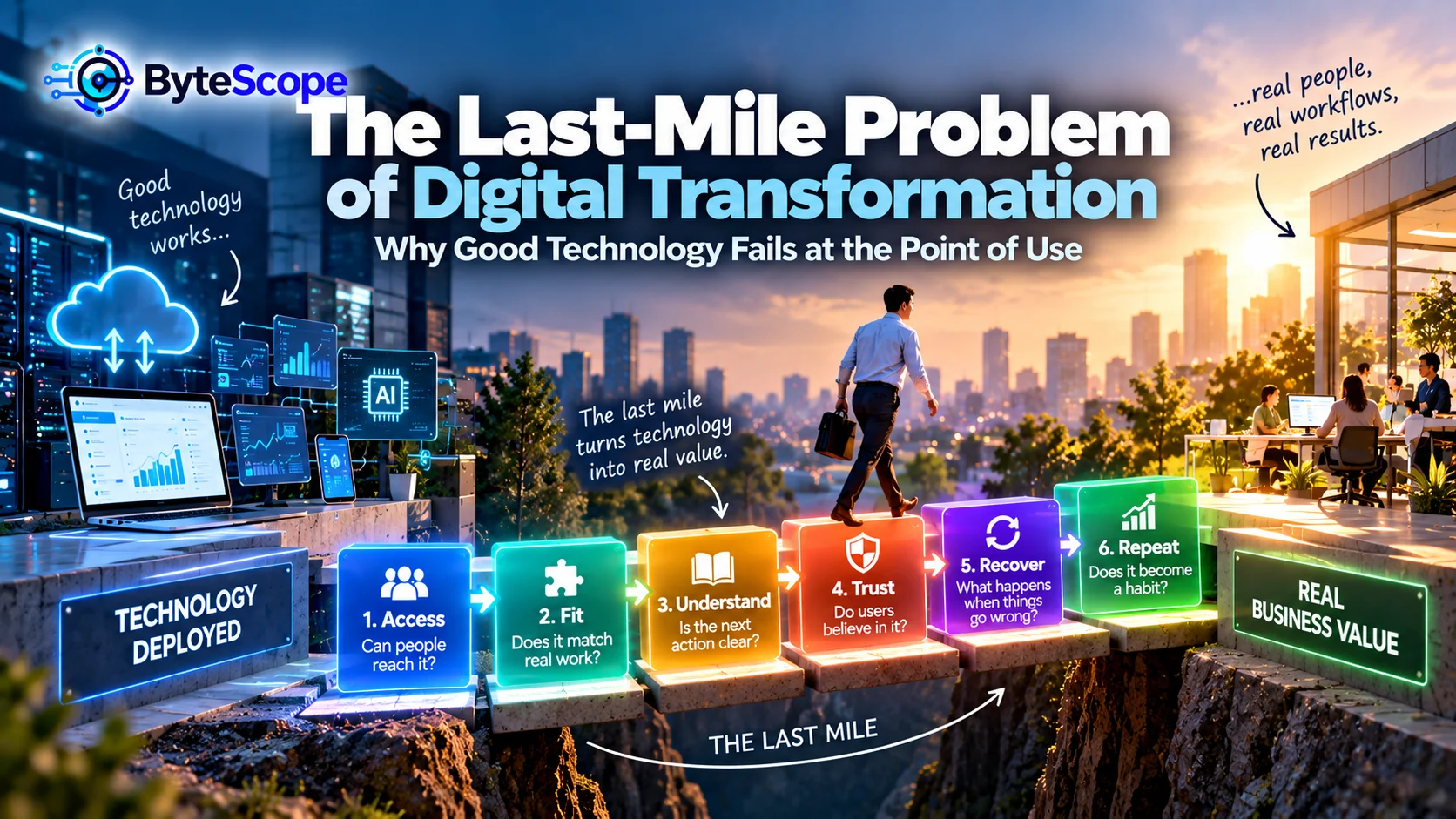
This is the last-mile problem of digital transformation.
The last mile is the point where technology finally meets the real conditions under which
people must use it: limited time, established habits, incomplete information, unusual
exceptions, competing priorities, customer pressure, and the practical realities of work.
Digital transformation creates value only when a new capability survives this final mile.
Technical Success Is Not the Same as Operational Success
Digital projects are often measured using implementation milestones.
Was the platform launched?
Did migration complete?
Was the integration connected?
Were employees trained?
Did the project stay within budget?
These are legitimate project-management questions.
But they do not answer the most important question:
Does the new system actually improve what people do?
A technically successful implementation may still create little operational value if users
avoid it, misunderstand it, duplicate work around it, or cannot use it effectively when
real situations become complicated.
That distinction is central to the broader idea discussed in
Digital Innovation Beyond New Technology
.
Digital innovation is not simply the adoption of technology.
It is the creation of a better system.
Why the Last Mile Is So Difficult
Technology is usually designed under controlled assumptions.
Real work is not controlled.
Users become interrupted.
Customers provide incomplete information.
Internet connections become unstable.
Managers introduce exceptions.
Policies change.
Employees find shortcuts.
Two systems disagree.
A task that should take five minutes suddenly requires judgment.
This creates a gap between the designed workflow and the lived workflow.
The last mile is where that gap becomes visible.
The ByteScope Last-Mile Value Loop
To understand why technology succeeds or fails at the point of use, ByteScope uses the
Last-Mile Value Loop.
It contains six stages:
Access → Fit → Understand → Trust → Recover → Repeat.
Each stage represents a condition that must exist before a digital solution can become part
of normal behavior.
A system can fail at any one of them.
1. Access: Can People Actually Reach the Capability?
The first requirement sounds simple.
Can the user access the system when they need it?
Access problems may include:
- difficult login procedures;
- forgotten credentials;
- poor mobile support;
- slow loading;
- unstable connectivity;
- missing permissions;
- software that works only on certain devices;
- important features hidden behind several navigation steps.
Individually, these issues may look minor.
Repeated every day, they influence behavior.
If opening the new system takes three minutes while the old spreadsheet opens instantly,
employees receive a small incentive to continue using the spreadsheet.
People rarely describe this decision as “rejecting digital transformation.”
They simply choose the fastest path to finish their work.
Availability Is Not the Same as Accessibility
An organization may say:
“The system is available to everyone.”
That does not mean using it is effortless.
A tool can technically exist while remaining practically difficult to reach.
This distinction matters particularly for frontline work.
An employee sitting at a desk may easily access a browser-based application.
A warehouse worker carrying equipment may interact differently.
A technician wearing gloves may not be able to operate a small touchscreen efficiently.
A salesperson moving between customer locations may depend on mobile access and unreliable
networks.
Technology should be evaluated in the environment where the work actually happens.
2. Fit: Does the Technology Match the Real Workflow?
A digital product can be easy to access and still fail because it does not fit the job.
This is one of the most important last-mile problems.
Imagine a customer-support platform designed around a clean sequence:
- open case;
- select category;
- investigate;
- choose resolution;
- close case.
The real workflow may be very different.
The employee may need to contact another department.
The customer may send additional information later.
The issue may belong to two categories.
A manager may need to approve an exception.
Another system may contain the information necessary to solve the problem.
If the software cannot accommodate these realities, employees create workarounds.
Workarounds Are User Feedback in Disguise
Organizations sometimes treat workarounds as evidence that employees are resistant to
change.
Sometimes that is true.
But workarounds can also reveal missing functionality.
Consider these behaviors:
- employees maintain a private spreadsheet alongside the official system;
- users copy records into notes before making decisions;
- teams send screenshots through messaging apps;
- staff export data before every important meeting;
- employees create unofficial templates.
Instead of asking only:
“Why are users refusing the new process?”
ask:
“What does the unofficial process allow them to do that the official system does
not?”
That question turns resistance into diagnostic information.
The Shadow Workflow
When digital transformation does not fit real work, a shadow workflow often develops.
The official system contains the required record.
The actual workflow happens somewhere else.
For example:
The CRM says a sales opportunity is at one stage.
The salesperson’s private notes contain the real status.
The project-management tool lists the assigned tasks.
The team actually coordinates through chat.
The customer portal contains the official support case.
The employee keeps a separate spreadsheet because it is easier to prioritize work there.
The organization has technically digitized the process.
It has also created duplicate work.
3. Understand: Is the Next Action Obvious?
Users do not need to understand the entire technical system.
They need to understand what to do next.
This sounds obvious, yet many digital products expose the complexity of the organization
directly to the user.
A form contains terminology from an internal department.
A status message uses language meaningful only to administrators.
A dashboard contains dozens of metrics without indicating which ones require action.
An AI assistant produces an answer without making clear how the user should verify or use
it.
A good point-of-use experience reduces cognitive effort.
Every Screen Should Answer a Practical Question
Useful digital interfaces help the user answer questions such as:
- What is happening?
- What requires my attention?
- What should I do next?
- What information is missing?
- What happens after I submit this?
- How do I correct a mistake?
If users repeatedly need separate instructions to interpret the interface, the system may
be technically complete but operationally unclear.
Training Cannot Fix Every Design Problem
When users struggle, organizations often respond with more training.
Training is valuable.
But not every usability problem is a training problem.
If employees need a 30-page guide to complete a routine task, the workflow may deserve
redesign.
If users repeatedly forget which of seven categories to select, the classification model
may be too complicated.
If customers need instructions explaining how to find the main action, navigation may be
the problem.
Training should help people develop capability.
It should not permanently compensate for avoidable design complexity.
4. Trust: Do Users Believe the System Will Help Rather Than Hurt?
Even a well-designed technology can fail if users do not trust it.
Trust is especially important when software influences important decisions.
Imagine an AI assistant that summarizes a long customer record.
The summary saves time.
But the employee has previously seen the system miss important details.
The employee now manually reads the original record every time.
The AI technically works.
Its productivity value disappears because the user cannot rely on it.
Trust Is Built Through Predictable Experience
Users begin trusting digital systems when they understand:
- what the system can do;
- what it cannot do;
- where information comes from;
- how reliable important outputs are;
- how mistakes can be corrected;
- when human judgment is expected.
The
Trust Layer of Digital Innovation
explores these ideas through privacy, security, access control, explanation, monitoring,
and recovery.
At the last mile, these principles become practical user questions.
Can I trust this recommendation?
Can I undo this action?
Will the system remember what I entered?
Who can see this information?
False Confidence Can Be Worse Than Low Trust
Low trust causes users to avoid a tool.
Excessive trust creates a different problem.
Users may accept automated output without appropriate verification.
They may assume that because a system sounds confident, the result must be correct.
Good digital adoption should therefore create
calibrated trust.
Users should rely on the system where it performs reliably and maintain judgment where
uncertainty remains meaningful.
5. Recover: What Happens When Reality Does Not Follow the Happy Path?
This is where many digital systems reveal their weakness.
The ordinary workflow works beautifully.
Then something unusual happens.
The customer entered the wrong information.
The payment succeeded but the confirmation failed.
The employee accidentally selected the wrong status.
Two systems contain different versions of the same record.
An automated process stops halfway through.
What happens next?
A strong last-mile experience provides a recovery path.
Digital Systems Need an Escape Hatch
Recovery mechanisms may include:
- undo;
- edit;
- resubmit;
- manual override;
- human escalation;
- error explanation;
- saved drafts;
- retry mechanisms;
- clear support paths.
The article
When Automation Helps—and When It Hurts
emphasized that automated workflows need escalation and exception handling.
The same principle applies to every digital experience.
A system becomes easier to use when users know that making a mistake will not trap them.
The Happy Path Is Not the Real World
Software demonstrations often use perfect scenarios.
Every field contains valid information.
The customer remembers the password.
The integration works.
The network is available.
No duplicate record exists.
Every approval arrives on time.
Real operations contain exceptions.
Last-mile quality is often determined by how gracefully the system handles those
exceptions.
6. Repeat: Does the New Behavior Become the Default?
The final stage of the Last-Mile Value Loop is repetition.
One successful use does not create transformation.
The new workflow needs to become normal.
A useful technology eventually becomes boring.
People stop discussing adoption because using the system is simply how the work happens.
That is an important milestone.
Habit Is the Hidden Infrastructure of Adoption
Human workflows contain habits.
An employee begins the morning by checking email.
A manager exports data before the weekly meeting.
A salesperson writes notes immediately after a call.
A support agent opens three systems in the same sequence every day.
New technology competes with these established behaviors.
If the new process requires users to remember an additional step, adoption may remain weak.
If the system naturally fits into the moment where the work already happens, adoption is
much easier.
Do Not Add the New Workflow on Top of the Old One
One of the most damaging adoption patterns is requiring employees to use both systems
indefinitely.
The team enters information into the old spreadsheet.
Then they also enter it into the new platform.
Management calls this a transition.
Employees experience it as twice the work.
A temporary parallel period may be necessary for migration or risk control.
But it should have an exit plan.
Otherwise, the organization teaches users that digital transformation means additional
administration.
Why Employees Return to Spreadsheets
Spreadsheets are frequently criticized as outdated substitutes for specialized digital
systems.
Yet employees return to them for understandable reasons.
Spreadsheets are:
- flexible;
- familiar;
- fast to modify;
- easy to inspect;
- under direct user control.
A specialized system may provide stronger governance and integration while reducing this
flexibility.
If the new system does not solve the employee’s actual problem better than the spreadsheet,
the spreadsheet may survive.
The goal should not be to eliminate spreadsheets simply because they look less modern.
The goal is to understand why users still need them.
Last-Mile Failure in Customer Self-Service
The same pattern appears outside the organization.
Companies often create self-service experiences intended to reduce customer effort and
support costs.
The portal works for common situations.
Then the customer encounters an exception.
There is no appropriate option.
The customer tries chat.
The chatbot repeats irrelevant information.
Eventually, the customer calls support and repeats everything.
The organization has technically created self-service.
The last mile failed.
ByteScope’s
The Invisible Customer Journey
examines how these hidden routing, waiting, and handoff problems shape the customer’s
actual experience.
Last-Mile Failure in AI Adoption
AI creates especially interesting last-mile challenges.
An organization may provide employees with a capable AI system.
The tool can summarize, draft, analyze, classify, and answer questions.
But employees may still struggle with:
- knowing when to use it;
- knowing how much to trust it;
- understanding which data can be entered;
- verifying outputs;
- integrating the result into existing work;
- recovering when the output is poor.
The issue is not model capability.
It is workflow integration.
The “When Should I Use This?” Problem
Organizations often train users on how a technology works but spend less time explaining
when it should be used.
This is particularly important with flexible AI tools.
Employees may understand how to write a prompt while remaining uncertain about which tasks
are appropriate.
Useful adoption guidance might say:
Use the AI assistant to create a first draft of routine internal text.
Use it to summarize long non-sensitive documents.
Use it to brainstorm possible approaches.
Do not rely on it without verification for high-consequence decisions.
Specific workflow guidance is often more valuable than generic feature training.
The Manager Can Become the Last-Mile Bottleneck
Employees are not always the reason adoption fails.
Managers can unintentionally preserve old behavior.
A company launches a new dashboard.
The manager continues asking employees to send the old spreadsheet.
A new project-management system is introduced.
Leadership still requests updates through email.
An automated reporting process is built.
Managers continue requesting manually formatted presentations.
Users quickly learn what behavior actually receives recognition.
If leadership behavior contradicts the transformation, the old workflow survives.
Digital Transformation Is Also Behavior Design
This does not mean manipulating users.
It means designing the environment so that the better behavior is also the easier behavior.
For example:
- place the new tool inside an existing workflow;
- remove redundant old processes;
- use sensible defaults;
- reduce unnecessary choices;
- automatically carry context between steps;
- provide clear recovery paths;
- make successful behavior visible.
Adoption improves when the system supports the behavior instead of requiring users to
remember it.
Measure Adoption at the Point of Use
Login counts can make adoption look stronger than it is.
A user may log in and immediately return to another tool.
Better questions include:
- What percentage of relevant tasks actually use the new workflow?
- How often do users export information and continue working elsewhere?
- Where do users abandon the process?
- Which features become part of normal work?
- Which old processes remain?
- How many manual workarounds still exist?
The article
Digital Innovation That Pays Off
explored the relationship between baseline, friction, change, adoption, outcomes, and
learning.
Last-mile measurement focuses especially on the adoption link in that chain.
The Last-Mile Friction Audit
Choose one digital workflow and observe how it is actually performed.
Do not begin with documentation.
Watch the work.
Ask users to complete a normal task and look for moments where they:
- pause;
- switch applications;
- copy information;
- ask another person;
- consult private notes;
- re-enter information;
- avoid a feature;
- create a workaround;
- wait for permission;
- recover from an error.
These moments reveal the real last mile.
Ask Users About Friction, Not Features
Instead of asking:
“Do you like the new system?”
ask:
- Which part of your work still feels slower?
- Where do you leave the system to finish a task?
- Which information do you have to enter twice?
- What happens when something unusual occurs?
- Which part do you not trust?
- What do you still keep outside the system?
These questions produce more actionable feedback.
Do Not Solve Every Adoption Problem With More Features
When adoption is weak, product teams may assume the solution is another feature.
Sometimes the opposite is true.
Users may already face too many options.
A simpler path may create more value.
The innovation-debt problem discussed in
Innovation Debt
is relevant here.
Every additional feature, integration, configuration, and exception can make the system
harder to understand and maintain.
Last-mile improvement often requires subtraction.
The Minimum Useful Workflow
Instead of asking how many features the system can provide, identify the smallest workflow
that produces meaningful value.
For example:
A salesperson needs to record a customer interaction.
What is the minimum information necessary?
Can existing account details be filled automatically?
Can follow-up tasks be created from the same action?
Can the employee complete the workflow without switching tools?
The objective is not maximum functionality.
It is minimum friction around a useful outcome.
Small Businesses Face the Same Last-Mile Problem
Last-mile failure is not limited to large transformation programs.
A small business may purchase scheduling software intended to reduce phone calls.
Customers continue calling because available time slots are confusing.
The owner then manually enters those appointments into the scheduling system.
The software exists.
The old work remains.
The
Small-Business Innovation Ladder
emphasized the importance of making work visible, connected, automated, measured, and
scaled gradually.
That progression works partly because it allows organizations to discover last-mile
problems before scaling them.
Technology Should Disappear Into the Workflow
One sign of mature digital adoption is that users stop thinking about the technology.
The tool becomes part of the work.
People do not say:
“I am now using our digital transformation platform.”
They simply complete the task.
This is often what great digital design looks like.
The complexity remains behind the interface.
The user experiences a clear path to an outcome.
Seven Warning Signs of Last-Mile Failure
A digital transformation may have a last-mile problem when:
- employees maintain unofficial spreadsheets alongside the new system;
- users repeatedly export data before they can work with it;
- important tasks require information to be entered more than once;
- employees understand the features but do not know when to use them;
- users avoid automated outputs because they do not trust them;
- exceptions require informal workarounds;
- the old workflow continues after the new one has launched.
These are not merely user-behavior problems.
They are system-design signals.
Six Questions Before Scaling a Digital Solution
Before expanding a new tool or workflow across an organization, apply the Last-Mile Value
Loop.
- Access: Can users reach it easily in the environment where work actually happens?
- Fit: Does it match the real workflow, including common exceptions?
- Understand: Is the next action clear without excessive instruction?
- Trust: Do users know when they can rely on the system and when verification is needed?
- Recover: Can users correct mistakes and escape unusual situations?
- Repeat: Is the new behavior becoming easier than returning to the old process?
If several answers are weak, scaling may simply multiply the friction.
Frequently Asked Questions
What is the last-mile problem in digital transformation?
The last-mile problem is the gap between successfully deploying a digital capability and
getting people to use it effectively in real workflows. It occurs when technical success
does not translate into consistent operational value.
Why do employees resist new digital tools?
Resistance can have many causes. Users may prefer familiar workflows, but they may also be
responding to poor workflow fit, extra data entry, unreliable outputs, unclear benefits,
difficult interfaces, or missing exception handling. Understanding the cause is more useful
than assuming all resistance is cultural.
How can companies improve digital adoption?
Make the new workflow easy to access, align it with real work, reduce unnecessary steps,
explain when and how the system should be used, provide recovery paths, remove redundant old
processes, and measure whether the tool becomes part of normal behavior.
Is training enough to solve low technology adoption?
Not always. Training can improve knowledge and confidence, but it cannot fully compensate
for poor usability, weak workflow fit, missing functionality, low trust, or a process that
creates more work than the system it replaces.
What is a shadow workflow?
A shadow workflow is an unofficial process employees use alongside or instead of the
official digital system. Common examples include personal spreadsheets, messaging channels,
manual notes, or exported files used because the official platform does not fully support
the practical workflow.
How should digital transformation adoption be measured?
Go beyond registrations and login counts. Measure the percentage of relevant tasks
completed through the new workflow, repeated use, abandonment, continued use of old
processes, manual workarounds, user effort, and whether the intended operational outcome
actually improves.
Why do good technologies fail after implementation?
Technology may fail after implementation because real environments contain constraints and
exceptions that were not reflected in the design. Poor integration, additional work,
unclear ownership, low trust, difficult recovery, management behavior, and existing habits
can all prevent technical capability from becoming operational value.
The Bottom Line
Digital transformation does not end when technology is deployed.
That is where the most important test begins.
Can people reach the new capability easily?
Does it fit how work actually happens?
Do users understand what to do?
Do they trust the result appropriately?
Can they recover when reality does not follow the expected path?
Does successful use become a habit?
The ByteScope Last-Mile Value Loop summarizes these conditions:
Access → Fit → Understand → Trust → Recover → Repeat.
Access puts the capability where the user needs it.
Fit connects technology to the real workflow.
Understanding reduces cognitive friction.
Trust allows users to rely on the system appropriately.
Recovery prevents exceptions from becoming dead ends.
Repetition turns a new capability into normal behavior.
The most expensive digital transformation failure is not always a project that never
launches.
Sometimes it is a project that launches successfully, receives positive announcements,
passes technical checks, and then quietly becomes irrelevant to the people it was supposed
to help.
That is why the point of use matters.
Technology creates potential.
The last mile determines whether that potential becomes behavior.
Behavior changes the workflow.
The workflow creates the outcome.
And only then does digital transformation create value.