Modern organizations rarely suffer from a shortage of software.
They have customer platforms, spreadsheets, analytics tools, project-management systems,
cloud storage, payment services, communication apps, marketing software, automation
platforms, artificial intelligence tools, and specialized applications for almost every
business function.
The technology stack keeps growing.
Yet employees still copy information between screens.
Customers still repeat details they already provided.
Reports still require manual reconciliation.
Two departments can still look at the same customer and see different information.
One system says an order is complete.
Another says it is still processing.
A support agent knows that a customer recently purchased a product, but cannot see the
customer’s earlier conversation with sales.
The organization owns more technology.
The organization is not necessarily more connected.
This is why interoperability may be one of the most important capabilities in digital
innovation.
Interoperability is the ability of different systems, applications, data sources, and
workflows to exchange information and use it meaningfully enough to support a shared
outcome.
It is what turns a collection of digital tools into a digital system.
More Software Does Not Automatically Mean More Capability
Adding technology is easy to measure.
An organization can count applications.
It can count subscriptions.
It can count integrations.
It can announce new platforms.
But digital capability is not determined by the number of tools available.
Imagine two companies.
Company A uses fifteen digital applications.
Customer information moves automatically between the most important systems. Employees can
see the status they need without asking another department. Orders, support requests,
billing information, and operational data follow clear workflows.
Company B uses forty applications.
Employees export spreadsheets, copy customer information manually, send screenshots to
other departments, and maintain private notes because the systems do not share context.
Company B has the larger technology stack.
Company A may have the stronger digital system.
This is the difference between owning technology and orchestrating technology.
Interoperability Is More Than Moving Data
At first glance, interoperability sounds like a technical integration problem.
System A sends information to System B.
Done.
In reality, simply transferring data does not guarantee useful interoperability.
The receiving system also needs to understand:
- what the information represents;
- which record it belongs to;
- how current it is;
- whether it can be trusted;
- what should happen next.
For example, one system may use:
Customer Status = Active
while another uses:
Account State = Enabled
Are those concepts identical?
Maybe.
Maybe not.
If systems exchange data without shared meaning, organizations can automate confusion.
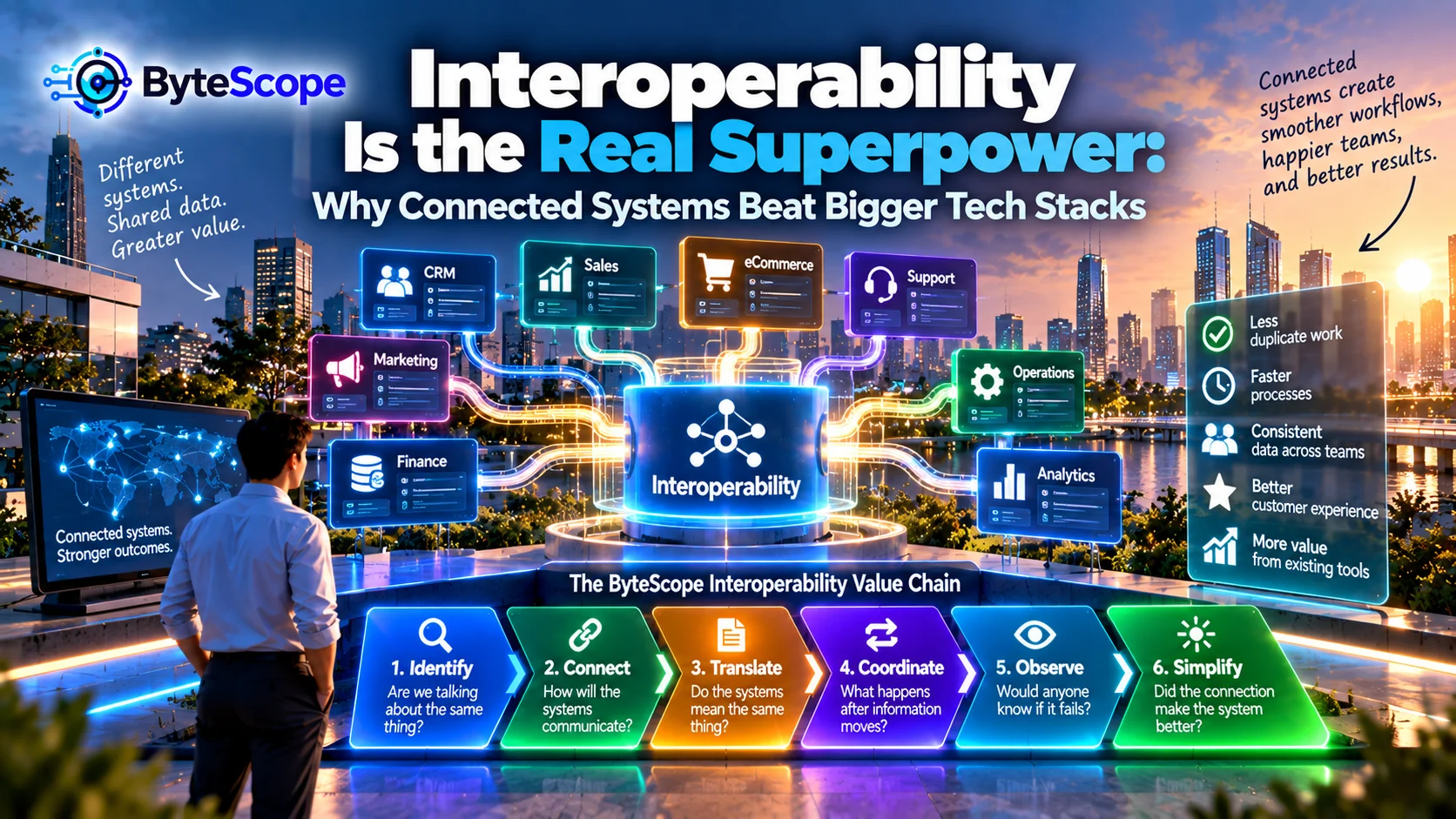
The ByteScope Interoperability Value Chain
To make interoperability easier to understand, ByteScope uses a six-stage model:
Identify → Connect → Translate → Coordinate → Observe → Simplify.
Each stage answers a different question.
What entities need to be recognized across systems?
How will systems communicate?
Do they understand the information the same way?
What workflow should happen after information moves?
Can failures be detected?
Does the connection actually reduce complexity?
1. Identify: Are We Talking About the Same Thing?
Before systems exchange information, they need some way to identify the same real-world
entity.
That entity may be:
- a customer;
- an employee;
- an order;
- a product;
- a machine;
- a support case;
- an invoice;
- a project;
- a location.
This sounds simple until different systems identify the same thing differently.
The sales system may identify a customer by CRM ID.
The billing system may use an account number.
The website may use an email address.
The support platform may create another customer ID.
The organization now needs a reliable way to know that all four records represent the same
person.
Identity Problems Create Invisible Friction
When identity is unclear, employees compensate manually.
They search by customer name.
They compare email addresses.
They check phone numbers.
They ask another department whether two records belong to the same account.
These small actions consume time and create error opportunities.
A strong interoperability strategy begins by defining which identifiers matter and how
records should be matched.
One Customer Should Not Become Five Different Customers
Duplicate records are particularly damaging because they fragment context.
Marketing sees one history.
Sales sees another.
Billing sees another.
Support sees another.
The customer experiences one company.
The company’s systems experience several partial customers.
This is one reason interoperability directly affects customer experience.
ByteScope’s article
The Invisible Customer Journey
explored how customers feel the consequences of disconnected internal workflows even when
they never see the systems themselves.
2. Connect: How Will the Systems Communicate?
Once systems can identify the same entities, information needs a path between them.
Connections can take many forms.
- APIs;
- webhooks;
- file transfers;
- automation platforms;
- database connections;
- event streams;
- scheduled imports and exports;
- manual transfer.
Not every connection needs to be technically sophisticated.
A small organization may successfully synchronize two systems once per day.
Another environment may require information to move within seconds.
The correct connection depends on the decision and workflow.
Real-Time Integration Is Not Always Necessary
Organizations sometimes assume that more immediate data is always better.
It is not.
A safety alert may need near-instant communication.
A monthly reporting dataset may not.
Real-time integration can introduce additional technical and operational complexity.
Before demanding immediate synchronization, ask:
What happens if this information arrives five minutes later?
If the answer is “almost nothing,” then real-time integration may not create meaningful
value.
This is similar to the workload-placement principle discussed in
From Cloud to Edge: Where Digital Innovation Actually Happens
.
Technical speed should match the speed required by the real decision.
APIs Are Important, but APIs Alone Are Not Interoperability
An application programming interface, or API, allows software systems to communicate using
defined requests and responses.
APIs are an important interoperability mechanism.
But connecting two APIs does not solve every problem.
The systems may still disagree about:
- field definitions;
- status meanings;
- record ownership;
- timing;
- permissions;
- error handling.
The connection moves information.
The architecture determines whether the information becomes useful.
3. Translate: Do the Systems Mean the Same Thing?
Translation is one of the most underestimated interoperability problems.
Suppose System A sends:
Status: Closed
What does “closed” mean?
The request is solved?
The customer cancelled?
Payment is complete?
No additional work is allowed?
The word may have different meanings in different systems.
Interoperability therefore requires semantic alignment.
Systems need shared understanding of important information.
Data Mapping Is Really Meaning Mapping
Technical teams often create mappings such as:
Field A → Field B.
That is necessary.
But teams should also ask:
Does Field A actually mean the same thing as Field B?
For example:
One system’s “Created Date” may represent when a customer submitted a request.
Another system’s “Created Date” may represent when the internal record was generated.
Mapping one to the other without understanding the distinction can produce misleading
analytics.
Create a Shared Vocabulary for Important Concepts
Organizations do not need to standardize every field across every application.
But important concepts benefit from shared definitions.
Examples include:
- active customer;
- completed order;
- qualified lead;
- open support case;
- approved invoice;
- available inventory.
A shared vocabulary reduces disagreement between systems and departments.
Without it, analytics becomes an argument about definitions.
4. Coordinate: What Happens After Information Moves?
Interoperability becomes valuable when data movement improves a workflow.
Consider a customer completing a purchase.
The payment system confirms the transaction.
That event may need to:
- update the order;
- reserve inventory;
- trigger fulfillment;
- update the customer record;
- generate a receipt;
- notify analytics.
Simply transferring payment data into another database is not enough.
The systems need to coordinate around an outcome.
This is the point where interoperability becomes workflow design.
Connected Systems Should Remove Handoffs
One of the best ways to evaluate an integration is to ask:
Which manual handoff disappears because these systems are connected?
For example:
Before integration:
An employee receives a payment notification and manually marks the customer account as
paid.
After integration:
The confirmed payment automatically updates the appropriate account.
The integration removed work.
That is a clear value proposition.
Integration That Creates More Work Is a Warning Sign
Some integrations technically connect systems but still require substantial manual
maintenance.
Employees export failed records.
They correct formatting.
They reconcile mismatches.
They restart failed automations.
They manually check whether information arrived.
The integration exists, but the organization has created an additional operational layer.
This can become part of the
innovation debt
that makes future digital change increasingly difficult.
5. Observe: Would Anyone Know if the Connection Failed?
Interoperability creates dependencies.
Dependencies fail.
An API becomes unavailable.
Credentials expire.
A field changes.
A vendor updates its service.
A record contains unexpected information.
A network connection becomes unstable.
If nobody monitors the connection, failures may remain invisible until a customer or
employee notices something wrong.
A Silent Integration Failure Can Be Worse Than an Obvious Outage
If an entire website goes offline, everyone knows there is a problem.
If 8 percent of customer updates stop synchronizing, the system may look healthy.
Some records are current.
Others are not.
Employees make decisions based on incomplete information.
Silent partial failures are particularly dangerous because users may continue trusting the
system.
Every Important Integration Needs an Owner
Someone should know:
- what the integration does;
- which systems depend on it;
- how failure is detected;
- how to investigate a problem;
- what happens when synchronization is delayed;
- who should be contacted if a vendor changes something.
The trust principles discussed in
The Trust Layer of Digital Innovation
apply directly here.
Connected systems need monitoring, ownership, access controls, and recovery plans.
6. Simplify: Did the Connection Make the System Better?
Interoperability should ultimately simplify something.
It might reduce:
- manual data entry;
- duplicate information;
- application switching;
- customer repetition;
- report reconciliation;
- workflow waiting;
- employee uncertainty.
If a new integration does not improve any meaningful outcome, it may simply create another
dependency.
Integration Count Is a Bad Success Metric
A company can proudly announce that it has connected fifty systems.
That number says almost nothing about value.
The better questions are:
- How many manual steps disappeared?
- Did data become more consistent?
- Did employees spend less time searching?
- Did customers stop repeating information?
- Did processing become faster?
- Did error rates decrease?
The measurement principles from
Digital Innovation That Pays Off
apply here as well.
Connectivity is activity.
Simplification is evidence of value.
The Human Integration Layer
One of the clearest signs of weak interoperability is when employees become the integration
layer.
They copy information.
They rename files.
They compare records.
They send screenshots.
They update several applications.
They tell another team that the system changed.
Humans are performing the synchronization that software should potentially handle.
Manual Integration Is Not Always Wrong
This does not mean every manual transfer should be automated.
A rare process may not justify building an integration.
A high-risk situation may benefit from deliberate human review.
The question is frequency and value.
If employees repeat the same predictable transfer hundreds of times every week, there may
be a strong interoperability opportunity.
The “Swivel Chair” Problem
A classic example occurs when an employee looks at one application, rotates to another
screen, and manually re-enters the same information.
The technology exists on both sides.
The human performs the bridge.
This pattern remains surprisingly common because organizations optimize individual
applications rather than the complete workflow.
Interoperability and the Last-Mile Problem
The article
The Last-Mile Problem of Digital Transformation
explained why good technology can fail where people actually use it.
Poor interoperability is one of the strongest contributors to last-mile friction.
A user may have an excellent CRM.
An excellent billing platform.
An excellent support platform.
An excellent analytics tool.
But if the employee must manually carry information between them, the overall experience
can still be poor.
Users do not work inside products.
They work across workflows.
The Best Tool Can Still Create a Bad Workflow
Software comparisons often ask:
Which product has more features?
Which product has the better interface?
Which product uses more advanced AI?
These questions matter.
But another question can be more important:
How well will this product fit into the systems we already depend on?
The technically “best” standalone product may create a worse overall workflow if it cannot
exchange the necessary information with the surrounding environment.
Interoperability and AI
Artificial intelligence becomes significantly more useful when it has appropriate access to
relevant context.
Consider an AI support assistant.
Without interoperability, the employee may need to manually provide:
- customer information;
- recent orders;
- previous support conversations;
- product documentation;
- billing status.
With appropriate integration, the system may be able to retrieve relevant context directly.
The quality of AI is therefore not only a model question.
It can also be a systems question.
AI Agents Make Interoperability More Important
As AI systems become capable of performing multi-step tasks, they may need to interact with
multiple tools.
An AI system might:
- read a customer request;
- retrieve account information;
- check inventory;
- create a task;
- draft a response.
Every step depends on access to other systems.
If those systems use inconsistent data, unclear permissions, or unreliable integrations,
AI does not remove the problem.
It can make the problem move faster.
Interoperability and Digital Twins
Digital twins also depend heavily on connected systems.
A useful digital twin may combine:
- sensor data;
- maintenance records;
- equipment identity;
- historical performance;
- environmental data;
- operational information.
ByteScope’s article
Digital Twins Without the Hype
described digital twins as decision systems rather than merely 3D representations.
Their usefulness depends on different information sources being connected coherently.
Without interoperability, the twin becomes an isolated visualization.
Interoperability and Cloud-to-Edge Systems
Modern systems may also span physical locations.
A factory edge device processes local sensor data.
A cloud platform aggregates information from multiple factories.
A maintenance system tracks work orders.
An analytics application detects trends.
The value comes from coordination across these layers.
The cloud and edge may each work perfectly but still create little value if information
cannot flow reliably between them.
The Danger of Point-to-Point Integration Sprawl
Organizations often begin interoperability one connection at a time.
System A connects to B.
B connects to C.
A also connects to D.
D connects to B.
C connects to E.
Over time, the organization creates a web of dependencies.
A change to one system may affect several others.
Nobody can easily visualize the entire network.
This is integration debt.
Not Every System Should Connect Directly to Every Other System
As organizations grow, they may benefit from more deliberate architecture.
Instead of building a unique connection for every relationship, teams may use shared
integration patterns, event systems, standardized APIs, common data platforms, or other
architectural approaches.
The exact technology depends on scale and requirements.
The principle is simpler:
connections should remain understandable as the system grows.
Interoperability Does Not Mean One Giant Platform
One response to integration complexity is to move everything into one enormous platform.
Sometimes consolidation is valuable.
But interoperability does not require every function to live in one application.
Specialized tools may be better at particular jobs.
A strong architecture can allow different applications to specialize while sharing the
information required for the overall workflow.
The goal is not one tool.
The goal is one coherent experience.
The System of Record Question
For every important type of information, organizations should know which system is
authoritative.
Where is the official customer profile?
Where is the official order status?
Where is the official inventory quantity?
Where is the official employee record?
Where is the official invoice?
Multiple systems may contain copies.
But one source should generally own the truth for a particular concept.
Without Ownership, Synchronization Becomes Conflict
Suppose both the CRM and billing system can modify a customer’s address.
The CRM changes it at 10:00.
The billing system changes it at 10:05 using older information.
Which value should win?
If nobody defined ownership, synchronization can overwrite correct information with
incorrect information.
Interoperability therefore requires governance, not only connectivity.
A Small-Business Example
Consider a small service business using:
- a website contact form;
- email;
- a scheduling application;
- accounting software;
- a spreadsheet;
- a customer-management tool.
The owner may assume interoperability is an enterprise concern.
But the business already has an integration problem.
A customer submits the form.
An employee copies the details into the CRM.
The appointment is manually added to the calendar.
After the service, another employee creates an invoice.
Payment status is later updated manually in the spreadsheet.
The workflow crosses several systems.
The people are the integration layer.
Start With One High-Friction Connection
A small business does not need to connect everything.
Identify one repetitive handoff.
For example:
website inquiry → customer record.
Or:
confirmed booking → calendar event.
Or:
completed payment → invoice status.
Automating one high-frequency connection may provide more value than replacing the entire
technology stack.
The Interoperability Audit
Choose one important workflow.
List every system the workflow touches.
Then document:
- what information enters each system;
- what information leaves;
- where employees copy data manually;
- which system owns each important record;
- where definitions differ;
- how synchronization failures are detected;
- what happens when systems disagree.
This simple exercise often reveals more than an inventory of software licenses.
The Five-Second Handoff Test
Ask an employee:
“When you finish this step, what happens next?”
If the answer is:
“I copy this number into another system.”
“I message Sarah.”
“I export the spreadsheet.”
“I wait until tomorrow’s synchronization.”
“I check whether it appeared.”
you may have found an interoperability opportunity.
When Not to Integrate
Not every connection is worth building.
Integration may be unnecessary when:
- the workflow is extremely rare;
- manual review creates meaningful value;
- the systems are being retired soon;
- the integration would cost more than the friction it removes;
- the data should not be shared;
- the dependency would create unacceptable risk.
Connected systems are valuable.
Unnecessary dependencies are not.
Interoperability Should Reduce Cognitive Load
The technical architecture ultimately reaches a human being.
A well-connected system allows a user to focus on the task.
A poorly connected system forces the user to remember:
Which application contains this?
Which version is current?
Did the synchronization happen?
Do I need to update another system?
Where is the customer’s previous information?
This is cognitive overhead created by architecture.
Good interoperability makes much of that complexity disappear.
Seven Questions Before Adding Another Digital Tool
Before expanding the technology stack, ask:
- Which existing systems will this tool need to communicate with?
- Which records will it create or duplicate?
- Which system will remain the authoritative source?
- Which manual handoff should disappear?
- How will failures become visible?
- Who will own the integration?
- Will the new tool simplify the workflow or create another place users must check?
These questions shift the decision from:
“Is this a good tool?”
to:
“Will this tool make the overall system better?”
Frequently Asked Questions
What is interoperability in digital systems?
Interoperability is the ability of different systems, applications, or devices to exchange
information and use that information meaningfully enough to support shared workflows and
outcomes.
What is the difference between integration and interoperability?
Integration typically refers to creating a technical connection between systems.
Interoperability is broader. It includes whether the systems can exchange information,
interpret it correctly, coordinate workflows, and operate together effectively.
Why is interoperability important for digital transformation?
Digital transformation often spans multiple applications and departments. Without
interoperability, employees may need to manually move information, reconcile duplicate
records, and switch repeatedly between tools, reducing the value of otherwise capable
technology.
Does interoperability require APIs?
No. APIs are a common and powerful method for connecting modern systems, but interoperability
can also use files, event streams, automation platforms, databases, scheduled transfers, or
other mechanisms. The correct approach depends on the workflow and technical environment.
Can small businesses benefit from interoperability?
Yes. Small businesses often use several cloud applications and may rely heavily on manual
copying between them. Connecting even one or two high-frequency workflows can reduce
repetitive work and improve data consistency.
What is a system of record?
A system of record is the authoritative source for a particular type of information. Other
applications may contain copies, but the organization knows which system owns the official
version.
Can too many integrations become a problem?
Yes. Each integration introduces another dependency that requires monitoring, maintenance,
security, and ownership. Unplanned point-to-point connections can accumulate into integration
debt and make future changes harder.
The Bottom Line
Digital organizations do not become stronger simply by accumulating more technology.
They become stronger when technology works together.
Interoperability is what allows information to move without losing meaning.
It allows workflows to continue across application boundaries.
It reduces repeated data entry.
It preserves customer context.
It enables automation.
It gives analytics a more consistent foundation.
It allows AI systems to access relevant information appropriately.
And most importantly, it reduces the need for people to manually connect systems that
should already understand each other.
The ByteScope Interoperability Value Chain summarizes the process:
Identify → Connect → Translate → Coordinate → Observe → Simplify.
Identify the same entities across systems.
Connect the systems through an appropriate mechanism.
Translate information so that shared data has shared meaning.
Coordinate the workflow that should follow.
Observe the connection so failures do not remain invisible.
Simplify the experience so that the integration creates measurable value.
The biggest technology stack is therefore not necessarily the most advanced.
A smaller group of well-connected systems may outperform dozens of applications that force
employees to move information manually.
That is the real superpower of interoperability.
It makes the boundaries between tools less important.
And when those boundaries begin disappearing for the user, the organization stops feeling
like a collection of applications.
It begins behaving like one digital system.