Automation is one of the most attractive promises of digital innovation. A task that once
required a person to open an email, copy information, update a spreadsheet, create a
document, send a notification, or check a status can sometimes happen automatically in
seconds.
That sounds like an obvious improvement.
Sometimes it is.
But automation can also make a bad process faster, hide errors until they become larger,
remove useful human judgment, frustrate customers, and create systems that are difficult
to understand when something goes wrong.
The important question is therefore not:
“Can this be automated?”
A better question is:
“Should this part of the workflow be automated, and what should happen when the
automation reaches its limits?”
That distinction matters because the most effective digital workflows are rarely completely
manual or completely automated. They usually divide work between software and people
according to what each handles best.
Automation is excellent at repetition, consistency, speed, and rule-based execution.
Humans remain valuable when situations are ambiguous, unusual, sensitive, creative, or
consequential.
Digital innovation becomes stronger when automation is designed around that boundary.
Automation Is Not the Same as Digital Innovation
Automation and digital innovation are closely connected, but they are not identical.
Automation focuses on reducing manual execution. Digital innovation asks whether the
overall system works better.
A company may automate a process and still fail to improve it.
Imagine an organization where every expense request requires approval from four managers.
The process is slow, so the company introduces automated notifications that remind each
manager to approve the request.
The workflow now moves slightly faster, but nobody has asked whether four approvals are
necessary in the first place.
The company has automated the waiting rather than redesigned the process.
This reflects the broader principle discussed in
Digital Innovation Beyond New Technology
:
technology should improve the system rather than simply reproduce an old process in a
new interface.
Good automation removes unnecessary work.
Great digital innovation also removes unnecessary rules.
Why Automation Is So Appealing
Businesses are attracted to automation for understandable reasons.
Routine administrative work consumes time. Repetitive tasks create boredom and
inconsistency. Manual data transfer creates errors. Delayed handoffs create customer
frustration. Managers may spend hours preparing reports that follow nearly identical steps
every week.
Automation offers several potential benefits:
- faster processing;
- greater consistency;
- fewer repetitive manual actions;
- lower risk of simple data-entry mistakes;
- faster customer notifications;
- better visibility into workflow status;
- more time for employees to focus on higher-value work.
Those advantages are real.
The mistake is assuming that because automation can create value in one part of a workflow,
more automation must always create more value.
The ByteScope Automation Boundary Test
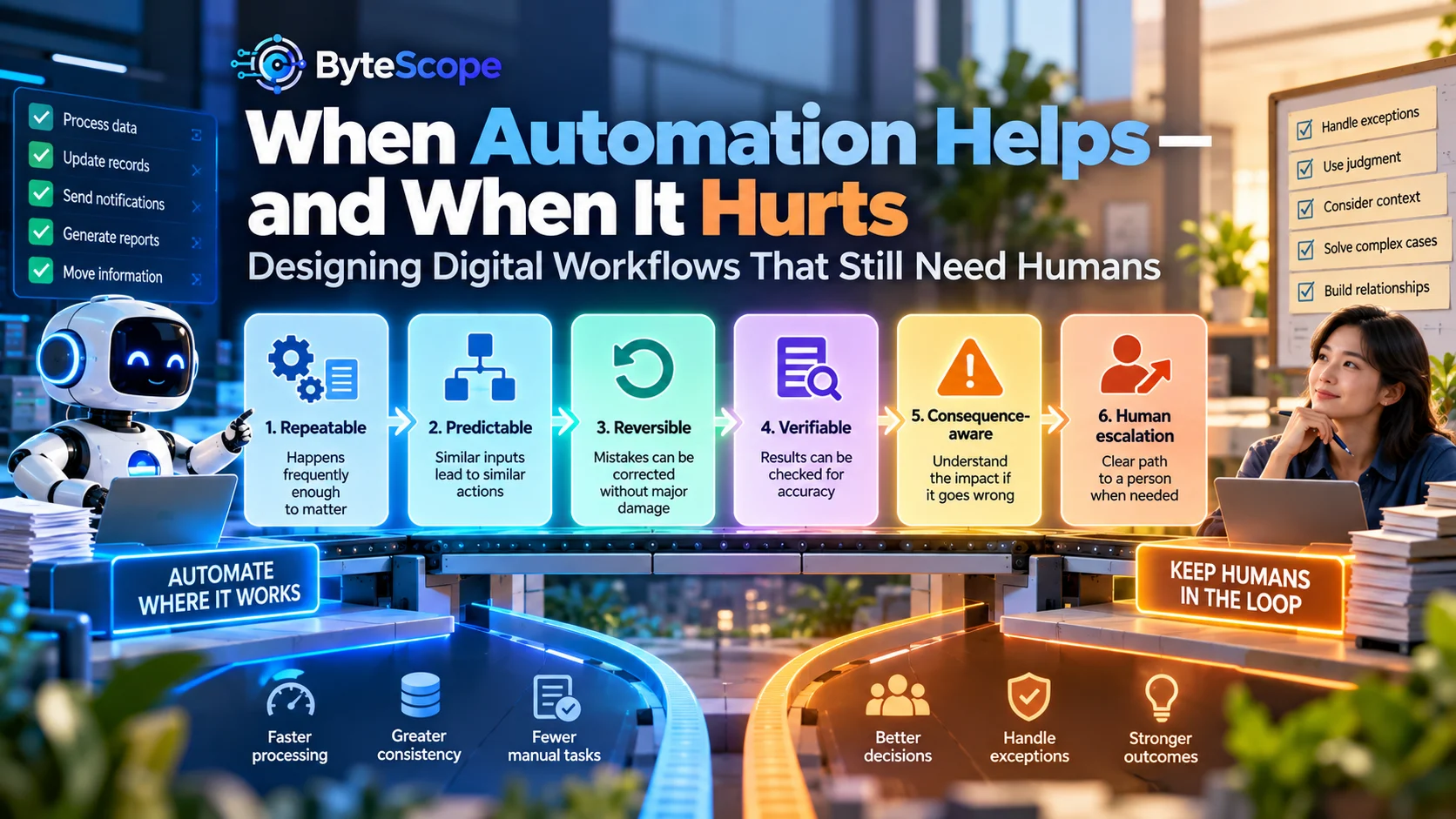
To decide whether a task is a good automation candidate, ByteScope uses a six-part framework:
the Automation Boundary Test.
Before automating a task, ask whether it is:
- Repeatable — Does the task happen frequently enough to matter?
- Predictable — Do similar inputs usually require similar actions?
- Reversible — Can mistakes be corrected without major damage?
- Verifiable — Can the system or a person determine whether the result is correct?
- Consequence-aware — What happens if the automation makes the wrong decision?
- Escalatable — Is there a clear path to a human when the normal process fails?
The more strongly a task satisfies these conditions, the more suitable it may be for
automation.
The framework does not produce a simple yes-or-no answer. Instead, it helps determine
how much automation a workflow should contain.
1. Repeatable: Automation Needs Enough Repetition to Matter
Automation has setup and maintenance costs.
Even a simple workflow requires someone to configure rules, test conditions, monitor
results, update integrations, and fix problems when surrounding systems change.
That investment makes more sense when a task happens repeatedly.
For example, manually sending the same confirmation message fifty times a day is a strong
automation candidate. Manually preparing a highly unusual report once per year may not be.
Frequency alone is not enough, but it provides an important starting point.
A useful way to estimate automation value is to look at:
frequency × time per task × consistency of the process.
A five-minute task performed once may be trivial. The same task performed 100 times each
week can become a significant operational cost.
2. Predictable: Stable Rules Create Better Automation
Automation works particularly well when similar situations produce similar actions.
Consider an online store.
When a customer completes payment successfully, the system can mark the order as paid,
send confirmation, update inventory, and trigger fulfillment.
The event is clear. The expected actions are clear.
Now compare that with a customer writing:
“I received the product, but it wasn’t really what I expected and I am not sure whether
I want a refund or an exchange.”
That situation contains ambiguity.
Automation can still help. Software may classify the message, retrieve the order record,
prepare response options, or assign the case.
But fully deciding the outcome may require context.
Predictability therefore helps determine the automation boundary.
The more uncertain the relationship between input and correct action, the stronger the
case for keeping human judgment somewhere in the workflow.
3. Reversible: Safe Automation Should Allow Recovery
One of the most useful questions in automation design is:
“What happens if this goes wrong?”
Some actions are easy to reverse.
If software assigns a task to the wrong internal queue, an employee can reassign it.
If an automated reminder is sent slightly early, the consequence may be minor.
Other actions are harder to reverse.
A payment may be transferred.
A customer account may be deleted.
A legal communication may be sent.
Sensitive information may be exposed.
An important application may be rejected.
The less reversible an action becomes, the more carefully automation should be designed.
High-impact actions may still use automation, but the system may need approval gates,
additional verification, or stronger monitoring before execution.
4. Verifiable: Someone or Something Must Be Able to Check the Result
Automation becomes dangerous when incorrect results are difficult to detect.
A system that automatically renames files can be checked easily.
A system that automatically generates financial recommendations may require much stronger
verification.
Good automation design therefore includes a method for determining whether the output is
acceptable.
Verification may be performed through:
- deterministic rules;
- data validation;
- comparison with a trusted source;
- confidence thresholds;
- human review;
- sampling and quality checks;
- monitoring of downstream outcomes.
Verification becomes especially important when AI participates in the workflow because AI
outputs may be probabilistic rather than guaranteed.
5. Consequence-Aware: Not All Automation Errors Are Equal
Automation discussions often focus on accuracy.
But accuracy alone is not enough.
Two workflows may both achieve 95 percent accuracy while having dramatically different
risk.
A recommendation system that occasionally suggests an irrelevant article creates mild
inconvenience.
A system that incorrectly approves financial transactions five percent of the time would
be unacceptable.
The consequence of error determines how much reliability and oversight the workflow needs.
This is why responsible automation is context-dependent.
ByteScope’s
Responsible AI: A Beginner’s Guide to Safety, Bias, and Ethics
explores similar principles for AI systems: capabilities should be evaluated together
with risk, accountability, privacy, and human oversight.
6. Escalatable: Every Automated Workflow Needs an Exit
The most frustrating automated systems are often not the ones that make mistakes.
They are the ones that make mistakes and provide no way out.
A customer explains that none of the available menu options matches the problem, yet the
system repeatedly forces the same choices.
An employee encounters an unusual record, but the workflow will not continue until an
irrelevant required field is completed.
An AI assistant provides an incorrect answer, but there is no mechanism for escalation.
A robust automated workflow needs an exception path.
That path may involve:
- sending the case to a review queue;
- allowing the user to request human help;
- flagging low-confidence outputs;
- temporarily pausing automation;
- allowing authorized employees to override the system.
Human escalation is not evidence that automation failed.
It is evidence that automation was designed realistically.
The Four Zones of Automation
Another useful way to think about automation is to divide workflow tasks into four zones.
Zone 1: Automate Freely
These tasks are repetitive, predictable, low-risk, and easy to verify.
Examples include:
- sending confirmation notifications;
- moving standardized data between systems;
- creating routine calendar events;
- updating simple workflow statuses;
- generating recurring internal reminders.
Zone 2: Automate With Monitoring
These tasks are mostly predictable but may occasionally produce important exceptions.
Examples include:
- categorizing customer inquiries;
- generating routine summaries;
- flagging overdue invoices;
- routing leads;
- detecting unusual activity.
Automation handles the majority of cases while monitoring identifies unusual outcomes.
Zone 3: Assist the Human
These tasks benefit from software support but still require interpretation.
Examples may include:
- reviewing complicated customer complaints;
- preparing strategic recommendations;
- evaluating unusual financial situations;
- reviewing sensitive documents;
- making decisions where context matters significantly.
Here the system may summarize, retrieve information, generate options, or highlight
patterns while the person remains responsible for the decision.
Zone 4: Human-Led
Some situations deserve primarily human judgment.
These may involve major consequences, emotional sensitivity, ethical ambiguity, negotiation,
relationship management, or decisions where the correct outcome cannot be reduced to
stable rules.
Technology can still support these situations, but it should not necessarily control them.
Automation Should Remove Handoffs, Not Create More of Them
One of the strongest automation opportunities exists between systems.
Employees often spend surprising amounts of time acting as bridges between software:
copying information from a form into a spreadsheet, moving attachments into folders,
creating tasks from emails, or updating another application when a status changes.
These handoffs are often predictable.
The article
The Hidden Architecture of Digital Innovation
describes how data, workflows, decisions, and integrations form the invisible structure
behind digital systems.
Automation can remove many of these unnecessary human handoffs when the underlying data
and ownership rules are clear.
A person should not need to copy information simply because two systems cannot communicate.
A Practical Example: Customer Support
Consider a customer-support workflow.
A message arrives:
“My subscription renewed yesterday, but I meant to cancel it. Can someone help?”
A fully manual workflow might require an employee to:
- read the message;
- identify the customer;
- look up the subscription;
- categorize the request;
- check the renewal date;
- review refund rules;
- prepare a response;
- record the outcome.
Not every step needs the same amount of human judgment.
Software can identify the customer, retrieve subscription details, classify the request,
and display the relevant policy automatically.
AI may summarize the history or draft a response.
A human may still decide whether an exception to the normal refund policy is appropriate.
After the decision, automation can record the outcome and send the approved message.
The result is neither manual nor fully automated.
It is a human-centered automated workflow.
A Practical Example: Invoice Processing
Invoice processing provides another useful example.
Software can extract invoice information, match the vendor, compare the amount with a
purchase order, check for duplicate invoice numbers, and prepare an accounting entry.
Routine invoices that match expected conditions may move automatically.
Unusual situations can be escalated:
- the invoice amount differs from the purchase order;
- bank details recently changed;
- the invoice appears to be a duplicate;
- the vendor is unknown;
- the payment exceeds a defined threshold.
Automation handles the predictable path.
Humans handle uncertainty.
This is often more effective than forcing every invoice through manual review or allowing
software to approve every invoice without meaningful controls.
AI Agents Make the Automation Boundary More Important
Traditional automation usually follows predefined rules.
More advanced AI systems can interpret instructions, use tools, retrieve information,
and perform sequences of actions.
ByteScope’s guide to
AI Agents: How Autonomous AI Systems Work
explores how agent-like systems can perform multi-step tasks with greater flexibility than
traditional automation.
That flexibility is useful, but it also makes boundaries more important.
A system capable of taking several actions should have clear permissions.
Can it read customer information?
Can it modify a database?
Can it send messages?
Can it issue refunds?
Can it purchase something?
Can it delete records?
The greater the capability, the more carefully those permissions should be designed.
Autonomy should increase only when the organization has confidence in both the system and
the controls surrounding it.
The Danger of Automating a Broken Process
One of the most common automation mistakes is improving execution without questioning the
process.
Imagine employees manually create a weekly report containing 40 metrics.
Automation could generate the report automatically.
That saves time.
But what if management actually uses only five of the metrics?
The better innovation may be to redesign the report first and automate the smaller,
more useful version.
Before automating, ask:
- Does this step need to exist?
- Does this information need to be collected?
- Does this approval add meaningful control?
- Does the customer need to provide this information again?
- Could two steps become one?
The best automation may eliminate work rather than merely execute it faster.
Automation Can Create Hidden Complexity
A workflow may appear simple because employees no longer perform the steps manually.
Behind the scenes, however, the system may contain dozens of triggers, integrations,
conditions, APIs, scripts, and dependencies.
That creates a new form of operational risk.
If nobody understands how the automation works, a minor change in one application can
break several downstream processes.
Organizations should therefore document important automations.
At minimum, teams should know:
- what starts the automation;
- which systems it touches;
- which data it changes;
- who owns it;
- what happens if it fails;
- how it can be paused or reversed.
Automation should reduce operational complexity, not merely hide it from view.
When Automation Hurts the Customer Experience
Efficiency is not always the same as good service.
A company may automate customer communication to reduce staff workload, yet create a worse
experience if customers cannot escape the automation when something unusual happens.
Warning signs include:
- customers repeatedly receive irrelevant automated answers;
- users must enter the same information several times;
- the system refuses reasonable exceptions;
- customers cannot reach a person;
- automated messages hide rather than explain delays.
A good automated experience should feel easier, not merely cheaper for the company to
operate.
Human Review Should Be Designed, Not Added as an Emergency Fix
Many organizations treat human intervention as something that happens only when automation
fails.
A better design intentionally identifies where humans create the most value.
The person may approve only high-value transactions.
They may review AI outputs below a confidence threshold.
They may handle emotionally sensitive customer interactions.
They may investigate unusual patterns identified by automated monitoring.
This is sometimes called a human-in-the-loop approach, but the important principle is
broader:
human attention should be placed where context and consequences justify it.
Automation Should Change Jobs, Not Simply Remove Tasks
When repetitive work disappears, the remaining role often changes.
An employee who previously copied information between systems may spend more time checking
exceptions.
A support agent may spend less time answering routine questions and more time resolving
complex cases.
A financial employee may spend less time assembling reports and more time analyzing
unusual results.
Organizations should plan for this change.
Automation creates value when employees know how their responsibilities change after the
routine tasks disappear.
Otherwise, technology may remove one set of tasks while leaving uncertainty about who owns
the new workflow.
How Small Businesses Should Approach Automation
Smaller organizations can benefit significantly from automation, but they should avoid
building large automation stacks before understanding their processes.
The ByteScope
Small-Business Innovation Ladder
recommends moving through stages:
Manual → Visible → Connected → Automated → Measured → Scaled.
That sequence helps businesses avoid automating confusion.
Make the workflow visible first.
Connect important information.
Then automate the stable portions.
This approach is often cheaper and easier to maintain than purchasing large systems before
the organization understands what it actually needs.
Measure More Than Time Saved
Automation projects often measure success by hours saved.
That matters, but it is not enough.
A workflow can save time while reducing quality.
Useful automation metrics may include:
- processing time;
- manual interventions;
- error rate;
- exception rate;
- customer satisfaction;
- repeat contacts;
- rework;
- automation failure frequency;
- time required to recover from failure.
Measurement should answer one question:
Did the workflow become better, or merely faster?
Eight Questions Before Automating a Workflow
Before building an automation, ask:
- What specific friction are we trying to remove?
- Does this step need to exist at all?
- How often does the task occur?
- How predictable are the correct actions?
- How serious would an incorrect action be?
- How will the result be verified?
- What happens when the workflow encounters an exception?
- How will we measure whether automation improved the outcome?
If these questions are difficult to answer, the workflow may not be ready for automation.
Frequently Asked Questions
What tasks are best suited for automation?
Tasks are strong automation candidates when they occur frequently, follow stable rules,
use structured information, produce results that can be verified, and have manageable
consequences when errors occur.
Should every repetitive task be automated?
No. Some repetitive tasks happen too infrequently to justify automation, while others may
depend on changing rules or important human judgment. Setup, maintenance, and failure costs
should be considered alongside potential time savings.
When should a human remain involved?
Human involvement becomes more valuable when decisions are ambiguous, high-impact,
emotionally sensitive, difficult to verify, unusual, or dependent on context that software
cannot reliably interpret.
Can AI replace traditional workflow automation?
Not necessarily. Traditional rules remain excellent for predictable processes. AI expands
automation into areas involving language, patterns, generation, and flexible interpretation.
Many strong workflows combine deterministic rules with AI assistance and human review.
What is human-in-the-loop automation?
Human-in-the-loop automation is a workflow where software performs part of the process but
a person reviews, approves, corrects, or handles certain situations. Human involvement is
usually concentrated around uncertainty, exceptions, or higher-risk decisions.
How do you know whether automation is working?
Compare outcomes before and after automation. Useful indicators include time saved, errors,
exceptions, rework, customer experience, manual interventions, and the reliability of the
overall process.
The Bottom Line
Automation is powerful because software can perform repetitive work with speed and
consistency that humans cannot match.
But the goal of digital innovation is not to maximize the amount of work performed by
machines.
It is to design better systems.
The ByteScope Automation Boundary Test provides a practical way to decide
where automation belongs:
Repeatable → Predictable → Reversible → Verifiable → Consequence-aware →
Escalatable.
Tasks that satisfy those conditions strongly can often be automated confidently.
Tasks that involve greater ambiguity or consequence may benefit more from assistance than
full automation.
The best digital workflows therefore have boundaries.
Software handles routine movement.
Rules handle predictable decisions.
AI helps interpret complexity.
Humans handle uncertainty, exceptions, responsibility, and context.
When those roles are designed deliberately, automation stops being a race to remove people
from the workflow.
Instead, it becomes a way to remove unnecessary work while preserving the judgment that
makes the system trustworthy.
That is when automation helps rather than hurts: not when humans disappear, but when both
humans and technology are used where they provide the greatest value.