Every digital system eventually encounters something it did not expect. A cloud service
becomes unavailable, an integration stops synchronizing, a credential expires, an
automation processes the wrong records, an employee enters incorrect information, a
network connection disappears, or a third-party platform changes without warning.
The instinctive goal is often to prevent all of these events. Prevention matters, but it
can never be perfect. The more useful question is what happens after prevention fails.
Does one problem remain small, or does it spread across the organization?
This is the difference between a system that is merely functional and one that is
resilient.
Digital resilience is the ability of a system and the organization around it to continue
providing important functions, limit the impact of disruption, recover in a controlled
way, and improve after failure.
A resilient system does not assume that technology will always behave perfectly. It assumes
that components, people, networks, integrations, vendors, and processes can fail, then
designs around that reality.
Reliability and Resilience Are Related but Different
Reliability asks whether a system performs consistently under expected conditions.
Resilience asks what happens when expected conditions disappear.
A highly reliable application may operate for months without interruption. But when the
database becomes unavailable, the entire service may stop immediately. Another system may
experience more minor failures but continue providing essential functions while the problem
is being repaired.
The second system may be more resilient even if the first appears more reliable during
normal operation.
This distinction matters because modern digital environments contain many dependencies.
Applications rely on networks, cloud providers, identity services, APIs, payment platforms,
databases, automation tools, and external vendors. The overall system can only be as strong
as the relationships between those components.
ByteScope’s article
The Hidden Architecture of Digital Innovation
explored why digital value depends on data, workflows, decisions, integrations, controls,
and feedback working together. Resilience asks what happens when one of those layers stops
working correctly.
The Wrong Goal: “Nothing Must Ever Fail”
A zero-failure mindset sounds responsible, but it can create unrealistic architecture.
Every component would need perfect availability, every employee would need to avoid
mistakes, every vendor would need uninterrupted service, and every integration would need
to behave exactly as expected.
Real systems do not operate that way. Hardware fails. Software contains bugs. Networks
become unstable. People misunderstand instructions. Data arrives in unexpected formats.
External services change.
The better design goal is:
failure should be expected without being allowed to become catastrophic.
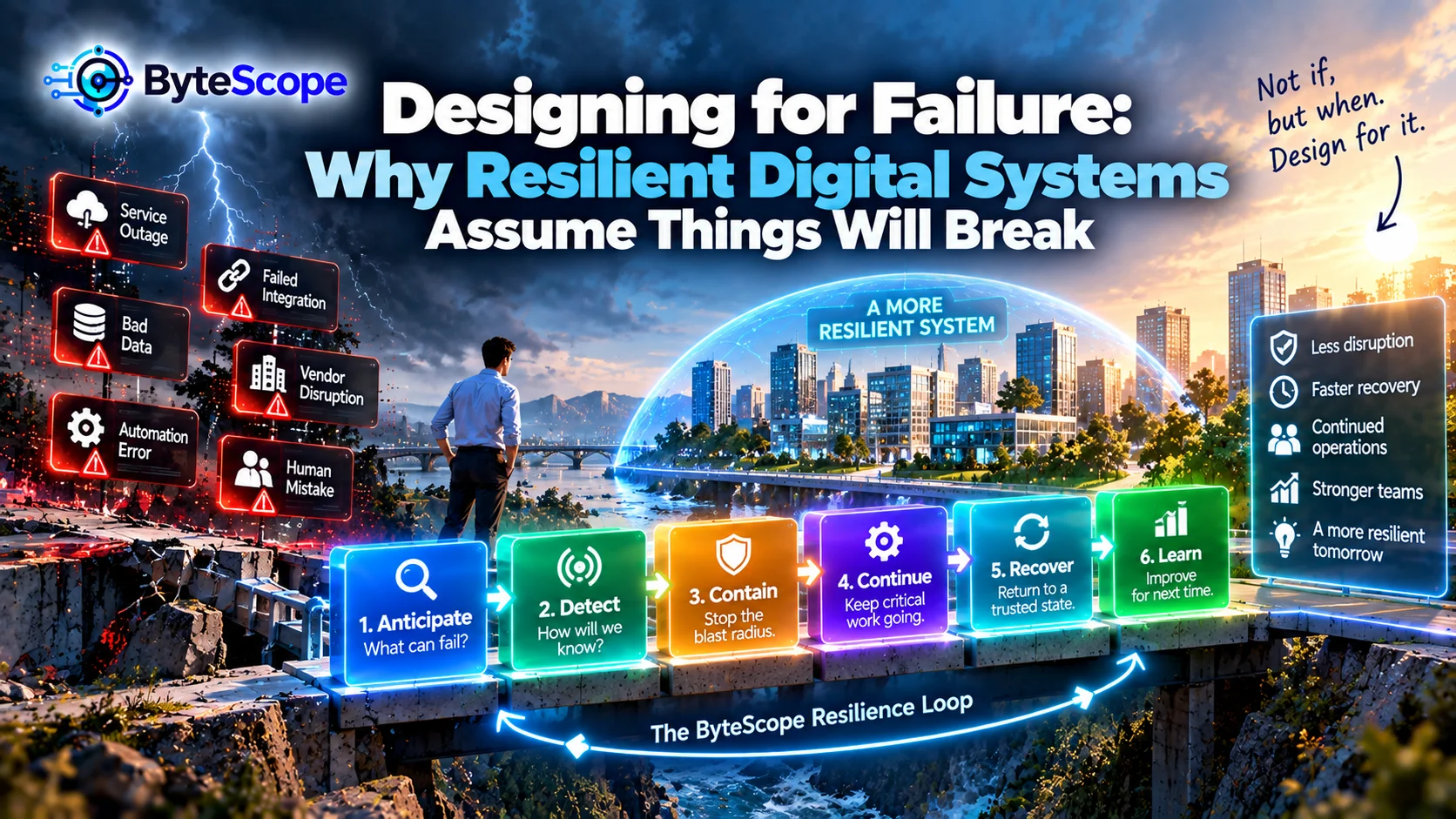
The ByteScope Resilience Loop
ByteScope uses a six-stage model for thinking about digital resilience:
Anticipate → Detect → Contain → Continue → Recover → Learn.
The model begins before failure occurs and continues after service has been restored.
Resilience is therefore not only an incident-response activity. It is part of system design.
1. Anticipate: Ask What Can Fail Before It Does
The first stage is deliberately imagining failure.
For every important workflow, ask what it depends on. Does a payment process require an
external payment provider? Does customer login depend on one identity service? Does a
warehouse require constant internet access? Does one spreadsheet feed several critical
reports?
Useful failure scenarios include unavailable cloud services, expired API credentials,
damaged or delayed data, failed integrations, unavailable employees, broken automations,
incorrect configuration, and third-party outages.
The objective is not predicting every possible incident. It is understanding the most
important dependencies and the consequences if they disappear.
Find the Single Points of Failure
A single point of failure is a component whose failure can stop an entire important
process.
Sometimes it is technical. One database may serve every customer-facing application.
Sometimes it is operational. One employee may be the only person who understands a critical
automation.
Other examples include one administrator account, one internet connection, one vendor,
one spreadsheet, one approval authority, or one undocumented script.
The phrase “only this person knows how it works” is therefore not only a knowledge problem.
It is a resilience warning.
The innovation-debt patterns discussed in
Innovation Debt: The Hidden Cost of Moving Fast With Digital Technology
can create these fragile dependencies over time.
Not Every Failure Deserves the Same Attention
Resilience should be proportional to consequence.
If an internal analytics dashboard becomes unavailable for twenty minutes, the impact may
be limited. If a safety system fails for twenty minutes, the consequence could be very
different.
A useful question is:
What becomes impossible if this component disappears?
Another is:
How long can the organization tolerate that condition?
These questions help teams focus resilience investments where interruption genuinely
matters.
2. Detect: Failure Is More Dangerous When Nobody Knows It Happened
Some failures are obvious. A website goes offline and customers immediately see an error.
Other failures are quiet.
An integration stops synchronizing only a portion of customer records. An automation
continues running but skips one category of transactions. A report completes successfully
using incomplete data.
Silent failures can be particularly dangerous because users continue trusting the system.
Detection therefore needs to answer two questions:
Did something stop working, and did something continue working incorrectly?
Monitor Outcomes, Not Only Infrastructure
Technical monitoring may confirm that a server is online while the business workflow is
still broken.
For example, every application may technically be available while orders are no longer
moving from the ecommerce platform into fulfillment.
A useful monitoring strategy therefore includes both technical and workflow signals.
- service availability;
- integration failures;
- unusual error rates;
- delayed transactions;
- missing records;
- abnormal queue growth;
- automation failures;
- unexpected changes in completion rates.
The interoperability principles discussed in
Interoperability Is the Real Superpower
are relevant here. Connected systems create value, but every connection also creates
another dependency that needs visibility.
An Alert Needs an Owner
Monitoring is not useful merely because logs exist.
A useful alert needs someone who knows what it means and what action to take.
Teams should understand who receives an alert, how urgent it is, what information is
available for diagnosis, and when the issue should be escalated.
A warning that appears in a dashboard nobody checks is not meaningful detection.
3. Contain: Stop One Failure From Becoming Ten Failures
Once something goes wrong, the next objective is limiting the blast radius.
Imagine an automation receives incorrect data. If the automation has permission to modify
every customer record, one bad input can become a large problem very quickly.
If the automation operates within narrower permissions and affects only a limited workflow,
the same error may remain manageable.
Containment is therefore closely connected to system boundaries.
Reduce the Blast Radius
Useful containment strategies may include separating environments, limiting permissions,
isolating workloads, restricting automated actions, validating data before processing, and
preventing failures in one service from automatically propagating into unrelated systems.
The principle is simple:
one broken component should not automatically break everything connected to it.
This is also why access control matters. ByteScope’s
Trust Layer of Digital Innovation
described the value of giving people and systems only the authority necessary for their
function.
Limited authority also limits failure.
The Circuit Breaker Principle
Imagine one system repeatedly calling another service that is unavailable.
Without protection, thousands of requests may continue being sent. Queues grow, resources
are consumed, and another system begins failing under the additional load.
A circuit-breaker approach temporarily stops repeated attempts after a failure threshold
is reached.
The exact implementation is technical, but the broader design principle is useful across
digital operations:
when a dependency is clearly failing, stop pretending it is healthy.
4. Continue: Preserve the Critical Work
Resilience does not always mean maintaining every feature.
Sometimes the best response to failure is graceful degradation.
The system loses some capability while preserving the most important function.
A retail store may temporarily lose centralized analytics but continue processing basic
transactions. An application may disable personalized recommendations while preserving
checkout. A factory may lose cloud synchronization but retain essential local controls.
The system becomes less capable without becoming useless.
Define the Minimum Viable Operation
For each important workflow, ask:
What is the smallest version of this service that must continue during disruption?
For ecommerce, that may be accepting orders.
For healthcare scheduling, it may be accessing essential appointments.
For a warehouse, it may be processing already-received orders.
For an industrial environment, it may be preserving local safety controls.
This minimum viable operation provides a target for continuity planning.
Cloud-to-Edge Architecture Can Support Continuity
Some systems improve resilience by distributing selected capabilities.
ByteScope’s article
From Cloud to Edge: Where Digital Innovation Actually Happens
explored why certain workloads benefit from being processed close to where data or action
occurs.
One advantage can be continuity.
A store, machine, or device may continue performing selected functions locally even when
its connection to centralized infrastructure is interrupted.
When connectivity returns, relevant information can synchronize with the broader system.
Offline Is a Product State, Not Just a Network Error
Applications often treat connectivity loss as an unexpected technical problem.
For users who routinely work in mobile, remote, industrial, or field environments,
connectivity problems may be normal.
In those situations, offline or degraded operation should be deliberately designed.
Users should understand which capabilities remain available, what information may be out
of date, what is saved locally, and what will happen when synchronization resumes.
5. Recover: Return to a Trusted State
Continuity keeps important work moving. Recovery restores the full system.
Recovery is more complicated than simply turning something back on.
Suppose an integration was offline for three hours.
When it returns, what happens to the data created during the outage?
Are transactions replayed?
Could they be processed twice?
Did employees create manual workarounds that now need reconciliation?
Which system contains the most current record?
A technically restored service can still leave the business in an inconsistent state.
Recovery Must Include Data Reconciliation
Distributed digital systems often continue changing during disruption.
That means recovery may require comparing records and determining which state is correct.
For example, a store may continue recording transactions locally while the central platform
is unavailable.
When the connection returns, the system needs a reliable way to synchronize those
transactions without duplication or loss.
Recovery therefore includes information integrity, not only service availability.
Backups Are Valuable Only if They Can Be Restored
Organizations commonly describe backups as a resilience control.
That is only partly true.
A backup that cannot be restored quickly, correctly, or completely may provide less
protection than expected.
Teams should know what is backed up, how often, where copies are stored, who can restore
them, how long restoration may take, and whether restoration has actually been tested.
The objective is not possessing backups.
It is recovering usable operations.
Know Your Recovery Priorities
During a major disruption, every system may not be recoverable at once.
Teams need priorities.
Customer authentication may need restoration before analytics.
Order processing may matter before marketing automation.
Safety systems may have higher priority than administrative tools.
Recovery planning therefore forces organizations to understand which digital capabilities
actually matter most.
6. Learn: Failure Should Improve the Next Version of the System
Once normal service returns, there is a temptation to declare the incident finished.
But resilience improves when the organization studies what happened.
The useful questions are not limited to “Who made the mistake?”
Instead ask:
Why was the failure possible?
Why did it spread?
Why was it not detected earlier?
Which workaround helped?
Which part of recovery was slow?
What would reduce the impact next time?
Do Not Waste a Failure
Incidents provide evidence about the real architecture.
A system diagram may say two applications are loosely connected.
An outage may reveal that the organization cannot function without both.
Documentation may say a workflow has a backup path.
A real incident may reveal that employees do not know how to use it.
Failure exposes assumptions.
That makes it valuable information.
Post-Incident Reviews Should Improve Systems, Not Find Villains
People make mistakes. If the only conclusion after an incident is that someone should
“be more careful,” the system may remain fragile.
A stronger review asks why one ordinary mistake was able to produce a large consequence.
Could validation have caught it?
Could permissions have limited it?
Could monitoring have detected it sooner?
Could an undo capability have shortened recovery?
Resilience improves when organizations redesign conditions rather than depending entirely
on perfect human behavior.
Automation Can Multiply Both Value and Failure
Automation allows one action to affect many records quickly.
This creates efficiency.
It also means mistakes can scale rapidly.
ByteScope’s
When Automation Helps—and When It Hurts
discussed the importance of reversibility, verification, consequence awareness, and human
escalation.
Those characteristics are fundamental to resilient automation.
Before giving an automated process broad authority, ask what happens if the automation is
wrong.
Use Progressive Automation for High-Impact Work
An automation does not always need full authority on the first day.
A team may begin by having the system recommend an action.
Humans approve it.
After the behavior becomes well understood, selected cases may become fully automated.
This progressive approach allows the organization to observe failure modes before expanding
the blast radius.
AI Systems Need Resilience Too
AI introduces a different type of failure.
The system may remain online while producing an inappropriate, inaccurate, incomplete, or
unexpected output.
This means availability monitoring alone is insufficient.
Organizations may need controls around output quality, human review, confidence, data
sources, permissions, and actions the AI is allowed to execute.
An AI system that generates a poor draft creates one level of consequence.
An AI agent that can modify customer accounts or trigger financial actions creates another.
Greater authority requires stronger containment and recovery.
The Human Fallback Still Matters
Fully digital workflows can create the impression that humans are no longer necessary.
Then the system encounters an exception it cannot resolve.
A resilient process should define when a human takes over, what information that person
receives, and what authority they have to resolve the problem.
The last-mile principles discussed in
The Last-Mile Problem of Digital Transformation
apply here.
A recovery path is part of the user experience.
Third-Party Vendors Create Shared Failure Domains
Modern digital systems depend heavily on external providers.
A company may use outside services for payments, authentication, email, cloud hosting,
analytics, customer management, AI, or communication.
These services can be reliable and still fail occasionally.
Organizations therefore need to understand what happens when a vendor is unavailable.
Can users continue working?
Does data queue safely?
Is another provider available?
Is manual operation possible?
How will customers be informed?
Redundancy Is Useful, but It Is Not Free
One response to failure risk is duplication.
Two servers instead of one.
Two network connections.
Multiple geographic locations.
More than one service provider.
Redundancy can improve resilience, but every duplicate component creates cost and
maintenance.
The goal is therefore not maximum redundancy.
It is sufficient redundancy for the consequence being managed.
Complexity Can Reduce Resilience
Adding backup systems, fallback services, integrations, and monitoring tools can make an
architecture more robust.
It can also make it harder to understand.
At some point, resilience mechanisms can create their own
innovation debt
.
This creates an important design tension:
resilience requires redundancy, but excessive complexity creates new failure
modes.
Good architecture balances the two.
The Resilience Value Question
Organizations sometimes struggle to justify resilience investment because success looks
like nothing happening.
A backup system may operate for years without being used.
A failover connection may sit idle.
A recovery procedure may rarely be activated.
That does not automatically make the investment wasteful.
Value should be evaluated against the consequence of interruption.
The measurement ideas in
Digital Innovation That Pays Off
are useful here because digital value can include risk reduction and resilience, not only
revenue or productivity.
A Practical Example: Ecommerce Outage
Imagine an online store where the recommendation engine becomes unavailable.
A fragile architecture may prevent the product page from loading because the page expects
recommendation data before rendering.
A resilient architecture may simply remove the recommendation section temporarily.
Customers can still browse products and complete purchases.
One feature failed.
The business did not.
This is graceful degradation in practice.
A Practical Example: Payment Provider Failure
Suppose a payment provider experiences an outage.
The organization might decide that orders cannot be finalized until payment succeeds.
But the customer experience can still be resilient.
The shopping cart can remain saved.
The customer can receive a clear message.
The system can avoid creating duplicate payment attempts.
The user can retry when service returns.
Resilience does not mean ignoring the failure.
It means failing in a controlled way.
A Practical Example: Factory Connectivity Loss
A factory may use centralized cloud systems for analytics while local equipment requires
immediate control.
If internet access disappears, local safety and operating functions should not necessarily
stop.
The edge system can continue essential processing and preserve relevant data for later
synchronization.
This architecture separates what requires centralized intelligence from what requires
local continuity.
A Practical Example: Small Business Dependency
Consider a small business whose entire booking process depends on one SaaS platform.
If the service becomes unavailable, staff may have no access to the day’s appointments.
A lightweight resilience plan could include an accessible daily schedule export, documented
customer contact information, and a simple manual process for recording new appointments
until service returns.
Resilience does not always require expensive enterprise technology.
It requires thinking about the failure before it happens.
The Digital Resilience Audit
Choose one business-critical digital workflow and follow it from beginning to end.
For each component, ask what the workflow depends on, how failure would become visible,
what other systems would be affected, what functions could continue, and how normal
operations would eventually be restored.
A useful audit should reveal technical dependencies and human dependencies.
The “Pull the Plug” Thought Experiment
For every important system, imagine it disappears for one hour.
What stops?
Which employees cannot work?
Which customers are affected?
What information becomes unavailable?
What manual workaround begins?
Now imagine the outage lasts one day.
The answers often change dramatically.
This simple exercise helps reveal hidden concentration of risk.
Seven Warning Signs of Weak Digital Resilience
- One employee is the only person who understands a critical workflow.
- Important integrations can fail without generating useful alerts.
- The organization has backups but has never tested restoration.
- One external provider can stop an entire customer journey.
- Automations can make large changes without easy reversal.
- Employees do not know what to do when the main system is unavailable.
- Incidents are fixed but rarely reviewed afterward.
Six Questions for Designing a More Resilient System
Apply the ByteScope Resilience Loop to any important digital capability:
- Anticipate: What are the most important ways this system can fail?
- Detect: How quickly would we know something was wrong?
- Contain: How far could the failure spread?
- Continue: Which critical functions can still operate?
- Recover: How do we return to a trusted and consistent state?
- Learn: What evidence from the incident should change the system?
Frequently Asked Questions
What is digital resilience?
Digital resilience is the ability of an organization and its digital systems to withstand
disruption, preserve important functions, recover safely, and improve after failures.
What is the difference between reliability and resilience?
Reliability focuses on consistent operation under expected conditions. Resilience focuses
on how effectively a system handles unexpected disruption and returns to useful operation.
A system can be reliable during normal conditions but poorly prepared for failure.
What is graceful degradation?
Graceful degradation means allowing a system to lose nonessential capabilities while
preserving its most important functions. Instead of failing completely, the system continues
operating in a reduced state.
Why should organizations design for failure?
Because failures cannot be eliminated completely. Software bugs, outages, network problems,
human error, third-party disruptions, and unexpected data will eventually occur. Designing
for failure reduces the chance that one incident becomes a major interruption.
Do small businesses need resilience planning?
Yes. The approach can be simple. Small businesses benefit from understanding which systems
are critical, maintaining appropriate backups, documenting important workflows, knowing
how to operate during temporary outages, and avoiding dependence on knowledge held by only
one person.
How does automation affect resilience?
Automation can improve consistency and recovery, but it can also spread mistakes quickly.
Important automated processes benefit from validation, limited permissions, monitoring,
reversibility, and clear paths for human intervention.
How can resilience be measured?
Useful indicators can include service availability, time to detect problems, time to
recover, number of customers affected, percentage of critical functions preserved during
disruption, data loss, repeat incidents, and effectiveness of recovery procedures.
The Bottom Line
Strong digital systems are not built on the belief that everything will always work.
They are built on a more realistic assumption:
something will eventually fail.
The ByteScope Resilience Loop provides a practical way to design around
that reality:
Anticipate → Detect → Contain → Continue → Recover → Learn.
Anticipate important failure scenarios before they become emergencies. Detect abnormal
behavior early enough to respond. Contain problems so one failure does not spread across
the entire system.
Continue the most important work even when some capabilities are unavailable. Recover to
a trusted state rather than merely turning technology back on. Learn from every incident
so the next failure has less impact.
This mindset changes the definition of a good digital system.
A good system is not one that has never experienced failure.
It is one that knows how to fail without losing control.
That may mean an application temporarily loses one feature rather than becoming completely
unavailable. It may mean local systems continue operating while cloud connectivity is
interrupted. It may mean an automation stops itself before a small error becomes thousands
of incorrect changes.
Most importantly, resilience turns failure from an unpredictable disaster into a condition
the organization has already considered.
The future of digital innovation will involve more integrations, more automation, more AI,
more cloud services, and more connected devices.
Every new capability will create another dependency.
The organizations that benefit most will not be those that believe those dependencies can
never fail.
They will be the organizations capable of continuing when they do.