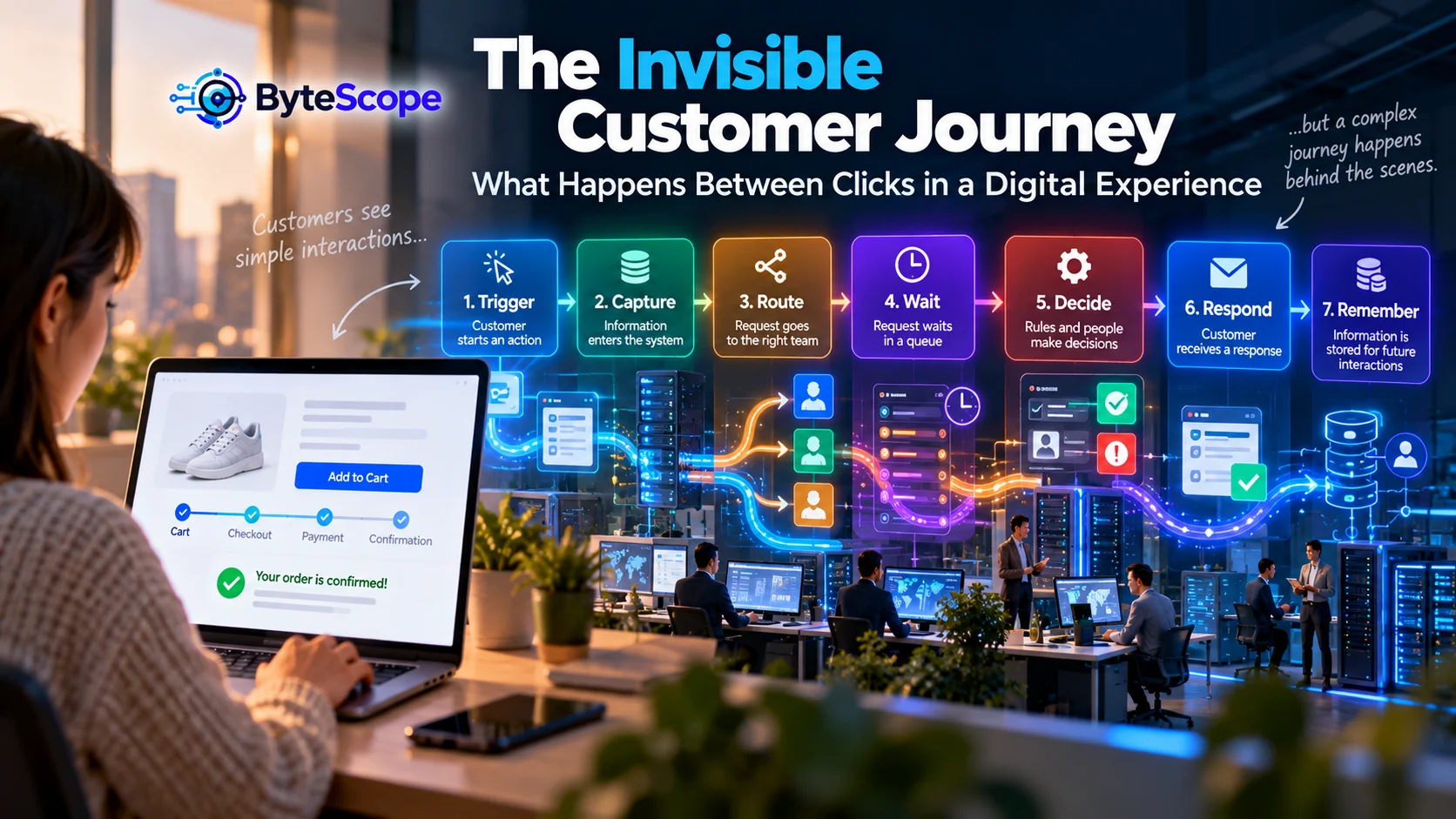
A customer opens a website, fills out a form, presses a button, and receives a confirmation.
From the customer’s perspective, the interaction may take less than a minute.
Inside the organization, however, that single click can begin a much longer journey.
Information may enter a database. A notification may be sent. A customer record may be
created or updated. A rule may decide which team receives the request. An employee may need
to review it. Another system may check payment, inventory, eligibility, availability, or
account status. The request may wait in a queue. A second person may approve something.
Eventually, another system sends the customer a response.
Most of this journey is invisible.
Customers do not see APIs, internal queues, spreadsheets, approval rules, database
synchronization, automation triggers, or departmental handoffs.
They experience the consequences.
When the hidden system works well, the experience feels effortless.
When it works badly, customers experience silence, repetition, delay, contradictory
information, irrelevant automated messages, or the frustrating instruction to provide
information they already submitted.
This is the invisible customer journey: everything that happens between
the visible moments of a digital experience.
The Customer Journey Is Bigger Than the Screen
Customer experience is often discussed through visible touchpoints:
- the homepage;
- search;
- product pages;
- forms;
- checkout;
- chatbots;
- confirmation messages;
- support conversations.
These touchpoints matter, but they are only the surface.
A beautifully designed form does not create a good experience if the information disappears
into an unmanaged inbox.
A fast checkout page does not help if inventory information is inaccurate.
An intelligent chatbot does not create convenience if customers must repeat the entire
conversation when they eventually reach a human.
A polished account dashboard does not build trust if the status displayed there differs
from what the support team sees internally.
Digital experiences therefore depend on two journeys happening simultaneously:
the journey the customer sees and the journey the organization performs.
The second journey is often where digital innovation creates the greatest improvement.
A Good Interface Can Hide a Bad System
Organizations can improve visual design much faster than they can redesign operations.
As a result, modern interfaces sometimes sit on top of surprisingly fragmented systems.
A customer presses “Submit.”
Behind the button, an employee may manually copy the request into another system.
A website displays “We will contact you soon.”
Internally, nobody has been automatically assigned responsibility.
A mobile application shows an account update.
Another department still works from a spreadsheet that has not been synchronized.
The interface creates the impression of one connected organization while the actual
operation may consist of several disconnected processes.
This is why the earlier ByteScope article
The Hidden Architecture of Digital Innovation
focused on the relationships between data, workflows, decisions, integrations, controls,
and feedback.
Customer experience is where those hidden architectural choices become visible through
their consequences.
The ByteScope Journey Shadow Map
To examine the hidden side of customer experience, ByteScope uses a seven-stage framework
called the Journey Shadow Map.
The stages are:
Trigger → Capture → Route → Wait → Decide → Respond → Remember.
The framework follows what happens after a customer initiates an interaction and asks a
different question at every stage.
Rather than mapping only what customers click, it maps what the organization must do to
fulfill the promise behind the click.
1. Trigger: What Starts the Journey?
Every customer journey begins with an event.
A customer may:
- submit a contact form;
- place an order;
- request a quote;
- cancel a subscription;
- schedule an appointment;
- report a problem;
- download a resource;
- make a payment;
- ask a chatbot a question;
- update account information.
The visible trigger is usually simple.
The hidden question is:
What does the organization believe happened?
If a customer submits a support request, does the system create a case?
If the customer presses a payment button, does the order immediately become “paid,” or
does another system need to confirm the transaction?
If a user changes an email address, which systems receive the update?
Clear triggers matter because everything downstream depends on how the event is interpreted.
2. Capture: What Information Enters the System?
After the trigger, the organization captures information.
The customer may provide a name, address, account number, question, product selection,
payment information, document, preference, or description of a problem.
Poor digital experiences often begin here.
Organizations frequently ask for information because a legacy process expects it, not
because it is genuinely necessary.
Long forms may contain fields nobody uses.
Customers may be asked to enter account information that the organization already knows.
A support request may ask the customer to select a category even though the description
could potentially provide enough information for routing.
The design question should therefore be:
What is the minimum information required to move this journey forward safely?
Every unnecessary field adds friction.
At the same time, collecting too little information can create more work later.
The right balance depends on the next decision in the journey.
Customers Should Not Become Data Integrators
One of the clearest signs of a fragmented digital journey is repeated information.
A customer enters an order number into a form.
The chatbot asks for the same number.
The support agent asks for it again.
Later, another department requests the same details by email.
From inside the organization, these may be separate systems.
From the customer’s perspective, they are all the same company.
The customer should not have to understand the organization’s system boundaries.
When appropriate and permitted, relevant information should travel with the journey.
3. Route: Where Does the Request Go?
Once information has been captured, something needs to determine where the request belongs.
Routing may be based on:
- product;
- customer type;
- location;
- urgency;
- transaction value;
- language;
- availability;
- issue category;
- risk level.
A simple process may use deterministic rules.
More complicated text-based requests may use AI-assisted classification.
But routing has to be designed around ownership.
Automation can assign something instantly, yet the customer receives no benefit if the
destination queue is ignored.
The real question is not:
“Can the system route the request?”
It is:
“Does routing create clear responsibility for the next action?”
Routing Errors Are More Expensive Than They Appear
A incorrectly routed request may seem like a minor operational issue.
But each wrong handoff can create additional waiting.
Team A receives the request.
Several hours later, someone decides Team B should handle it.
Team B discovers that information is missing and sends it back.
The customer sees none of this movement.
They simply experience two days of silence.
This is why internal workflow efficiency is also a customer-experience issue.
4. Wait: The Most Invisible Part of the Customer Journey
Many digital journey maps emphasize actions.
They pay less attention to waiting.
But customers often spend more time waiting than interacting.
An application takes five minutes to submit and three days to process.
A support form takes two minutes to complete and twelve hours to receive a response.
A refund request takes thirty seconds to initiate but several days to resolve.
The hidden journey therefore contains a critical question:
Where is the customer waiting, and why?
Waiting may occur because:
- work sits unassigned;
- a system updates only once per day;
- one employee must manually transfer information;
- an unnecessary approval is required;
- two departments depend on each other;
- an exception has no clear owner;
- the organization lacks capacity;
- a customer is expected to provide additional information.
The Difference Between Necessary and Unexplained Waiting
Not all waiting can be removed.
A custom service may genuinely require time.
A financial process may require verification.
A physical product may need transportation.
A specialist may need to review a complicated case.
The problem is often not the existence of waiting.
It is uncertainty during the wait.
Customers become frustrated when they do not know:
- whether the request was received;
- what happens next;
- how long the process usually takes;
- whether they need to do anything;
- how to get help if something goes wrong.
A simple status update can sometimes improve the experience more than a major interface
redesign.
5. Decide: Who or What Determines the Next Step?
Digital journeys contain decisions everywhere.
Is the payment valid?
Is the customer eligible?
Does the request qualify for automatic approval?
Does this complaint need escalation?
Is inventory available?
Which employee should handle the case?
Should the system provide an immediate response or wait for human review?
Some decisions are straightforward and predictable.
Others involve context, ambiguity, or meaningful consequences.
The ByteScope article
When Automation Helps—and When It Hurts
explores this boundary in more detail.
The central idea applies directly to customer journeys:
automate predictable work while maintaining an appropriate path to human judgment when
exceptions or consequences justify it.
The Worst Automation Is a Closed Door
Customers usually do not object to automation merely because it is automated.
They object when automation prevents them from accomplishing what they need.
A chatbot that answers a common question immediately can be useful.
A chatbot that repeatedly provides the wrong answer while preventing access to a human
becomes a barrier.
A self-service refund process can be convenient.
A self-service process that cannot handle a legitimate exception creates frustration.
Good automation creates a fast path.
Bad automation removes every alternative path.
6. Respond: What Does the Customer Actually Receive?
Eventually, the internal process becomes visible again.
The organization sends something back:
- a confirmation;
- an answer;
- a status update;
- a refund;
- an appointment;
- a recommendation;
- a completed service;
- a request for more information.
The quality of the response depends on everything that happened before it.
A customer-service employee may write an excellent message, but the overall experience is
still poor if the customer waited five days because the request was initially routed to
the wrong team.
Similarly, an instant automated response can feel useless if it ignores the customer’s
actual problem.
Speed and relevance need to work together.
A Response Should Reduce Uncertainty
Good digital communication tells customers more than what happened.
It helps them understand what happens next.
Compare:
“Your request has been received.”
with:
“Your request has been received. Our team will review it within one business day. You do
not need to submit it again. We will email you when the status changes.”
The second message reduces uncertainty.
This is a small design choice with potentially large effects on repeat contacts and customer
confidence.
7. Remember: Does the Next Interaction Start From Zero?
The final stage of the Journey Shadow Map is often overlooked.
What does the organization remember?
A customer who returns tomorrow should not always need to rebuild the relationship from
the beginning.
Appropriate system memory may include:
- previous interactions;
- account preferences;
- recent purchases;
- support history;
- open requests;
- communication preferences;
- relevant status information.
This does not mean organizations should retain unlimited data.
Privacy, security, purpose, retention, and user expectations matter.
The point is that relevant continuity can reduce friction.
A good digital journey remembers enough to be useful while respecting appropriate
boundaries.
Customer Experience Is an Integration Problem
Many customer frustrations that appear to be interface problems are actually integration
problems.
The customer changes an address on the website, but the billing platform still uses the old
one.
A payment succeeds, but the account status does not update.
A support agent cannot see what happened in the chatbot.
An order is cancelled in one system but still appears active in another.
These problems occur because the customer journey crosses system boundaries.
The customer, however, does not experience those boundaries as legitimate explanations.
They experience one brand.
This is one reason the earlier ByteScope article
Digital Innovation Beyond New Technology
emphasized system improvement rather than technology adoption.
Adding another customer-facing tool can actually make the experience worse if it becomes
another disconnected system.
The Invisible Journey of an Online Purchase
Consider a simple online purchase.
A customer sees:
- product page;
- cart;
- checkout;
- payment;
- confirmation.
The invisible journey may contain many more steps.
The system verifies availability.
The payment provider authorizes the transaction.
Fraud rules evaluate the purchase.
Inventory is reserved.
The order record is created.
A warehouse or supplier receives the fulfillment request.
A shipping process generates another record.
Customer notifications are scheduled.
Analytics systems record the conversion.
Accounting data may be updated.
If any one of those steps fails silently, the visible experience eventually breaks.
The Invisible Journey of a Support Request
Now consider a support form.
The customer writes:
“My account was charged twice.”
A well-designed hidden journey might:
- identify the customer;
- attach recent transaction history;
- classify the issue as billing;
- check whether a duplicate charge appears;
- route the case to the correct queue;
- assign a priority;
- provide the agent with relevant policy information;
- notify the customer that the case is being reviewed.
The employee can begin closer to the actual problem.
A fragmented workflow may instead require the customer to repeat account details and the
employee to search several systems before understanding the issue.
The difference is not simply employee efficiency.
It is customer experience.
Do Not Automate the Customer Into a Corner
Digital self-service is valuable because customers often prefer completing straightforward
tasks without waiting for assistance.
But self-service should be designed around the reality that exceptions exist.
A useful system should distinguish:
the normal path, the exception path, and the recovery path.
The normal path handles expected situations efficiently.
The exception path recognizes that the ordinary rules do not fit.
The recovery path tells the customer how to continue.
Without those paths, digital efficiency becomes digital rigidity.
Customer Journey Mapping Should Include Backstage Work
Traditional customer journey maps often show stages such as awareness, consideration,
purchase, onboarding, use, and support.
That perspective remains useful.
But operational digital innovation benefits from adding a second layer underneath every
customer-facing step.
For each visible action, ask:
- What information enters the organization?
- Which system receives it?
- Who owns the next step?
- Which decision occurs?
- How long can the request wait?
- Which other systems are involved?
- What happens when something fails?
- What does the customer hear during the wait?
That second layer reveals the shadow journey.
A Simple Journey Shadow Audit
A business can examine a digital experience without sophisticated customer-experience
software.
Choose one journey.
For example:
“Customer requests a quote.”
Then document both sides.
Customer Side
What does the customer click, type, receive, wait for, and decide?
Organization Side
Which systems, people, rules, approvals, integrations, and queues are activated?
Then look for friction.
Common warning signs include:
- the same information being entered more than once;
- manual copying between systems;
- unclear responsibility;
- long periods without customer communication;
- several approvals for routine cases;
- conflicting customer records;
- exceptions managed through personal messages;
- customers repeatedly asking for status.
Waiting Time Can Reveal More Than Click Data
Digital analytics commonly measure page views, clicks, conversions, bounce rates, and
session duration.
Those metrics help explain what happens on the interface.
They may say very little about what happens after submission.
For service-heavy businesses, another set of metrics can be equally valuable:
- time until assignment;
- time until first meaningful response;
- number of internal handoffs;
- time spent waiting for approval;
- percentage of cases requiring rework;
- number of repeat customer contacts;
- percentage of requests routed incorrectly;
- time from request to final resolution.
These measurements expose the invisible journey.
Faster Is Not Always Better
Speed is valuable, but customer journeys should not be optimized for speed alone.
Consider an automated loan, insurance, support, or account-review process.
A decision delivered in five seconds may be operationally impressive.
But if customers cannot understand what happened, correct inaccurate information, or seek
appropriate review, speed may not produce a better experience.
The same principle applies to ordinary commercial services.
A fast response that does not solve the problem generates another interaction.
The better metric may therefore be:
time to useful resolution,
not simply time to first response.
Where AI Fits Into the Invisible Journey
AI can support several points in the Journey Shadow Map.
It can classify incoming messages.
It can summarize previous interactions.
It can extract information from documents.
It can help employees retrieve relevant information.
It can draft responses.
It can identify patterns across customer feedback.
But AI should be evaluated as one component of the overall journey.
A brilliant response generator does not fix a workflow where requests wait unassigned for
two days.
An AI classifier does not create value if there is no clear ownership after classification.
The strongest AI use cases connect directly to the next action.
Cloud, Edge, and the Customer Experience
Even infrastructure decisions can affect the customer journey.
ByteScope’s article
From Cloud to Edge: Where Digital Innovation Actually Happens
explored how workload placement affects latency, resilience, data movement, and system
behavior.
Customers may never know whether a task runs locally or in cloud infrastructure.
They notice when the application responds quickly.
They notice when a store can continue processing transactions despite a temporary network
problem.
They notice when a service becomes unavailable.
Architecture becomes customer experience when technical choices change what the customer
can accomplish.
Small Businesses Have Invisible Journeys Too
The concept is not limited to large corporations.
A small service company may have a simple website and five employees, yet its hidden journey
can still be fragmented.
A customer submits a form.
The owner receives an email.
The information is copied into a spreadsheet.
A staff member is contacted through a messaging app.
The customer calls two days later because no confirmation was sent.
None of these systems is individually sophisticated.
The customer journey still depends on how well they connect.
The
Small-Business Innovation Ladder
offers a useful progression for improving these workflows without requiring an
enterprise-sized technology project.
Design for the Exception, Not Only the Happy Path
Customer experiences are often tested using ideal situations.
The payment succeeds.
The address is correct.
The product is available.
The customer remembers the password.
Every required field contains exactly what the system expects.
Real customers create less predictable situations.
They mistype information.
They have unusual requests.
They change their minds.
Payment providers fail.
Products become unavailable.
Two systems disagree.
Premium digital experiences are often differentiated not by how elegantly they handle
normal cases but by how gracefully they recover from abnormal ones.
The Importance of Continuity Across Channels
Customers may begin a journey on one channel and continue it somewhere else.
They research on a website.
They ask a question through chat.
They make a purchase on mobile.
They later contact support by email.
A fragmented organization treats these as unrelated interactions.
A connected organization preserves appropriate context.
Cross-channel continuity does not require every employee to see every piece of customer
data.
It requires the right context to be available where it is needed under appropriate access
controls.
Seven Questions to Reveal an Invisible Customer Journey
For any important customer interaction, ask:
- What event starts the journey?
- What information do we ask the customer to provide?
- Where is the request routed, and who becomes responsible?
- Where does the customer wait?
- Which decisions determine what happens next?
- What information does the customer receive during and after the process?
- What context is preserved when the customer returns?
These seven questions correspond directly to the Journey Shadow Map:
Trigger → Capture → Route → Wait → Decide → Respond → Remember.
How to Prioritize Customer Journey Improvements
Once problems become visible, teams may discover dozens of possible improvements.
Do not try to fix everything simultaneously.
Prioritize friction that combines:
- high customer frequency;
- significant waiting;
- repeated manual work;
- high error rates;
- frequent customer complaints;
- unnecessary information repetition;
- clear measurable outcomes.
A small improvement at a high-frequency point can produce more value than a dramatic
redesign of a rarely used feature.
Measure the Journey, Not Just the Interface
A customer journey can look successful in web analytics while failing operationally.
The form conversion rate may be excellent.
But what happens after submission?
The organization should connect interface metrics with process metrics.
For example:
- form completion rate + time to first response;
- checkout conversion + payment failure recovery;
- chatbot resolution + repeat contact rate;
- self-service usage + escalation success;
- support response time + actual resolution time.
This creates a more complete picture of the experience.
Frequently Asked Questions
What is an invisible customer journey?
The invisible customer journey is the internal sequence of data movement, workflow steps,
routing, waiting, decisions, integrations, automation, and human actions that happens
behind customer-facing interactions.
How is it different from a normal customer journey map?
A traditional customer journey map focuses primarily on what the customer does, thinks,
and experiences. An invisible journey map adds the operational layer underneath those
touchpoints, including systems, handoffs, decisions, queues, and internal processes.
Why do customers have to repeat information?
Repeated information often indicates that systems or departments do not share the relevant
context. In some cases repetition is necessary for verification, but unnecessary repetition
is frequently a symptom of fragmented data or workflows.
What is the biggest cause of friction in digital customer journeys?
There is no single cause, but common problems include unclear ownership, disconnected
systems, unnecessary manual handoffs, long unexplained waiting periods, poor exception
handling, and automation without an effective path to human assistance.
Can automation improve customer journeys?
Yes. Automation can reduce delays, route requests, provide notifications, transfer
information between systems, and handle predictable tasks. It works best when exceptions
and escalation paths are deliberately designed.
Does improving customer experience always require redesigning the website?
No. Significant improvements may come from internal changes such as faster routing, better
data synchronization, clearer ownership, status notifications, reduced waiting, and fewer
manual handoffs.
What should businesses measure in a customer journey?
Useful measures include completion rate, time to assignment, time to meaningful response,
total resolution time, number of handoffs, repeat contacts, error rates, exception rates,
and customer satisfaction. Metrics should reflect the specific outcome the journey is
intended to create.
The Bottom Line
Customers experience only a small portion of a digital system.
They see the form, button, message, dashboard, notification, or conversation.
Behind those moments lies another journey made of data, systems, employees, queues,
decisions, automation, integrations, and exceptions.
That hidden journey often determines whether the visible experience succeeds.
The ByteScope Journey Shadow Map provides a practical way to examine it:
Trigger → Capture → Route → Wait → Decide → Respond → Remember.
Understand what starts the process.
Collect only the information that genuinely supports the journey.
Route work toward clear ownership.
Identify where customers wait and reduce unnecessary uncertainty.
Design decisions around risk and context.
Respond with information that helps customers understand what happened and what comes next.
Preserve appropriate context so every future interaction does not begin from zero.
Digital innovation becomes visible to customers when these invisible layers work together.
They may never know that a database synchronized correctly, an automation removed a manual
handoff, or a routing rule prevented a two-day delay.
They simply experience a service that feels coherent.
And that may be one of the strongest signs of good digital design:
the complex work happens behind the scenes, while the customer experiences something
remarkably simple.